



Kramer
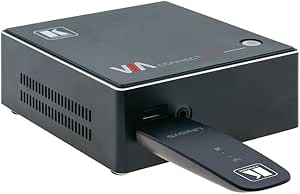
Kramer VIAcast Miracast USB Dongle for VIA Devices
1080P
Kramer VIAcast USB dongle adds Miracast wireless screen sharing to VIA presentation systems without requiring network infrastructure.
$120.00*
Check availability
*Price sourced from Amazon.com. Last updated:Aug 28, 2026.Price and availability are subject to change — details.
Affiliate Disclosure: As an Amazon Associate, Studio Supplies earns from qualifying purchases made through links on this page, at no additional cost to you. This helps support our editorial team.
Notice a mistake? Let Us Know
Overview
Key Features
Usb dongle for via go, via connect Pro and via connect Plus (firmware V2. 4 required).
No network infrastructure required.
Windows; 10 native support.
Compatible with Android devices that support Miracast® .
Up to 1080P resolution.
Specifications
Wireless Technology
Miracast
Maximum Resolution
1080p
Compatible Devices
VIA GO, VIA Connect PRO, VIA Connect PLUS
Firmware Requirement
V2.4 or later
OS Support
Windows 10 (native), Miracast-compatible Android
Installation
USB dongle, no network infrastructure required
Frequently Asked Questions
Which Kramer VIA devices is the VIAcast dongle compatible with?
It works with the VIA GO, VIA Connect PRO, and VIA Connect PLUS, provided each device is running firmware V2.4 or later.
Does the VIAcast dongle require a Wi-Fi network to function?
No, it creates a direct wireless connection using Miracast technology, so no existing network infrastructure is needed.
What operating systems and devices can wirelessly present through the VIAcast?
Windows 10 devices have native Miracast support, and Android devices that support Miracast are also compatible. Apple device support is enabled through the VIA ecosystem.
What is the maximum display resolution supported by the VIAcast?
It supports wireless screen mirroring at up to 1080p resolution.
How is the VIAcast dongle installed?
Simply plug it into a USB port on your compatible Kramer VIA device — no additional software installation or network configuration is required.
Related Products


