

Price history
Lenovo
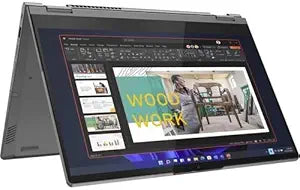
Lenovo 21DM003NUS ThinkBook 14s Yoga G2 IAP Touchscreen
★★★★★
1920 x 1080512 GB SSD
Elevate Your Productivity with Style and VersatilityIntroducing the Lenovo ThinkBook 14s Yoga G2 IAP, a 2-in-1 notebook designed for the modern professional. Seamlessly switch between laptop and tablet modes with its touchscreen display, powered by a 12th Gen Intel Core i7 processor and ample mem...
$799.99*$1,069.99Save 25%
View on Amazon
✓ In Stock on Amazon.com
*Price sourced from Amazon.com. Last updated:Aug 05, 2026.Price and availability are subject to change.
Affiliate Disclosure: Studio Supplies may earn a commission from qualifying purchases made through links on this page, at no additional cost to you. This helps support our editorial team.
Notice a mistake? Let Us Know
Overview
Elevate Your Productivity with Style and Versatility
Introducing the Lenovo ThinkBook 14s Yoga G2 IAP, a 2-in-1 notebook designed for the modern professional. Seamlessly switch between laptop and tablet modes with its touchscreen display, powered by a 12th Gen Intel Core i7 processor and ample memory for effortless multitasking.
- Processor: Intel Core i7-1255U Deca-core (10 Core)
- Memory: 16 GB Total RAM (8 GB On-Board)
- Storage: 512 GB SSD
- Display: 14" Touchscreen Full HD (1920 x 1080)
Key Features
With 16 GB of memory, runs as many programs as you want without losing the execution
The 14" 1920 x 1080 screen provides a great movie watching experience
512 GB SSD is enough to store your essential documents and files, favorite songs, movies and pictures
Specifications
RAM Size
16 GB
Display Size
14 inches
Display Resolution
1920 x 1080
Display Type
Touchscreen
Storage Type
SSD
Storage Capacity
512 GB
Frequently Asked Questions
How much memory does the Lenovo ThinkBook 14s Yoga G2 IAP have?
This Lenovo ThinkBook comes with 16 GB of memory, designed to allow users to run many programs concurrently without losing execution.
What is the screen size and resolution of this laptop?
It features a 14-inch screen with a 1920 x 1080 resolution, providing a great movie watching experience with clear visuals.
What kind of storage is included in this ThinkBook model?
The laptop is equipped with a 512 GB SSD, which offers sufficient space for essential documents, files, favorite songs, movies, and pictures.
Is the display a touchscreen?
Yes, the Lenovo 21DM003NUS ThinkBook 14s Yoga G2 IAP features a touchscreen display for interactive use.
Are there details about the processor in this laptop?
Specific details about the processor model or generation are not provided in the available features.
What operating system does this laptop run?
The operating system included with this laptop is not specified in the provided product features.
What is the benefit of having an SSD for storage?
An SSD allows for faster boot times and quicker access to stored data, enhancing overall system responsiveness.
Related Products

