



Lenovo
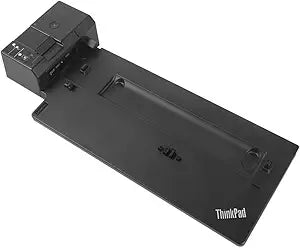
Lenovo 40AH0135US ThinkPad Pro Docking Station 135W
135WUSB-CUSB 3.0USB 2.0DisplayPort
One mechanical side-dock connection expands your ThinkPad into a full desktop workstation with dual 4K-ready DisplayPort outputs and 135W charging.
$59.99*$60.98Save 1%
Check availability
*Price sourced from Amazon.com. Last updated:Oct 24, 2026.Price and availability are subject to change — details.
Affiliate Disclosure: As an Amazon Associate, Studio Supplies earns from qualifying purchases made through links on this page, at no additional cost to you. This helps support our editorial team.
Notice a mistake? Let Us Know
Overview
Key Features
Enterprise-class, universal, mechanical side-docking station. Includes 135W Power Adapter and Power Cord.
1x USB-C (5 Gbps, 5V 3A power); 3x USB 3.0 Gen 1 (5 Gbps, 1 always-on USB Charging); 2x USB 2.0.
2x DisplayPort 1.4 ; 1x 3.5 mm Stereo/Mic Combo Port; 1x Gigabit Ethernet Port; 1x Kensington security lock slot (lock sold separately).
Compatibility: P52s, L580, L480, T580, P580p, T480s, T480, X1 Carbon Gen 6, X280.
What's in the Box: ThinkPad Basic Docking Station (with key lock and 2 keys); ThinkPad Slim Tip 135 W Power Adapter and Power Cord; Setup poster; Warranty poster.
Specifications
Model Number
40AH0135US
Docking Station Type
Mechanical Side-Docking
Included Power Adapter
135W
USB-C Ports
1 (5 Gbps, 5V 3A power)
USB 3.0 Gen 1 Ports
3 (5 Gbps, 1 always-on USB Charging)
USB 2.0 Ports
2
DisplayPort Outputs
2 (DisplayPort 1.4)
Audio Port
1 (3.5 mm Stereo/Mic Combo)
Ethernet Port
1 (Gigabit)
Security Slot
1 (Kensington)
Frequently Asked Questions
Which ThinkPad models are mechanically compatible with the 40AH0135US docking station?
Compatible models are the P52s, L580, L480, T580, T480s, T480, X1 Carbon Gen 6, and X280. The proprietary side-docking connector is not universal — verify your exact model number before purchasing, as even closely related ThinkPads may use a different dock generation.
Does this dock require any drivers to function?
No — the 40AH0135US is designed for a driver-free experience on supported ThinkPad models. The side-docking connector communicates directly with the laptop's firmware, so display outputs and USB ports become active as soon as you dock.
What is the maximum display resolution supported through the two DisplayPort 1.4 outputs?
DisplayPort 1.4 supports up to 8K at 30Hz or 4K at 120Hz per port. In practice, with two monitors connected, you can run dual 4K displays simultaneously, which covers the vast majority of professional monitor setups.
How much power does the included 135W adapter deliver to the laptop?
The dock passes through the full 135W to the laptop, which is sufficient for high-TDP ThinkPad configurations including the P52s. This eliminates the need for a separate laptop charger on your desk.
Is the Kensington lock slot on the dock itself, and does it lock the laptop too?
The Kensington slot secures the dock unit. The dock also includes a physical key lock (with two keys) that mechanically locks the laptop to the dock, providing a two-layer physical security solution for shared office environments.
Related Products


