



Lenovo
Lenovo ThinkPad Thunderbolt 4 Dock 100W 40B00135UK
8K4K100W135WThunderbolt 4
Lenovo's Thunderbolt 4 dock turns a single cable into a full workstation with 100W charging and quad-display support.
$191.00*$339.99Save 43%
Check availability
*Price sourced from Amazon.com. Last updated:Oct 23, 2026.Price and availability are subject to change — details.
Affiliate Disclosure: As an Amazon Associate, Studio Supplies earns from qualifying purchases made through links on this page, at no additional cost to you. This helps support our editorial team.
Notice a mistake? Let Us Know
Overview
Key Features
One Cable. All Your Needs. - A single Thunderbolt cable is all you need to take your productivity to new heights. Adding an 8K @ 30 Hz display or up to four 4K @ 60 Hz displays, lightning-fast 40 Gbps transfer speeds, vPro pass-through support, and enhanced dynamic power charging up to 100W. You can do it all with the ThinkPad Universal Thunderbolt 4 Dock.
Compatibility. Made Limitless. - Freedom is the key to productivity. That’s why we’ve engineered the ThinkPad Thunderbolt 4 Dock to be limitlessly adaptable — supporting up to 100W PD and unrivaled performance on all Thunderbolt 3 and 4, USB 4, and USB-C Windows-based systems
Remote Management. But Smarter. - Remote dock management just got a whole lot smarter. Thanks to Dock Manager and our latest hardware, firmware updates can be done without any end-user interruption, which means productivity is never compromised.
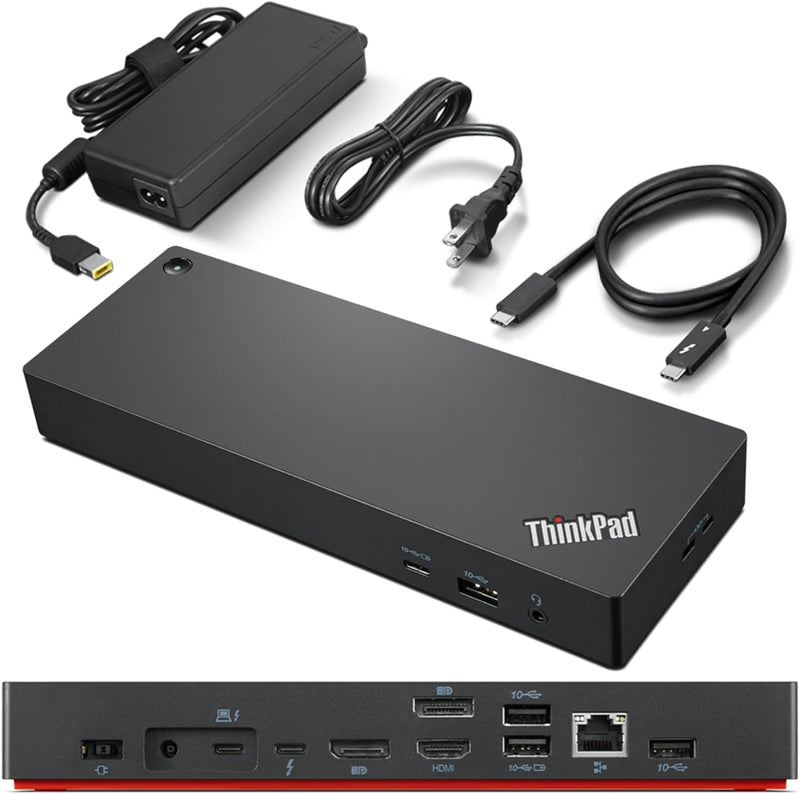
Video Ports: 2 x DisplayPort 1.4, 1 x HDMI 2.1, 1 x Thunderbolt 4 Downstream Port; USB Ports: 4 x USB 3.1 Gen 2* (1 x always-on), 1 x USB-C; Audio: 1 x 3.5 mm Combo Audio Jack; Networking: 1 x RJ45 Gigabit Ethernet
Power: 1 x Slim Tip 135W Power Adapter, Up to 100W Dynamic Power Charging to Notebook
Specifications
Connectivity
Thunderbolt 4
Data Transfer Speed
40 Gbps
Power Delivery
Up to 100W Dynamic Charging
Video Ports
2x DisplayPort 1.4, 1x HDMI 2.1, 1x Thunderbolt 4 Downstream
USB Ports
4x USB 3.1 Gen 2 Type-A (1x Always-On), 1x USB-C
Audio
1x 3.5mm Combo Audio Jack
Networking
1x RJ45 Gigabit Ethernet
Display Support
Up to 4x 4K @ 60Hz or 1x 8K @ 30Hz
Power Adapter
135W Slim Tip
Compatibility
Thunderbolt 3/4, USB 4, USB-C Windows Systems
Model
40B00135UK
Frequently Asked Questions
How many monitors can the ThinkPad Thunderbolt 4 Dock drive simultaneously?
It supports up to four 4K displays at 60Hz, or a single 8K display at 30Hz, using its two DisplayPort 1.4 outputs, HDMI 2.1 port, and Thunderbolt 4 downstream port.
Will this dock work with non-Lenovo laptops?
Yes, it is compatible with any Windows-based system that has a Thunderbolt 3, Thunderbolt 4, USB 4, or USB-C port, though power delivery and display output may vary by host device capability.
How much power does the dock deliver to the connected laptop?
It provides dynamic power charging up to 100W through the Thunderbolt cable, using the included 135W Slim Tip power adapter to power both the dock and the laptop.
Does the dock support firmware updates without user disruption?
Yes, Lenovo's Dock Manager software enables remote firmware updates that run silently in the background without interrupting the end user's workflow.
Does the always-on USB port charge devices when the dock is powered off?
Yes, one of the four USB 3.1 Gen 2 Type-A ports is designated as always-on, allowing it to charge phones or other devices even when the dock is in standby.
Related Products


