

Lenovo
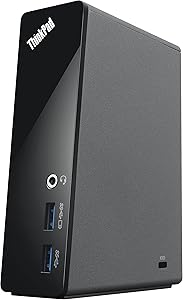
Lenovo 4X10A06077 ThinkPad OneLink Dock
★★★★★
USB 3.0USB 2.0
Transform Your ThinkPad into a Productivity Hub The Lenovo ThinkPad One Link Dock leverages Lenovo's innovative One Link technology to transform your ThinkPad into a versatile workstation. Enjoy high-speed data transfers, crystal-clear audio and video, and convenient charging, all through a sing...
Check availability
Affiliate Disclosure: Studio Supplies may earn a commission from qualifying purchases made through links on this page, at no additional cost to you. This helps support our editorial team.
Notice a mistake? Let Us Know
Overview
Transform Your ThinkPad into a Productivity Hub
The Lenovo ThinkPad One Link Dock leverages Lenovo's innovative One Link technology to transform your ThinkPad into a versatile workstation. Enjoy high-speed data transfers, crystal-clear audio and video, and convenient charging, all through a single connection.
Specifications
- Brand: Lenovo
- Model: 4X10A06077
- Technology: Lenovo One Link
- Ports: USB 3.0, HDMI
- Features: Charges notebook, phones, and tablets
- Compatibility Note: Not compatible with X1 Carbon 1st Generation.
Key Features
One Link delivers data, driver-free video, and power through a single convenient connector
Front Panel: 2x USB 3.0 (One with Always-On Mobile Device Charging) - Ideal for use with memory keys, hard drives and other quick access devices. Stereo / Mic Combo Audio Port
Rear Panel: 2x USB 2.0 - Ideal for most USB devices, including printers, keyboards, and mice. HDMI, Gigabit Ethernet (10/1000), DC PowerThinkPad One Link Dock
Compatible for ThinkPad X1 Carbon 2nd Generation (Machine Types 20A7, 20A8) and ThinkPad X1 Carbon 3rd Generation (Machine Types 20BS, 20BT)
Specifications
Product Type
ThinkPad OneLink Dock
Connectivity Technology
OneLink
Front USB Ports
2x USB 3.0 (One with Always-On Charging)
Front Audio Port
Stereo / Mic Combo Audio Port
Rear USB Ports
2x USB 2.0
Rear Video Output
1x HDMI
Network Port
Gigabit Ethernet (10/1000)
Power Port
DC Power
Compatible ThinkPad Models
X1 Carbon 2nd Generation (20A7, 20A8), X1 Carbon 3rd Generation (20BS, 20BT)
Pros & Cons
👍 Pros
- Utilizes OneLink technology for simplified connectivity, delivering data, driver-free video, and power through a single cable.
- Offers convenient front panel access with 2 USB 3.0 ports, one featuring Always-On Mobile Device Charging for quick power-ups.
- Includes a Stereo/Mic Combo Audio Port on the front for easy access to audio peripherals like headphones and microphones.
- Provides essential rear panel connectivity with 2 USB 2.0 ports, HDMI, Gigabit Ethernet, and DC Power input.
- Ensures network reliability with Gigabit Ethernet (10/1000) for fast and stable wired internet connections.
- Specifically compatible with ThinkPad X1 Carbon 2nd and 3rd Generation models, ensuring optimal integration.
👎 Cons
- Compatibility is limited to specific ThinkPad models: X1 Carbon 2nd Generation (20A7, 20A8) and X1 Carbon 3rd Generation (20BS, 20BT).
- The OneLink technology is proprietary, meaning it may not be compatible with non-ThinkPad or older ThinkPad models.
- Only features two USB 3.0 ports, which might be a limitation for users with many high-speed USB 3.0 devices.
- The rear panel USB 2.0 ports are slower than USB 3.0, less ideal for data transfer from external drives.
- Lacks more modern display outputs like DisplayPort or Thunderbolt, which newer docking stations often provide.
- The provided information does not detail power delivery wattage or if it can charge the connected laptop.
Frequently Asked Questions
Which ThinkPad models are compatible with the Lenovo ThinkPad OneLink Dock?
This dock is compatible with ThinkPad X1 Carbon 2nd Generation (Machine Types 20A7, 20A8) and ThinkPad X1 Carbon 3rd Generation (Machine Types 20BS, 20BT).
What is OneLink technology?
OneLink technology allows the dock to deliver data, driver-free video, and power to the ThinkPad through a single, convenient connector.
Can this dock charge mobile devices?
Yes, one of the front USB 3.0 ports features Always-On Mobile Device Charging, allowing you to charge devices even when your laptop is off.
What video output options does the dock offer?
The dock provides an HDMI port on the rear panel for connecting an external display.
Does the dock support wired internet connectivity?
Yes, it includes a Gigabit Ethernet (10/1000) port on the rear panel for a stable wired network connection.
How many USB ports are available on the dock?
The dock features a total of four USB ports: two USB 3.0 ports on the front and two USB 2.0 ports on the rear panel.
Related Products


