

Lenovo
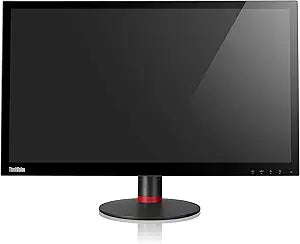
Lenovo 60B4RAR6US ThinkVision Pro2840m 28" 4K Monitor
4K
See Every Detail in Stunning 4KThe Lenovo ThinkVision Pro2840m 28'' LCD Monitor delivers an uncompromised display experience. Featuring a 4K panel, vibrant colors, and a fast response time, this monitor is designed to offer stunning image quality and exceptional detail for professionals and enthu...
View price on Amazon
Affiliate Disclosure: As an Amazon Associate, Studio Supplies earns from qualifying purchases made through links on this page, at no additional cost to you. This helps support our editorial team.
Notice a mistake? Let Us Know
Overview
See Every Detail in Stunning 4K
The Lenovo ThinkVision Pro2840m 28'' LCD Monitor delivers an uncompromised display experience. Featuring a 4K panel, vibrant colors, and a fast response time, this monitor is designed to offer stunning image quality and exceptional detail for professionals and enthusiasts alike.
- Panel Resolution: 3840x2160
- Color Depth: 10 bit
- Brightness: 300 nit
- Response Time: 5 millisecond
Key Features
28"-Inch square color-si tft monitor
Ten panel with 170/160 view angle
Digital controls with 8 languages OSD
Mercury / arsenic free glass
Low halogen (expect pcba and external cable)
Specifications
Model Name
ThinkVision Pro2840m
Screen Size
28-Inch
Resolution
4K
Display Technology
color-si TFT
Viewing Angle
170/160 degrees
Controls
Digital controls with 8 languages OSD
Environmental Features
Mercury / arsenic free glass, Low halogen (expect pcba and external cable)
Frequently Asked Questions
What is the screen size of the Lenovo ThinkVision Pro2840m monitor?
The Lenovo ThinkVision Pro2840m features a substantial 28-inch screen, providing a large workspace for various applications.
What is the resolution capability of this Lenovo 4K monitor?
This monitor offers 4K resolution, ensuring sharp and highly detailed visuals for both productivity and entertainment.
Does the Lenovo ThinkVision Pro2840m have wide viewing angles?
Yes, it boasts a 170/160-degree viewing angle, which helps maintain consistent image quality when viewed from different perspectives.
Are the on-screen display controls available in multiple languages?
The digital controls for the On-Screen Display (OSD) support 8 different languages, offering greater accessibility for international users.
Is this monitor designed with any environmentally conscious features?
Yes, the Lenovo ThinkVision Pro2840m is constructed with mercury-free and arsenic-free glass, and it is also low halogen (excluding PCBA and external cable).
Related Products


