



Lenovo
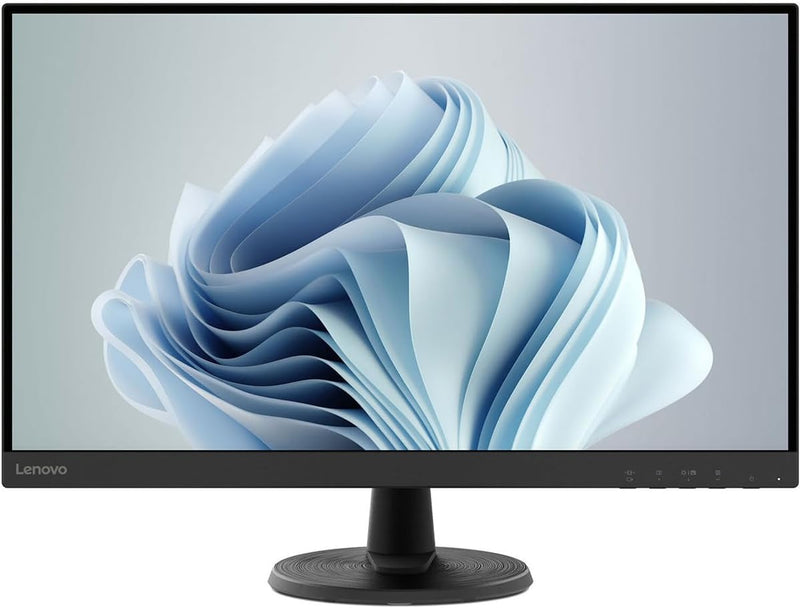
Lenovo 67A3KCC6US D27-40 27" FHD 75Hz Monitor
Immerse Yourself in Visuals with the Lenovo D27-40 MonitorThe Lenovo D27-40 Monitor delivers crisp visuals and smooth performance, perfect for both gaming and everyday use. Screen Size: 27 Inches Resolution: FHD 1080p (1920 x 1080) Refresh Rate: 75Hz Panel Type: IPS Aspect Ratio: 16:9 Brig...
$129.99*$184.99Save 29%
Check availability
*Price sourced from Amazon.com. Last updated:Aug 30, 2026.Price and availability are subject to change — details.
Affiliate Disclosure: As an Amazon Associate, Studio Supplies earns from qualifying purchases made through links on this page, at no additional cost to you. This helps support our editorial team.
Notice a mistake? Let Us Know
Overview
Immerse Yourself in Visuals with the Lenovo D27-40 Monitor
The Lenovo D27-40 Monitor delivers crisp visuals and smooth performance, perfect for both gaming and everyday use.
- Screen Size: 27 Inches
- Resolution: FHD 1080p (1920 x 1080)
- Refresh Rate: 75Hz
- Panel Type: IPS
- Aspect Ratio: 16:9
- Brightness: 250 nits
- Response Time: 4 ms
- Connectivity: HDMI and VGA Ports
- Features: AMD FreeSync, Tilt Stand
- Color: Raven Black
- Screen Surface: Matte
Key Features
WORK BY DAY GAME BY NIGHT – The Lenovo D27-40 is an impressive home office monitor that doubles as your gaming and entertainment machine. Get ready to level-up your work and play with an expansive display, vivid graphics, and a comfort-driven design.
A BIGGER WINDOW TO YOUR WORLD – Get an expansive view of your work documents and online hobbies on the 27” NearEdgeless VA panel with 178°/178° wide-viewing angle.
ENTERTAINMENT MACHINE – Spot the finer details in spreadsheets and movements in gameplay with the D27-40 monitor’s FHD resolution.
HOME OFFICE TO BATTLESTATION – The D27-40 monitor’s 75Hz refresh rate and 4ms response time arm you with the speed to strike first while AMD FreeSync technology prevents your screen from stuttering and tearing mid-action.
THE STAR OF YOUR EYE – Experience vivid colors that are true-to-life with the Lenovo D27-40 monitor’s 72% NTSC color gamut.
SMART SENSIBLE COMFORTABLE – Prioritize your posture with the easy-to-use tilt stand or VESA Mount support to give yourself more working space. Its integrated cable management system further clears your desk for a tidy and ergonomic setup.
A STEP AHEAD – Easily connect the monitor to your laptop or PC through HDMI and VGA ports while the audio-out port connects your headphones/speakers.
COMFORT REASSURED – The Lenovo D27-40 monitor’s Natural Low Blue Light technology protects your eyes by preventing harmful blue light emissions without distorting the colors.
Specifications
Screen Size
27"
Panel Type
VA NearEdgeless
Resolution
FHD
Refresh Rate
75Hz
Response Time
4ms
Viewing Angle
178°/178°
Color Gamut
72% NTSC
Adaptive Sync Technology
AMD FreeSync
Eye Comfort Technology
Natural Low Blue Light
Connectivity
HDMI, VGA, Audio-out
Stand Features
Tilt Stand, VESA Mount Support, Integrated Cable Management
Frequently Asked Questions
What is the refresh rate of the Lenovo D27-40 monitor?
The Lenovo D27-40 monitor features a 75Hz refresh rate, providing smooth visuals for both everyday work and gaming.
Does this monitor support any adaptive sync technology for gaming?
Yes, the D27-40 monitor incorporates AMD FreeSync technology, which helps prevent screen stuttering and tearing during gameplay.
How does this monitor address eye strain during prolonged use?
The Lenovo D27-40 monitor features Natural Low Blue Light technology, designed to protect your eyes by preventing harmful blue light emissions without distorting colors.
What kind of connectivity options are available on this monitor?
This monitor allows you to easily connect to your laptop or PC through its HDMI and VGA ports, and it also includes an audio-out port for headphones or speakers.
Can this monitor be adjusted for better ergonomics?
Yes, it comes with an easy-to-use tilt stand and supports VESA Mounts, enabling you to prioritize your posture and clear desk space with its integrated cable management system.
What is the color performance of the Lenovo D27-40 monitor?
The monitor delivers vivid and true-to-life colors with a 72% NTSC color gamut, offering an engaging visual experience.
What type of panel does the Lenovo D27-40 use and what are its viewing angles?
The Lenovo D27-40 uses a 27” NearEdgeless VA panel, which offers wide 178°/178° viewing angles for an expansive view.
Related Products

