
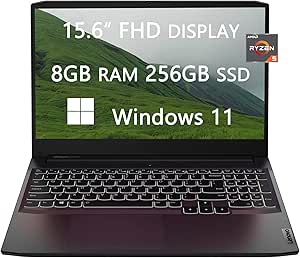
Lenovo 82K201XCUS Ideapad Gaming 3 Ryzen 5 RTX 3050 Ti Laptop
Level Up Your Game with the Lenovo Ideapad Gaming 3The Lenovo Ideapad Gaming 3 offers a superior gaming experience with its powerful AMD Ryzen processor, NVIDIA GeForce RTX graphics, and high-refresh-rate display, all encased in a sleek, gaming-focused design. Specifications Brand: Lenovo Mode...
Check availabilityNotice a mistake? Let Us Know
Overview
Level Up Your Game with the Lenovo Ideapad Gaming 3
The Lenovo Ideapad Gaming 3 offers a superior gaming experience with its powerful AMD Ryzen processor, NVIDIA GeForce RTX graphics, and high-refresh-rate display, all encased in a sleek, gaming-focused design.
Specifications
- Brand: Lenovo
- Model: 82K201XCUS
- Display: 15.6-inch FHD (1920 x 1080)
- Processor: AMD Ryzen 5 5600H (6-Core, 3.3 GHz up to 4.2 GHz)
- Memory: 8GB DDR4 SDRAM
- Storage: 256GB SSD
- Graphics: NVIDIA GeForce RTX 3050 Ti
- Operating System: Windows 11
- Ports: 1 HDMI 1.4b, 2 USB 3.2 Type A, 1 USB 3.2 Type C
- Connectivity: WiFi, Bluetooth
- Webcam: Yes
- Keyboard: Backlit
- Color: Shadow Black
- Dimensions: 14.16 x 9.92 x 0.95 inches
- Weight: 4.95 lbs
- Accessories: LIONEYE HDMI Cable
Key Features
【Powerful CPU&GPU】Intel Core i5-1135G7 (up to 4.2 GHz with Intel Turbo Boost Technology, 8 MB L3 cache, 4 cores), Intel Iris Xe Graphics provide everyday image quality for Internet use, basic photo editing and casual gaming.
【Memory&Hard Drive】Ram is expandable up to 40GB DDR4 Memory for fast processing and advanced multitasking , Hard Drive is expandable up to 2TB PCIe SSD. SSD(Solid State Drive) has faster data access speed, better performance and greater reliability, HDD provide larger storage so you could store more data and files on it. Please refer to item tile for your configuration
【Screen&Webcam】15.6" Full-HD 10-point multitouch screen The 1920 x 1080 resolution boasts impressive color and clarity. IPS technology for wide viewing angles. Energy-efficient LED backlight. Built-in HD webcam with Privacy Shutter Makes it easy to video chat with family and friends or teleconference with colleagues over Skype or other popular applications. Slide the Privacy Shutter closed for peace of mind when you’re not using your webcam.
【Ports&Connection】1 HDMI 1.4b, 1 USB 2.0 Type A, 1 USB 3.2 Type A, 1 USB 3.2 Type C(Data Transfer Only), 1 Media Card Reader, 1 headphone/microphone combo, Wi-Fi 6, Bluetooth; bundled with LIONEYE Mousepad, Brand Register on amazon
【Windows 11 Home in S mode】To install apps freely, MUST switch out of Windows 11 S mode to regular Windows 11. open Settings > System > Activation. Find Switch to Windows 11 Pro section, then select the Go to the Store link. Note: Don't select the link under Upgrade your edition of Windows. That's a different process that will keep you in S mode. On the page that appears in the Microsoft Store (Switch out of S mode or a similar page), select the Get button.
Specifications
Frequently Asked Questions
Related Products

