



Lenovo
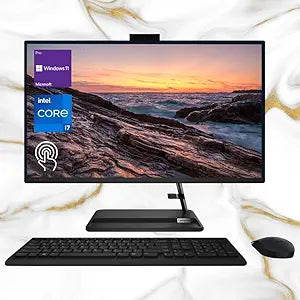
Lenovo F0GJ IdeaCentre 3 27" FHD Touchscreen All-in-One
FHD1920 x 1080i7-13620HUSB 2.0Bluetooth 5.1
Lenovo IdeaCentre 3 all-in-one packs a 27" FHD touchscreen, i7 power, 64GB RAM, and 2TB SSD into one sleek desktop.
$949.00*
Check availability
*Price sourced from Amazon.com. Last updated:Oct 24, 2026.Price and availability are subject to change — details.
Affiliate Disclosure: As an Amazon Associate, Studio Supplies earns from qualifying purchases made through links on this page, at no additional cost to you. This helps support our editorial team.
Notice a mistake? Let Us Know
Overview
Key Features
【High Speed RAM And Enormous Space】64GB high-bandwidth RAM to smoothly run multiple applications and browser tabs all at once; 2TB PCIe NVMe M.2 Solid State Drive allows to fast bootup and data transfer
【Processor】13th Generation Intel Core i7-13620H Processor (10Cores, 16 Threads, 824MB L3 Cache, Base at 1.80Hz, Up to 4.90 GHz Max Turbo Frequency)
【Display】27" FHD (1920 x 1080), IPS, Anti-Glare, Touch, 99%sRGB, 300 nits, 14 ms, WLED Backlight
【Tech Specs】2 x SuperSpeed USB Type-A, 1 x Headphone/Microphone Combo, 1 x RJ-45, 2 x USB 2.0 Type-A, 1 x HDMI, 1 x AC Power, Wi-Fi 6 and Bluetooth 5.1 Combo; Wireless Keyboard & Mouse
【Operating System】Windows 11 Pro-Get all the features of Windows 11 Home operating system plus Mobile device management, Group Policy, Enterprise State Roaming, Assigned Access, Dynamic Provisioningm, Windows Update for Business, Kiosk mode, and Active Directory/Azure AD
Specifications
Processor
13th Gen Intel Core i7-13620H (10 Cores, 16 Threads, up to 4.90 GHz)
Memory
64GB DDR4 RAM
Storage
2TB PCIe NVMe M.2 SSD
Display
27" FHD (1920 x 1080) IPS, Anti-Glare, Touchscreen, 99% sRGB, 300 nits
Graphics
Intel UHD Graphics
Operating System
Windows 11 Pro
Webcam
5MP
Wi-Fi
Wi-Fi 6
Bluetooth
5.1
Ports
2x SuperSpeed USB Type-A, 2x USB 2.0 Type-A, 1x HDMI, 1x RJ-45, 1x Headphone/Mic Combo, 1x AC Power
Backlight
WLED
Response Time
14 ms
Included Accessories
Wireless Keyboard and Mouse
Frequently Asked Questions
Does the Lenovo IdeaCentre 3 27" support being used as an external monitor via the HDMI port?
The HDMI port on this model is HDMI-out, designed for connecting an external display rather than accepting input from another device.
Can the RAM and storage be upgraded after purchase?
The 64GB DDR4 RAM and 2TB PCIe NVMe SSD come pre-installed. Upgrade options depend on available internal slots, which are limited in all-in-one form factors. Consult Lenovo's technical documentation for this specific configuration.
What is the webcam resolution on this IdeaCentre 3?
This model includes a built-in 5MP webcam, which is a step above the typical 720p cameras found on many all-in-ones, offering clearer video calls and conferencing.
Does this come with Windows 11 Home or Pro?
This configuration ships with Windows 11 Pro, which includes business-oriented features like Group Policy management, BitLocker encryption, Remote Desktop, and Azure AD support.
Is the touchscreen responsive enough for everyday use?
The 27" IPS touchscreen supports standard multi-touch gestures and is designed for direct interaction with Windows 11's touch-optimized interface, making it practical for navigation, drawing, and casual touch input.
Related Products

