Lenovo

Lenovo LOQ Ryzen 7 RTX 5050 Gaming Laptop

A GeForce RTX 5050 with 8GB of GDDR7 paired to a 144Hz FHD panel makes this LOQ a focused pick for mainstream gaming

$1,649.00*
In Stock on Amazon.com
View on Amazon

*Price sourced from Amazon.com. Last updated:Aug 17, 2026.Price and availability are subject to change — details.

Affiliate Disclosure: As an Amazon Associate, Studio Supplies earns from qualifying purchases made through links on this page, at no additional cost to you. This helps support our editorial team.

Notice a mistake? Let Us Know

Overview

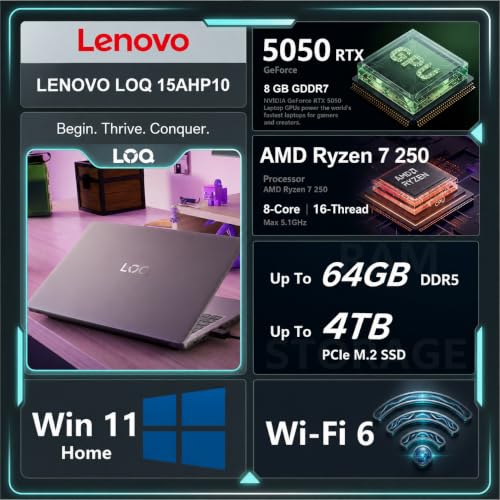
The Lenovo LOQ is built around a clear mission: deliver credible 1080p gaming at a mainstream price. At its heart sits the AMD Ryzen 7 250, an eight-core, sixteen-thread chip with 16MB of L3 cache that runs from a 3.3GHz base to a 5.1GHz maximum turbo. Alongside it, the GeForce RTX 5050 carries 8GB of GDDR7 memory, a pairing aimed at players who want steady performance in current games rather than headline-grabbing 4K numbers. It's a machine for the buyer who values balance over extremes.

The 15.6-inch display is where the gaming intent shows clearly. Its FHD IPS panel runs at 144Hz with an anti-glare finish, 100% sRGB coverage, and 300 nits of brightness, a combination that favors smooth motion and reasonably accurate color. Practical ownership details round out the package. There are three SuperSpeed USB Type-A ports, a USB Type-C port, HDMI, RJ-45 Ethernet, and a combo audio jack, plus Wi-Fi 6 and Bluetooth. The backlit keyboard includes a numeric keypad, and 32GB of DDR5 alongside a 1TB PCIe NVMe SSD keeps both multitasking and storage comfortable. A folding laptop cooler ships in the box, and Windows 11 Home is preinstalled.

Key Features

【High Speed RAM And Enormous Space】32GB DDR5 high-bandwidth RAM to smoothly run multiple applications and browser tabs all at once; 1TB PCIe NVMe M.2 Solid State Drive allows to fast bootup and data transfer

【Processor】AMD Ryzen 7 250 (8 Cores, 16 Threads, 16MB L3 Cache, Base Frequency at 3.3GHz, Up to 5.1GHz at Max Turbo Frequency), with GeForce RTX 5050 Graphics (8GB GDDR7)

【Display】15.6" FHD (1920 x 1080), IPS, Anti-Glare, 100%sRGB, 300 nits, 144Hz

【Tech Specs】3 x Superspeed USB Type-A, 1 x Superspeed USB Type-C, 1 x HDMI, 1 x RJ-45, 1 x Headphone/Microphone Combo; Backlit Keyboard (Fn+Space); Numeric Keypad; Wi-Fi 6 & Bluetooth

【Bundle】PCO Notebook Folding Radiator, Laptop Cooler

【Operating System】Windows 11 Home - Beautiful, more consistent new design, Great window layout options, Improved performance features, New videogame selection and capabilities, Compatible with Android Apps

Specifications

Processor
AMD Ryzen 7 250 (8 cores, 16 threads, 16MB L3 cache)
Clock Speed
3.3GHz base, up to 5.1GHz max turbo
Graphics
GeForce RTX 5050 (8GB GDDR7)
Memory
32GB DDR5
Storage
1TB PCIe NVMe M.2 SSD
Display
15.6" FHD 1920x1080 IPS, Anti-Glare, 100% sRGB, 300 nits, 144Hz
Ports
3x USB Type-A, 1x USB Type-C, HDMI, RJ-45, headphone/mic combo
Wireless
Wi-Fi 6, Bluetooth
Keyboard
Backlit with numeric keypad
Operating System
Windows 11 Home
Bundle
PCO Notebook Folding Radiator laptop cooler

Frequently Asked Questions

The 15.6-inch panel is FHD at 1920 x 1080 with a 144Hz refresh rate. It's an IPS display with anti-glare coating, 100% sRGB coverage, and 300 nits of brightness.
This configuration ships with 32GB of DDR5 RAM and a 1TB PCIe NVMe M.2 solid state drive, giving plenty of room for multitasking and a sizable game library.
The GeForce RTX 5050's 8GB of GDDR7 is aimed at 1080p gaming, matching the panel's native resolution. Demanding titles may require lowering settings, but mainstream games should run well.
It includes three SuperSpeed USB Type-A ports, one USB Type-C, HDMI, RJ-45 Ethernet, and a combo audio jack. Wireless is handled by Wi-Fi 6 and Bluetooth.
Yes. The package bundles a PCO Notebook Folding Radiator laptop cooler to aid airflow during longer sessions, and Windows 11 Home comes preinstalled.
Yes. The LOQ features a backlit keyboard with a full numeric keypad, and the backlight can be toggled using the Fn+Space shortcut.