



Lenovo
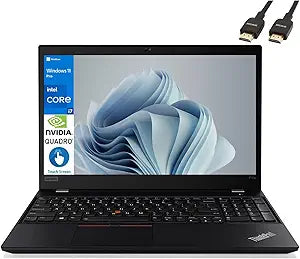
Lenovo ThinkPad P15s Gen 2 Mobile Workstation i7 16GB T500
A portable 15.6-inch workstation with Quadro T500 graphics and Thunderbolt 4 for professional workflows on the go.
Check availability
Affiliate Disclosure: As an Amazon Associate, Studio Supplies earns from qualifying purchases made through links on this page, at no additional cost to you. This helps support our editorial team.
Notice a mistake? Let Us Know
Overview
Specifications
Processor
Intel Core i7-1165G7 (2.8GHz / 4.7GHz Turbo)
Graphics
NVIDIA Quadro T500 4GB GDDR6
Memory
16GB DDR4-3200
Storage
128GB SSD M.2 2280 PCIe x4 NVMe Opal2
Display
15.6" FHD (1920x1080) IPS, 300 nits, Anti-glare
Operating System
Windows 10 Pro 64-bit
Wireless
Intel AX201 Wi-Fi 6 (802.11ax), 2x2 + Bluetooth 5.2
Ports
1x USB 3.2 Gen 1, 1x USB 3.2 Gen 1 (Always On), 2x Thunderbolt 4/USB4, 1x HDMI 2.0, 1x microSD, 1x Headphone/mic combo, 1x RJ45
Security
Discrete TPM 2.0, Fingerprint Reader, Camera Privacy Shutter
Battery
Integrated 57Wh
Frequently Asked Questions
What type of graphics card does the ThinkPad P15s Gen 2 include?
It features an NVIDIA Quadro T500 with 4GB of GDDR6 memory, a professional-grade GPU designed for CAD, 3D modeling, and ISV-certified applications.
Does this laptop support Thunderbolt docking stations?
Yes, it has two Thunderbolt 4/USB4 ports that support Thunderbolt docking stations for connecting multiple monitors, peripherals, and network connections through a single cable.
What security features are built into this laptop?
It includes a discrete TPM 2.0 chip for hardware-level encryption, a fingerprint reader for biometric login, and a camera privacy shutter for physical webcam control.
Is 128GB of SSD storage sufficient for professional use?
The 128GB SSD provides enough space for the operating system and core applications, but most professionals will want to upgrade to a larger drive for storing project files and datasets.
How long does the battery last on a charge?
The integrated 57Wh battery is designed for all-day use during typical business tasks, though battery life will vary depending on workload intensity and display brightness.
Related Products


