



Lenovo
Lenovo Tab M8 4th Gen Google Kids Tablet
The Lenovo Tab M8 Gen 4 packs 16-hour battery life and Google Kids Space into a sub-$150 Android tablet built to survive family use for years.
$249.99*
View on Amazon
✓ In Stock on Amazon.com
*Price sourced from Amazon.com. Last updated:Aug 28, 2026.Price and availability are subject to change — details.
Affiliate Disclosure: As an Amazon Associate, Studio Supplies earns from qualifying purchases made through links on this page, at no additional cost to you. This helps support our editorial team.
Notice a mistake? Let Us Know
Overview
Key Features
POCKET-SIZED ENTERTAINMENT - Tap into on-the-go fun for you or your kids with a slim 8" HD display and powerful dual speakers.
ALL-DAY FUN - Equipped with up to 16 hours of online video playback, the Tab M8 is jam-packed with ways for you and your kids to relax and learn.
HELP YOUR KIDS DISCOVER, CREATE, AND GROW - Curate healthy learning habits for your kids with Google Kids Space, which offers teacher-approved content based on their unique interests.
BETTER DIGITAL HABITS FOR THE WHOLE FAMILY - Utilize parental controls through the Family Link app and guide your kid's digital experience with content management tools and screen time limits.
SAFER SCREEN TIME - Keep young eyes safe from harmful blue light with TÜV Eye Care during story time and enjoy Reading Mode for a more immersive reading experience.
GREATER PEACE OF MIND - Safeguard your family with a privacy dashboard that manages your privacy permission settings.
DESIGNED FOR EXTRA CARE - Tablets should last as families grow. With up to three years of security updates and accidental damage coverage through Premium Care, the Tab M8 will last for years to come.
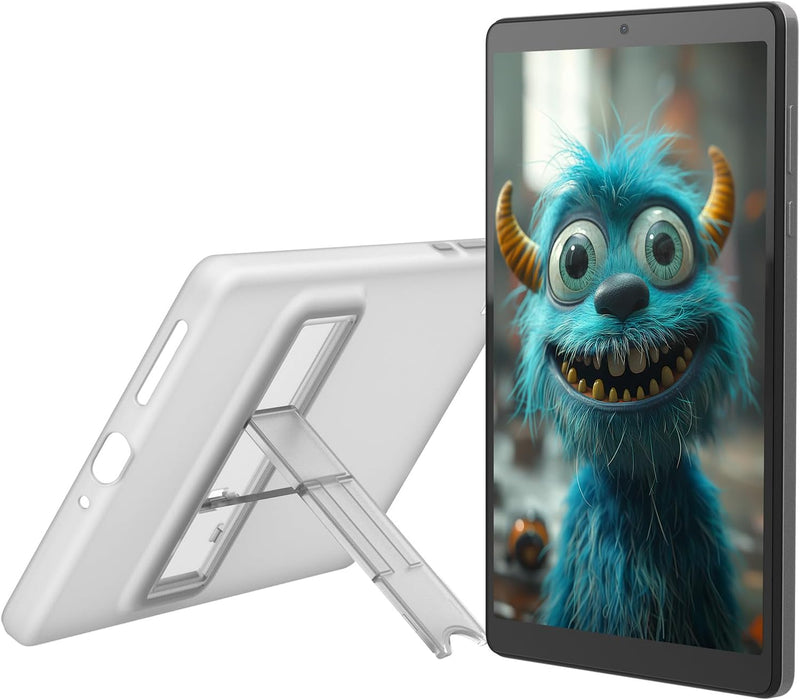
YOUR ESSENTIAL PROTECTION ON THE GO - Protect your tablet with the included clear folio case equipped with an integrated stand for hands-free use.
Specifications
Brand
Lenovo
Model
Tab M8 4th Gen
Display
8" HD Touch Display
Processor
MediaTek Helio A22
RAM
2 GB
Storage
32 GB
Operating System
Android 12 Go
Battery Life
Up to 16 hours (online video playback)
Eye Care
TÜV Eye Care certified
Included Accessories
Clear folio case with integrated stand
Security Updates
Up to 3 years
Parental Controls
Google Family Link, Google Kids Space
Frequently Asked Questions
What Android version does the Tab M8 Gen 4 ship with, and will it receive updates?
It ships with Android 12 Go edition — a lightweight version of Android optimized for lower-RAM devices. Lenovo commits to up to three years of security updates, which is a defined support window rather than an open-ended promise. Major OS version upgrades are not guaranteed on Android 12 Go hardware.
Is 2GB RAM and 32GB storage sufficient for kids' tablet use?
For the intended use case — Google Kids Space apps, YouTube Kids, light browsing, and e-books — yes. Android 12 Go is specifically engineered to run efficiently on 2GB RAM. 32GB storage will fill quickly with downloaded videos and apps; a microSD card slot (if present) would extend this, but the spec sheet does not confirm expandable storage — check before purchasing if local storage is a priority.
What parental control tools are built into this tablet?
The Tab M8 Gen 4 uses Google Family Link for parental controls, which allows screen time limits, content filtering, app approval, and location tracking through Google's ecosystem. Google Kids Space provides a curated, teacher-approved content layer on top of that. Both are Google-managed tools, not proprietary Lenovo software.
What does TÜV Eye Care certification mean for the display?
TÜV Eye Care certification indicates the display meets third-party tested standards for reduced blue light emission and flicker reduction. For a tablet used heavily during evening reading or story time, this is a meaningful certification — not just a marketing claim — as TÜV Rheinland is an independent testing body.
Does it come with a case?
Yes — a clear folio case with an integrated stand is included in the box. The stand enables hands-free use for video viewing or video calls, and the folio format provides front-screen protection.
Related Products


