

LG
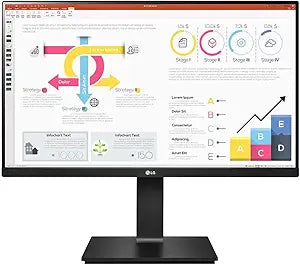
LG 24BP55Q-B 24-inch IPS HDMI DP Business Monitor
2560 x 1440HDMI 1.4
Experience Crisp Visuals with the LG 24BP55Q-B 24" Monitor The LG 24BP55Q-B is a 24-inch monitor designed to deliver clear and vibrant visuals for both professional and personal use. Featuring an IPS panel, HDMI and DisplayPort connectivity, this monitor offers excellent color accuracy and wide ...
$135.00*
Check availability
*Price sourced from Amazon.com. Last updated:Jul 14, 2026.Price and availability are subject to change.
Affiliate Disclosure: Studio Supplies may earn a commission from qualifying purchases made through links on this page, at no additional cost to you. This helps support our editorial team.
Notice a mistake? Let Us Know
Overview
Experience Crisp Visuals with the LG 24BP55Q-B 24" Monitor
The LG 24BP55Q-B is a 24-inch monitor designed to deliver clear and vibrant visuals for both professional and personal use. Featuring an IPS panel, HDMI and DisplayPort connectivity, this monitor offers excellent color accuracy and wide viewing angles, making it ideal for multitasking, content creation, and multimedia entertainment.
- Screen Size: 24"
- Panel Type: IPS
- Resolution: 2560 x 1440
- Aspect Ratio: 16:9
- Connectivity: HDMI 1.4(2), DP
- Color: Black
Key Features
24" LG MONITOR IPS HDMI DP
MFR-PART#: 24BP55Q-B
24" LG MONITOR, 2560 x 1440
16:9 IPS, HDMI 1.4(2), DP
Specifications
Brand
LG
Model Number
24BP55Q-B
Screen Size
24 inches
Panel Type
IPS
Resolution
2560 x 1440
Aspect Ratio
16:9
HDMI Ports
HDMI 1.4 (2 ports)
DisplayPort
DP (1 port)
Category
Business Monitor
Pros & Cons
👍 Pros
- Features a 24-inch IPS panel, providing wide viewing angles and consistent color reproduction.
- Offers a high resolution of 2560 x 1440, delivering sharp and detailed images for enhanced productivity and visual clarity.
- Includes two HDMI 1.4 ports and a DisplayPort, offering flexible connectivity options for various devices.
- Designed with a 16:9 aspect ratio, which is standard for most content and ideal for multitasking with multiple windows.
- Branded as an "LG MONITOR," suggesting reliability and quality from a well-known manufacturer in displays.
👎 Cons
- Specific refresh rate and response time are not provided, which are important metrics for users in fast-paced tasks or light gaming.
- The "Business Monitor" designation may imply it lacks advanced features found in gaming or specialized professional displays.
- While 16:9 is standard, some users might prefer a different aspect ratio for ultra-wide multitasking or specific creative work.
- The absence of a USB hub or other convenience features could be a minor drawback for desktop organization and peripheral connectivity.
- Details regarding stand adjustability (e.g., height, swivel, pivot) are not mentioned, potentially limiting ergonomic comfort.
Frequently Asked Questions
What is the screen size and resolution of the LG 24BP55Q-B monitor?
This LG monitor features a 24-inch IPS display with a resolution of 2560 x 1440, offering sharp and clear visuals.
What type of panel does this monitor use?
The LG 24BP55Q-B uses an IPS (In-Plane Switching) panel, known for its wide viewing angles and accurate color representation.
What connectivity options are available on this monitor?
It comes equipped with two HDMI 1.4 ports and one DisplayPort, providing versatile options for connecting your devices.
Is this monitor suitable for business use?
Yes, it is explicitly referred to as an "HDMI DP Business Monitor," indicating its features and connectivity are well-suited for professional environments.
What is the aspect ratio of the display?
The monitor features a standard 16:9 aspect ratio, which is common for most video content and beneficial for general productivity tasks.
Related Products


