

LG
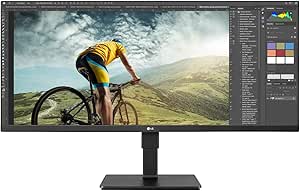
LG 34BN670-B 34" FHD UltraWide IPS Monitor
★★★★★
FHDHDR
Immerse Yourself in a Wider View with UltraWide ClarityIntroducing the LG 34” 34BN670-B IPS FHD UltraWide™ Monitor. This monitor provides a wide and immersive viewing experience, perfect for multitasking, content creation, and entertainment. Screen Size: 34 inches Resolution: 2560x1080 (FHD Ultr...
$279.99*
View on Amazon
✓ In Stock on Amazon.com
*Price sourced from Amazon.com. Last updated:Jul 14, 2026.Price and availability are subject to change.
Affiliate Disclosure: Studio Supplies may earn a commission from qualifying purchases made through links on this page, at no additional cost to you. This helps support our editorial team.
Notice a mistake? Let Us Know
Overview
Immerse Yourself in a Wider View with UltraWide Clarity
Introducing the LG 34” 34BN670-B IPS FHD UltraWide™ Monitor. This monitor provides a wide and immersive viewing experience, perfect for multitasking, content creation, and entertainment.
- Screen Size: 34 inches
- Resolution: 2560x1080 (FHD UltraWide)
- Aspect Ratio: 21:9
- Panel Type: IPS
- Features: VESA DisplayHDR™ 400, AMD FreeSync™, MaxxAudio®, Dynamic Action Sync
Key Features
34-inch UltraWide Full HD
IPS Display
sRGB 99% (Typ.)
VESA Display HDR 400
AMD FreeSync
Specifications
Display Size
34 inches
Resolution
UltraWide Full HD
Panel Type
IPS Display
Color Gamut
sRGB 99% (Typ.)
HDR Support
VESA Display HDR 400
Adaptive Sync Technology
AMD FreeSync
Pros & Cons
👍 Pros
- Features a spacious 34-inch UltraWide Full HD IPS Display, providing an expansive viewing area for multitasking and immersive content.
- Utilizes an IPS panel, which offers wide viewing angles and consistent color reproduction.
- Achieves sRGB 99% (Typ.) color gamut, ensuring accurate and vibrant colors for creative work and general use.
- Supports VESA Display HDR 400, enhancing contrast and color depth for a more dynamic visual experience.
- Incorporates AMD FreeSync technology, which helps to eliminate screen tearing and stuttering during gaming.
- The UltraWide aspect ratio is ideal for productivity, allowing multiple windows to be open side-by-side with ease.
👎 Cons
- The Full HD resolution on a 34-inch screen might result in a lower pixel density compared to 1440p or 4K monitors of similar size.
- Specific refresh rate and response time details are not provided, which are important for fast-paced gaming.
- While sRGB 99% (Typ.) is good, it may not be sufficient for professional color-critical workflows that require wider gamuts like Adobe RGB or DCI-P3.
- VESA Display HDR 400 offers an entry-level HDR experience and may not provide the same impact as higher-tier HDR certifications.
- Ergonomic adjustments for the stand (e.g., height, pivot) are not mentioned in the features.
Frequently Asked Questions
What is the screen size and resolution of the LG 34BN670-B monitor?
The LG 34BN670-B is a 34-inch UltraWide Full HD IPS Monitor, providing an expansive workspace.
Does this monitor offer good color accuracy for creative tasks?
Yes, it features an IPS Display with sRGB 99% (Typ.) color gamut, ensuring accurate and vibrant color reproduction for creative work.
Is this monitor suitable for gaming?
Yes, it incorporates AMD FreeSync technology, which helps to reduce screen tearing and stuttering for a smoother gaming experience.
What kind of HDR support does this monitor have?
The LG 34BN670-B supports VESA Display HDR 400, which enhances contrast and color depth for a more dynamic visual experience.
What are the benefits of an UltraWide display?
An UltraWide display provides ample screen real estate, making it ideal for multitasking, working with multiple applications simultaneously, and immersive content consumption.
Does the IPS panel on this monitor provide wide viewing angles?
Yes, IPS panels are known for their wide viewing angles, ensuring consistent color and brightness even when viewed from the side.
Related Products


