

LG
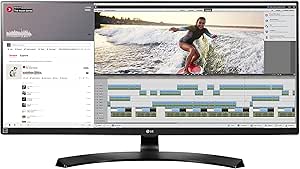
LG 34UM88C-P 34-Inch UltraWide QHD Monitor
QHD
Immerse Yourself in a World of UltraWide VisualsThe LG 34UM88C-P is a 34-inch UltraWide QHD IPS monitor designed for immersive gaming, professional content creation, and enhanced productivity. Its expansive screen and vibrant color accuracy bring your visuals to life. Screen Size: 34-Inch Aspect ...
Check availability
Affiliate Disclosure: As an Amazon Associate, Studio Supplies earns from qualifying purchases made through links on this page, at no additional cost to you. This helps support our editorial team.
Notice a mistake? Let Us Know
Overview
Immerse Yourself in a World of UltraWide Visuals
The LG 34UM88C-P is a 34-inch UltraWide QHD IPS monitor designed for immersive gaming, professional content creation, and enhanced productivity. Its expansive screen and vibrant color accuracy bring your visuals to life.
- Screen Size: 34-Inch
- Aspect Ratio: 21:9 UltraWide
- Resolution: QHD (3440 x 1440)
- Panel Type: IPS
- Features: USB Quick Charge, sRGB over 99%, Height/Tilt Adjustable Stand
Key Features
34" 21:9 QHD IPS Monitor
sRGB Over 99%
USB QuickCharge
On-Screen Control w/ Screen Split 2.0
Height / Tilt Adjustable Stand
Refresh Rate: 60 Hz
Specifications
Brand
LG
Model
34UM88C-P
Screen Size
34-Inch
Aspect Ratio
21:9
Resolution
UltraWide QHD
Panel Type
IPS
Color Gamut
sRGB Over 99%
Refresh Rate
60 Hz
Stand Adjustability
Height / Tilt Adjustable
Feature
USB QuickCharge
Feature
On-Screen Control w/ Screen Split 2.0
Frequently Asked Questions
What is the resolution of the LG 34UM88C-P monitor?
The LG 34UM88C-P features an UltraWide QHD resolution, providing a detailed and expansive visual experience on its 34-inch screen.
Is this monitor suitable for professional graphic design or photo editing?
Yes, with sRGB over 99%, this monitor offers excellent color accuracy, making it well-suited for professional graphic design, photo editing, and other color-critical tasks.
What is the refresh rate of this LG UltraWide monitor?
This LG 34UM88C-P monitor has a refresh rate of 60 Hz, which is standard for general use and productivity.
Can I adjust the monitor's position for ergonomic comfort?
Yes, the monitor comes with a height and tilt adjustable stand, allowing you to customize its position for optimal ergonomic comfort.
What are the benefits of the On-Screen Control and Screen Split 2.0 features?
On-Screen Control provides an intuitive interface for managing monitor settings, while Screen Split 2.0 enhances multitasking by allowing you to easily divide the UltraWide display into multiple sections.
Does this monitor offer any fast charging capabilities for external devices?
Yes, it includes USB QuickCharge functionality, allowing you to rapidly charge compatible devices directly through the monitor.
Is the 21:9 aspect ratio good for gaming?
The 21:9 aspect ratio can offer a more immersive gaming experience by providing a wider field of view, though some games may not fully support this aspect ratio, leading to letterboxing.
Related Products

