

LG
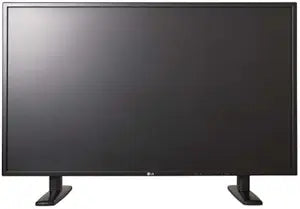
LG M4214TCBA 42-Inch LCD Touchscreen Monitor
1920 x 1080USB 2.0
Immersive Touchscreen Experience on a Large DisplayThe LG Electronics Flatron M4214TCBA is a 42-inch LCD touchscreen monitor designed to enhance interactivity and engagement. With a responsive touchscreen and a large display area, this monitor is ideal for presentations, interactive applications,...
View price on Amazon
Affiliate Disclosure: As an Amazon Associate, Studio Supplies earns from qualifying purchases made through links on this page, at no additional cost to you. This helps support our editorial team.
Notice a mistake? Let Us Know
Overview
Immersive Touchscreen Experience on a Large Display
The LG Electronics Flatron M4214TCBA is a 42-inch LCD touchscreen monitor designed to enhance interactivity and engagement. With a responsive touchscreen and a large display area, this monitor is ideal for presentations, interactive applications, and collaborative environments.
- Screen Size: 42 inches
- Display Type: LCD
- Aspect Ratio: 16:9
- Response Time: 10 ms
- Features: Touchscreen
Key Features
Product Type: LCD Touchscreen Monitor
Screen Size: 42"
Contrast Ratio: 1,300:1
Maximum Resolution: 1920 x 1080
Interface: USB 2.0, HDMI, DVI, VGA, S-Video
Mounting type: VESA Standard Mount Interface 600mm x 400mm
Specifications
Brand
LG
Model
M4214TCBA
Product Type
LCD Touchscreen Monitor
Screen Size
42"
Maximum Resolution
1920 x 1080
Contrast Ratio
1,300:1
Interface
USB 2.0, HDMI, DVI, VGA, S-Video
Mounting Type
VESA Standard Mount Interface 600mm x 400mm
Frequently Asked Questions
What type of display is the LG M4214TCBA?
This is an LG 42-inch LCD Touchscreen Monitor.
What is the maximum resolution of this monitor?
The maximum resolution supported by this monitor is 1920 x 1080, which is Full HD.
What interfaces are available on this LG touchscreen monitor?
It offers a variety of interfaces including USB 2.0, HDMI, DVI, VGA, and S-Video.
Can this monitor be mounted on a wall?
Yes, it features a VESA Standard Mount Interface of 600mm x 400mm, allowing for wall mounting.
What is the contrast ratio of the LG M4214TCBA?
The monitor has a contrast ratio of 1,300:1.
Is the touchscreen functionality capacitive or resistive?
The product description identifies it as a touchscreen monitor, but does not specify whether the technology is capacitive or resistive.
What is the screen size of this LG monitor?
The LG M4214TCBA has a 42-inch screen size.
Related Products


