Logitech

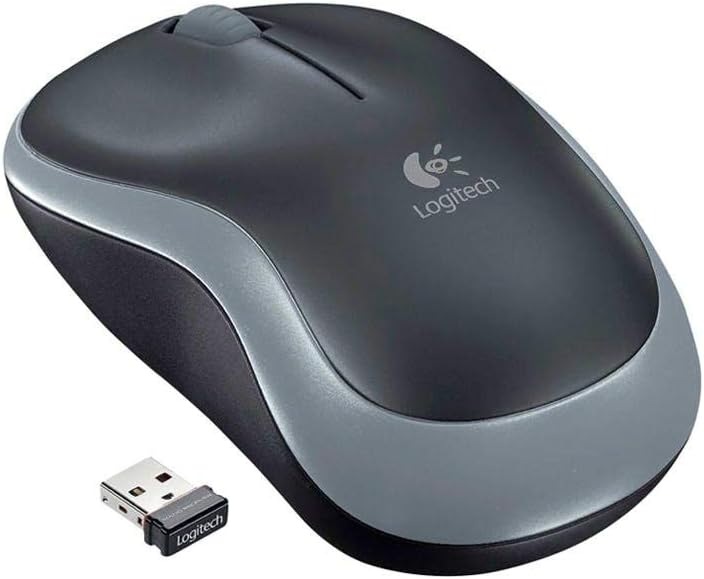
Logitech M185 Wireless Mouse - Black Red

4.6 (1511 reviews)

Plug-and-play RF wireless cuts the cord without cutting corners — the Logitech M185 delivers consistent cursor tracking for everyday computing at minimal cost.

$15.47*$19.99Save 22%
In Stock on Amazon.com
View on Amazon

*Price sourced from Amazon.com. Last updated:Jul 14, 2026.Price and availability are subject to change.

Affiliate Disclosure: Studio Supplies may earn a commission from qualifying purchases made through links on this page, at no additional cost to you. This helps support our editorial team.

Notice a mistake? Let Us Know

Overview

The Logitech M185 is a 2.4 GHz wireless mouse built around the core proposition of reliable, no-fuss wireless performance for everyday computing tasks. It uses a nano USB receiver rather than Bluetooth, which eliminates pairing steps and makes it operational within seconds on any USB-A equipped machine. The laser movement detection technology handles a broader surface variety than conventional optical sensors — including glass and highly reflective surfaces that trip up cheaper optical alternatives. With three buttons and an ambidextrous form factor, the M185 covers the baseline input needs for web browsing, document editing, and general office productivity without any configuration overhead.

Where the M185 makes its engineering trade-offs clear is in what it omits: there are no programmable side buttons, no adjustable DPI, and no dedicated software profile support. These are deliberate cost-structure decisions that place the M185 firmly in the entry-level productivity tier rather than the performance or enthusiast segments. The compact dimensions (2.36 x 7.24 inches footprint) make it suitable for travel and tight desk setups. The Black/Red colorway is the defining visual identifier of this SKU. For users who need a second mouse, a shared-workstation input device, or a low-cost replacement with zero setup time, the M185 is a well-validated, stable choice backed by Logitech's manufacturing consistency.

Specifications

Brand
Logitech
Model
M185
Color
Black / Red
Connectivity
2.4 GHz Radio Frequency (Nano USB Receiver)
Movement Detection
Laser
Number of Buttons
3
Handedness
Ambidextrous
Dimensions
2.36 x 7.24 x 0.04 inches

Pros & Cons

👍 Pros

  • 2.4 GHz nano receiver provides reliable, low-latency wireless connectivity without the pairing overhead of Bluetooth — practical for shared or frequently moved setups.
  • Ambidextrous design accommodates both left- and right-handed users, extending its usability across shared workstations and mixed-handed teams.
  • Laser tracking performs on a wider range of surfaces than standard optical sensors, including glossy and irregular textures.
  • Compact, low-profile form factor travels easily and fits most laptop bags without dedicated storage.
  • Plug-and-play nano receiver requires no driver installation for basic operation on most operating systems.

👎 Cons

  • At 3 buttons with no dedicated forward/back navigation buttons, the M185 lacks the side-button inputs that productivity users rely on for browser navigation and application shortcuts.
  • The laser sensor resolution and polling rate are not published, making it difficult to assess cursor precision for users with high-DPI displays or pixel-level work requirements.
  • The ambidextrous shape is flatter and less ergonomically sculpted than right-hand-optimized mice — users with larger hands may find fatigue over extended sessions.
  • No adjustable DPI settings are available, so cursor speed is fixed and must be managed entirely through OS-level sensitivity settings.
  • The nano USB receiver occupies a USB-A port permanently while in use — a notable constraint on modern thin laptops with limited port counts.

Frequently Asked Questions

The M185 uses Logitech's 2.4 GHz RF (radio frequency) via a nano USB receiver — not Bluetooth. That means no pairing process: plug in the receiver and the mouse is immediately operational.
The M185 has 3 buttons. Based on the standard M185 configuration, this includes left click, right click, and a clickable scroll wheel — covering all essential navigation inputs for productivity work.
Logitech rates the M185's laser movement detection as functional on almost any surface, including most desks, tables, and soft surfaces where optical mice may struggle.
No. The M185 features a contoured ambidextrous shape designed to accommodate both left- and right-handed users, making it practical for shared workstations.
The standard M185 operates at a typical wireless range of up to 10 meters (33 feet) from the nano receiver, though real-world range depends on RF interference in the environment.