Logitech

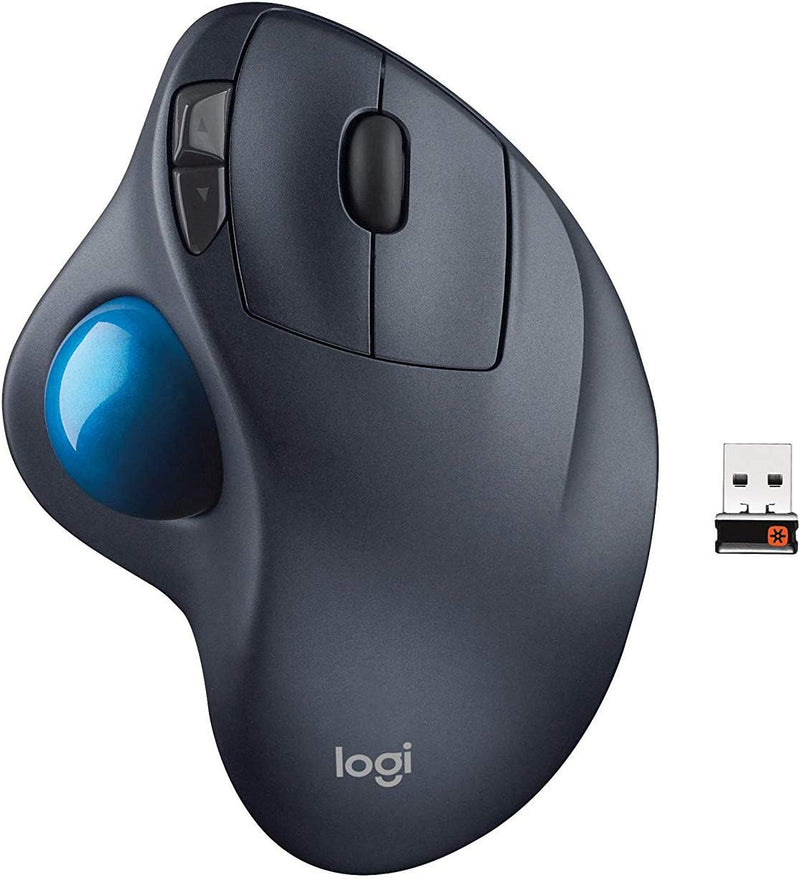
Logitech 5154062 Wireless M570 Trackball Mouse

4.6 (1299 reviews)

Reduce wrist strain and reclaim desk space with Logitech's sculpted wireless trackball mouse.

View price on Amazon
Affiliate Disclosure: Studio Supplies may earn a commission from qualifying purchases made through links on this page, at no additional cost to you. This helps support our editorial team.

Notice a mistake? Let Us Know

Overview

The Logitech Wireless M570 Trackball reimagines cursor control by placing a thumb-operated trackball into a sculpted, ergonomic body that stays fixed on your desk. Rather than sliding a mouse across a surface, you roll the ball with your thumb to move the cursor, which dramatically reduces the repetitive wrist and forearm motions that can lead to strain and discomfort over long work sessions. The sculpted right-hand shape cradles the hand in a relaxed, neutral position, and the stationary footprint means it works comfortably on even the most cluttered desk.

Wireless connectivity is handled through a compact USB receiver, freeing your workspace from cable tangle. The trackball itself is removable, making periodic cleaning quick and straightforward — a key maintenance step for keeping cursor movement smooth and responsive. While the M570 is not designed for pixel-precise creative work or fast-twitch gaming, it excels as a daily-driver input device for browsing, office productivity, and general computing where comfort and space efficiency are the top priorities.

Specifications

Brand
Logitech
Model
5154062
Type
Wireless Trackball Mouse
Connectivity
Wireless (USB Receiver)
Tracking Technology
Trackball
Color
Black
Hand Orientation
Right-Handed

Pros & Cons

👍 Pros

  • Stationary design eliminates repetitive wrist and arm movements, reducing strain during long sessions
  • Thumb-operated trackball requires no desk space for mouse movement, ideal for cramped workstations
  • Sculpted ergonomic shape supports the hand in a natural resting position
  • Wireless connectivity removes cable clutter and allows flexible placement

👎 Cons

  • Thumb-trackball control has a learning curve for users accustomed to traditional mice
  • Lacks the precision needed for tasks like detailed photo editing or competitive gaming at high sensitivity
  • The sculpted right-hand design is not suitable for left-handed users
  • Limited DPI and tracking customization compared to modern ergonomic mice

Frequently Asked Questions

Instead of moving the entire device across your desk, you control the cursor by rolling the trackball with your thumb while the mouse body stays stationary, which reduces wrist and arm movement.
No. Because the trackball is stationary, it works in tight spaces and does not need a mousepad or any surface area for movement.
The M570 connects via a small USB wireless receiver (Logitech Unifying Receiver) — it does not use Bluetooth.
Yes, the trackball can be popped out easily, allowing you to clean dust and debris from the socket to maintain smooth tracking.