
Logitech
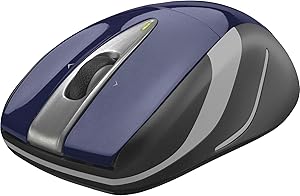
Logitech Wireless Laser Mouse M525 - Precise & Ergonomic
Logitech's M525 wireless laser mouse pairs micro-precise scrolling with an ergonomic shape built for all-day notebook use.
View price on Amazon
Affiliate Disclosure: As an Amazon Associate, Studio Supplies earns from qualifying purchases made through links on this page, at no additional cost to you. This helps support our editorial team.
Notice a mistake? Let Us Know
Overview
Key Features
For Windows and Mac computers: Works with Windows XP
Vista
7 and Mac OS X 10.5 or later
Specifications
Brand
Logitech
Type
Wireless Laser Mouse
Color
Blue / Navy
Scroll Wheel
Micro-Precise
Design
Ergonomic Shape
Connectivity
Wireless (USB Receiver)
Frequently Asked Questions
What type of wireless connection does the Logitech M525 use?
It connects via a small USB receiver (Logitech's Unifying receiver), so no Bluetooth pairing is required — just plug in the dongle and go.
What does "micro-precise scroll wheel" mean on the M525?
The scroll wheel is engineered for finer, click-by-click scrolling increments, giving you more control when navigating long web pages, documents, or spreadsheets.
Is the Logitech M525 suitable for left-handed users?
The M525 has a contoured, ergonomic shape that is designed primarily for right-handed use. Left-handed users can operate it but may find the contour less comfortable over long sessions.
What type of sensor does the M525 use?
It uses a laser sensor, which provides reliable tracking on a wider variety of surfaces compared to basic optical mice.
Related Products
