
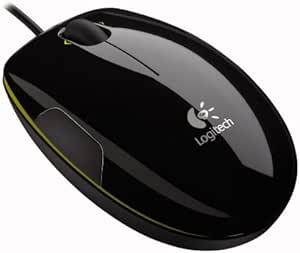
Logitech 910-000594 LS1 Laser Mouse
Navigate with Precision and Style The Logitech LS1 Laser Mouse brings a touch of elegance to your workspace. Its high-performance laser sensor ensures smooth and accurate cursor control on nearly any surface, while the ergonomic design with soft side grips provides enhanced comfort for both righ...
*Price sourced from Amazon.com. Last updated:Aug 31, 2026.Price and availability are subject to change — details.
Notice a mistake? Let Us Know
Overview
Navigate with Precision and Style
The Logitech LS1 Laser Mouse brings a touch of elegance to your workspace. Its high-performance laser sensor ensures smooth and accurate cursor control on nearly any surface, while the ergonomic design with soft side grips provides enhanced comfort for both right and left-handed users.
Specifications:
- Sensor Technology: Laser
- Design: Sleek, glossy finish with stylish color accent
- Grip: Soft side grips for enhanced comfort
- Hand Orientation: Ambidextrous
Key Features
Sleek, contemporary styling with glossy finish and color accent
Superior laser precision for smoother tracking on virtually any surface
Soft rubber side grips for exceptional comfort
Easy setup ¿ no software to install
Side-to-side scrolling and zoom for enhanced navigation
Specifications
Frequently Asked Questions
Related Products
