


Logitech
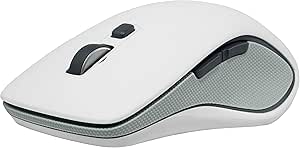
Logitech 910-003913 M560 Wireless Mouse - White
A wireless ambidextrous mouse with hyper-fast scrolling and Windows 8 shortcut integration built for all-day desktop productivity.
Check availability
Affiliate Disclosure: As an Amazon Associate, Studio Supplies earns from qualifying purchases made through links on this page, at no additional cost to you. This helps support our editorial team.
Notice a mistake? Let Us Know
Overview
Key Features
Wireless Mouse M560
Specifications
Brand
Logitech
Model
M560 (910-003913)
Color
White
Interface
RF Wireless (USB Receiver)
Tracking Technology
Laser
Form Factor
Ambidextrous
Battery Type
AA
Frequently Asked Questions
What wireless technology does the M560 use, and what receiver does it require?
The M560 uses Logitech's Unifying RF wireless protocol over a USB receiver. The receiver is a standard Logitech nano-USB dongle — if you already own another Unifying receiver, you may be able to pair the M560 to it using Logitech's Unifying software rather than occupying a second USB port.
What battery does the M560 use, and what is the expected life?
The M560 runs on a single AA battery. Logitech does not publish a specific battery life figure in the available specs, but RF wireless mice in this class typically achieve several months of use per battery under normal workloads.
Is the M560 truly ambidextrous, or does it favor right-handed users?
The M560 is listed with an ambidextrous form factor, meaning the shell is symmetric and usable left or right-handed. However, any dedicated side buttons, if present, may be positioned for right-hand primary access — verify button layout against your specific hand preference before purchasing.
What tracking technology does the M560 use, and on what surfaces does it perform reliably?
The M560 uses laser tracking, which offers broader surface compatibility than optical sensors, including glass and high-gloss surfaces where optical sensors often fail. This makes it a reliable choice for varied desk setups without requiring a dedicated mouse pad.
Does the M560 require driver software to function?
The M560 functions as a plug-and-play HID device without drivers for basic cursor and click operation. The Windows 8 shortcut features and any advanced configuration require Logitech's software to be installed on the host machine.
Related Products
