
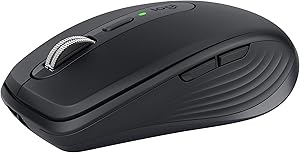
Logitech 910-005833 MX Anywhere 3 Wireless Mouse (Renewed)
Master Your Work Anywhere with the Logitech MX Anywhere 3 Mouse The Logitech MX Anywhere 3 is a compact and high-performance wireless mouse designed for mobile professionals. With its advanced features, comfortable design, and go-anywhere tracking, this mouse is perfect for enhancing your produc...
*Price sourced from Amazon.com. Last updated:Aug 30, 2026.Price and availability are subject to change — details.
Notice a mistake? Let Us Know
Overview
Master Your Work Anywhere with the Logitech MX Anywhere 3 Mouse
The Logitech MX Anywhere 3 is a compact and high-performance wireless mouse designed for mobile professionals. With its advanced features, comfortable design, and go-anywhere tracking, this mouse is perfect for enhancing your productivity wherever you are.
Specifications:
- Scrolling: MagSpeed Electromagnetic Scroll Wheel
- DPI: 4000 DPI
- Tracking: Tracks on Any Surface, Even Glass
- Connectivity: Bluetooth, USB-C
- Multi-Device: Connects to 3 Devices
- Battery Life: Up to 70 Days on a Full Charge
- Charging: USB-C Quick Charging (3 Hours of Use from 1-Minute Charge)
- Customization: Customizable Buttons with App-Specific Profiles
Key Features
MAGSPEED SCROLLING - Speed, precision, and silence. Effortlessly scroll 1,000 lines at once, and stop on a pixel. Auto-shifts between ratchet and hyper-fast modes.
GO-ANYWHERE COMFORT – Low-profile design contoured for your hand, with ultra-soft silicone side grips. Built to withstand the bumps and drops of mobile work.
TRACK ANYWHERE – EVEN GLASS - Track on virtually any surface, including glass – meaning you can work seamlessly at the desk, at a cafe, even on the couch.
USB-C QUICK CHARGING - Stays powered up to 70 days on a full charge – and gets 3 hours of use from a 1-minute quick charge. USB-C to A charging cable included.
MULTI-DEVICE, MULTI-OS - Connect up to three devices and switch between them at the tap of a button. MX Anywhere 3 works with Windows, macOS, iPadOS, ChromeOS, & Linux.
WORK FASTER WITH BUTTON CUSTOMIZATIONS AND PREDEFINED PROFILES for Adobe Photoshop, Adobe Premiere Pro, Final Cut Pro, Google Chrome, Safari, Microsoft Word, Excel, & PowerPoint.
MODERN DESIGN, PREMIUM MATERIALS - Modern design features a steel scroll wheel, grippy silicon side grips, and comes in Pale Gray, Graphite, and Rose finishes.
FLOW ENABLED – Control multiple computers across Windows and macOS operating systems. Effortlessly transfer text, images, and files between computers.
Be 50% more productive with a mouse compared to a touchpad* *Based on throughput computation in bits/second combining speed and accuracy averaged for all devices participating in the study. Logitech Ergonomic Lab study on 23 participants in (Oct / 2019) with two Logitech standard mice and two standard, embedded trackpads.
Specifications
Frequently Asked Questions
Related Products
