Logitech

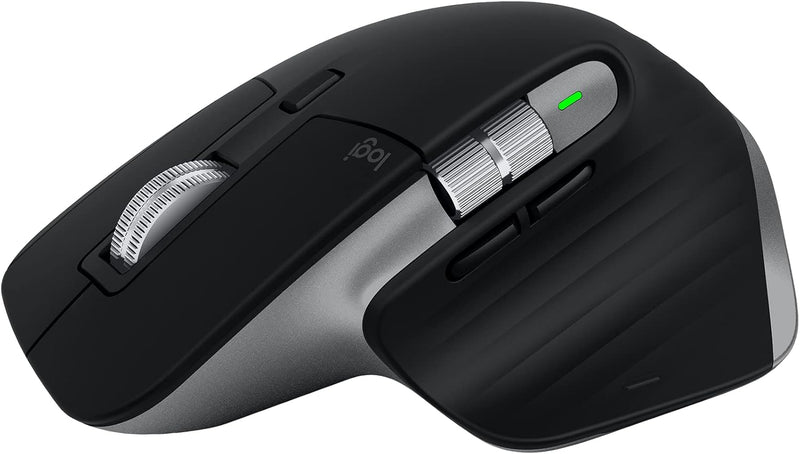
Logitech 910-006569 MX Master 3S Mac Wireless Mouse

4.6 (6071 reviews)
8KUSB-C

An 8K DPI track-on-glass sensor, near-silent MagSpeed scrolling, and 70-day battery life make the MX Master 3S the precision instrument Mac power users have been waiting for.

$119.99*
Check availability

*Price sourced from Amazon.com. Last updated:Jul 14, 2026.Price and availability are subject to change.

Affiliate Disclosure: Studio Supplies may earn a commission from qualifying purchases made through links on this page, at no additional cost to you. This helps support our editorial team.

Notice a mistake? Let Us Know

Overview

The Logitech MX Master 3S for Mac is a 7-button wireless mouse built around an 8,000 DPI Darkfield optical sensor capable of tracking on virtually any surface including glass. At 8K DPI, the sensor resolves fine cursor movements with sub-pixel accuracy on Apple's Retina and Pro Display XDR panels — the tracking resolution is not a marketing ceiling but a functional specification that matters when placing elements in Figma, trimming clips in Final Cut, or navigating dense codebases. MagSpeed scrolling replaces a mechanical scroll wheel with an electromagnetic mechanism: it detects scroll velocity and switches between precise ratcheted steps and frictionless free-spin, covering 1,000 lines per second at full speed. Quiet Clicks use a redesigned switch mechanism that reduces audible click noise by 90% without increasing actuation force or degrading tactile feedback.

This mouse is engineered specifically for Mac-centric knowledge workers and creative professionals who operate across multiple Apple devices in demanding desktop environments. The Easy Switch button cycles pairing among up to three Bluetooth devices — a Mac Mini, a MacBook, and an iPad — without re-entering Bluetooth settings. Logi Options+ provides per-application button mapping and scroll behavior customization, allowing the thumb wheel and side buttons to perform different actions in Photoshop versus Safari versus Xcode. USB-C charging with 1-minute emergency top-up and a 70-day full-charge runtime effectively removes battery anxiety from daily workflow. The right-handed ergonomic chassis positions the thumb on a dedicated rest with two programmable buttons, and the shape is designed to keep the wrist in a more neutral pronation angle during extended use.

Key Features

Remastered for Mac: MX Master 3S for Mac performance mouse is optimized for macOS, and compatible with iPadOS (1)

Feel the performance: MX Master 3S for Mac Bluetooth mouse features an 8K DPI track-on-glass sensor(2) and Quiet Clicks - offering 90% less click noise (3)

Magspeed scrolling: A computer mouse with remarkable speed, precision, and near silence - MagSpeed scrolling is 90% faster (4), 87% more precise (5), and ultra quiet

Ergonomic design: Work comfortably with a precision mouse featuring a silhouette crafted for a more natural wrist posture and optimally placed thumb controls

App-specific customizations: Speed up and customize your workflow with predefined macOS and app-specific profiles in the improved Logi Options plus (6)

Multi Mac Workflow: Pair this cordless mouse with up to 3 Mac computers or laptops and effortlessly transfer text, images, and files between them (6)

USB-C to USB-C rechargeable: Stay powered for up to 70 days on a full charge and get 3 hours of use from this wireless mouse with just a 1-minute quick charge (7)

Plastic parts in MX Master 3S for Mac include certified post consumer recycled plastic (Space Gray: 27%, Pale Gray: 22%(9).

Specifications

Compatibility
macOS, iPadOS
Connectivity
Bluetooth
Sensor
Darkfield track-on-glass optical, 8K DPI
Scrolling
MagSpeed electromagnetic (ratchet + free-spin)
Buttons
7 (including quiet click primary buttons)
Click Noise Reduction
90% quieter vs standard switches
Battery Life
Up to 70 days per full charge
Quick Charge
1 minute = 3 hours use
Charging Port
USB-C
Multi-Device Pairing
Up to 3 devices (Easy Switch)
Software
Logi Options+ (macOS)
Color
Space Grey

Pros & Cons

👍 Pros

  • 8K DPI track-on-glass sensor maintains tracking accuracy on materials that defeat standard optical sensors — glass desks, glossy surfaces, and marble are all viable working surfaces without a mouse pad.
  • MagSpeed electromagnetic scroll wheel covers 1,000 lines per second in free-spin mode, eliminating the need to repeatedly drag a scrollbar through long documents or codebases.
  • Quiet Clicks at 90% reduced noise versus standard switches make the mouse viable in shared office or studio environments where click noise is a distraction.
  • 70-day battery life on a full USB-C charge eliminates the battery management overhead of disposable-battery mice and weekly recharging cycles.
  • Easy Switch pairing supports up to three Mac devices simultaneously with hardware button switching — no re-pairing required when moving between a MacBook and a desktop Mac.

👎 Cons

  • Bluetooth-only connectivity means the MX Master 3S is subject to Bluetooth interference and latency variability in RF-dense environments — no Logi Bolt USB dongle option is included.
  • The ergonomic silhouette is designed for right-hand use only; left-handed users have no equivalent MX Master variant in this line.
  • At approximately 141g, the mouse is heavier than ultralight gaming or travel mice — a practical consideration for users who experience wrist fatigue during extended sessions.
  • App-specific profiles and full customization require Logi Options+ software, which runs as a background process and is macOS-only — the mouse functions as a basic pointer on other platforms.
  • The thumb wheel and horizontal scroll are optimized for right-handed grip; the control placement does not translate to ambidextrous or fingertip grip styles.

Frequently Asked Questions

8,000 DPI means the sensor reports 8,000 position samples per inch of movement — at that resolution, even micro-movements register, giving pixel-accurate cursor placement on 4K or 5K Retina displays. DPI is adjustable through Logi Options+ software, so you can set a lower tracking speed for detail work and a higher speed for spanning multiple monitors.
Standard scroll wheels use physical detents (clicks) that move the page in fixed increments. MagSpeed uses an electromagnetic mechanism that switches between ratcheted and free-spinning modes based on scroll velocity — at speed, it spins freely through long documents; slow it down and it snaps back to precise line-by-line control. The 87% precision figure refers to measured landing accuracy compared to conventional free-spinning wheels.
Bluetooth only — there is no Logi Bolt USB receiver included with the Mac variant. This keeps the design USB-C port-neutral but means Bluetooth stack quality on your Mac affects connection stability.
The hardware works with any Bluetooth device, but the optimized profiles, app-specific customizations, and Easy Switch multi-device pairing are configured through Logi Options+, which is macOS and iPadOS software. On Windows or Linux, the mouse functions but without the full customization layer.
A full charge via USB-C to USB-C takes approximately 2 hours. The 1-minute quick charge provides roughly 3 hours of use — useful for grabbing a short session when you've forgotten to charge overnight. Battery life of up to 70 days assumes standard office use patterns.