
Logitech
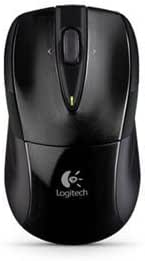
Logitech 910002696 M525 Wireless Notebook Mouse
Comfort and Precision in a Wireless Mouse Introducing the Logitech M525 Wireless Notebook Mouse, designed for the perfect blend of performance, precision, and comfort. With its micro-precise scroll wheel and ergonomic shape, this mouse provides a smooth and efficient navigation experience. Spec...
Check availability
Affiliate Disclosure: As an Amazon Associate, Studio Supplies earns from qualifying purchases made through links on this page, at no additional cost to you. This helps support our editorial team.
Notice a mistake? Let Us Know
Overview
Comfort and Precision in a Wireless Mouse
Introducing the Logitech M525 Wireless Notebook Mouse, designed for the perfect blend of performance, precision, and comfort. With its micro-precise scroll wheel and ergonomic shape, this mouse provides a smooth and efficient navigation experience.
Specifications:
- Type: Wireless Mouse
- Color: Black
- Scroll Wheel: Micro-precise
- Design: Ergonomic
Specifications
Model
M525
Connectivity
Wireless (2.4 GHz)
Scrolling
Tilt Scroll Wheel
Grip
Soft Rubber
Features
Battery Indicator Light
Frequently Asked Questions
Is the Logitech M525 Wireless Notebook Mouse compatible with both Windows and Mac operating systems?
Logitech mice typically offer broad compatibility with both Windows and Mac operating systems, providing versatility for various users.
Does this mouse use a USB dongle for its wireless connection?
Yes, the Logitech M525 uses a tiny Logitech Unifying receiver that plugs into a USB port for its 2.4 GHz wireless connection.
How long do the batteries typically last in the M525 mouse?
The listing does not specify battery life, but Logitech typically designs their wireless mice for extended battery performance.
Can the scroll wheel be customized for different functions?
While the scroll wheel offers tilt functionality for horizontal scrolling, specific customization options may depend on Logitech's software (if applicable).
Is this mouse suitable for left-handed users?
The M525 features an ergonomic shape, but specific left-handed optimization is not mentioned, suggesting it might be designed primarily for right-handed users.
Related Products
