

Logitech
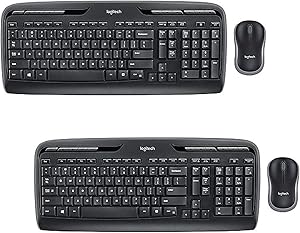
Logitech MK320 Wireless Mouse & Keyboard Combo (2-Pack)
Cordless Convenience: Logitech MK320 Wireless Keyboard and Mouse Combo Enhance your productivity and declutter your workspace with the Logitech MK320 Wireless Desktop Combo. This bundle includes a full-size wireless keyboard and mouse, providing reliable wireless connectivity and comfortable typi...
$78.95*$79.98Save 1%
View on Amazon
✓ In Stock on Amazon.com
*Price sourced from Amazon.com. Last updated:Aug 30, 2026.Price and availability are subject to change — details.
Affiliate Disclosure: As an Amazon Associate, Studio Supplies earns from qualifying purchases made through links on this page, at no additional cost to you. This helps support our editorial team.
Notice a mistake? Let Us Know
Overview
Cordless Convenience: Logitech MK320 Wireless Keyboard and Mouse Combo
Enhance your productivity and declutter your workspace with the Logitech MK320 Wireless Desktop Combo. This bundle includes a full-size wireless keyboard and mouse, providing reliable wireless connectivity and comfortable typing and navigation. Perfect for computers and laptops running Windows.
Detailed Specifications:
- Brand: Logitech
- Model: MK320
- Connectivity: Wireless
- Compatibility: Windows-based PC
- Wireless Range: Up to 30 feet
- Receiver: USB Receiver
- Keyboard Features: Hot keys for commonly used applications
- Battery: Pre-installed batteries (2 x AAA for Keyboard, 1 x AA for Mouse)
Key Features
THIS BUNDLE CONTAINS: 2 x Logitech MK320 Mouse and Keyboard Combo
Keyboard and Mouse | Advanced 2.4 GHz Wireless
Snap-on USB Receiver | Application Hot Keys
Hot Pluggable Capable | Long Battery Life Allows for More Productivity
Easy to Use Hotkeys Allow for Fast Internet Browsing and Other Functions
Specifications
Product Type
Wireless Mouse & Keyboard Combo
Pack Size
2-Pack
Wireless Technology
Advanced 2.4 GHz Wireless
Receiver Type
Snap-on USB Receiver
Keyboard Features
Application Hot Keys, Easy to Use Hotkeys
Mouse Features
Wireless
Power Source
Long Battery Life
Connectivity
Hot Pluggable Capable
Frequently Asked Questions
What is included in this Logitech MK320 bundle?
This bundle contains two Logitech MK320 Mouse and Keyboard Combos, providing a complete set for two users or workstations.
What kind of wireless technology does this combo use?
The combo utilizes advanced 2.4 GHz wireless technology, ensuring a reliable connection for both the mouse and keyboard.
Does the keyboard have special function keys?
Yes, the keyboard includes application hot keys, which allow for fast internet browsing and access to other functions, enhancing productivity.
What is the benefit of the snap-on USB receiver?
The snap-on USB receiver is designed for convenience, allowing it to be easily stored within the mouse or keyboard, making it portable and preventing loss.
How is the battery life for this combo?
The Logitech MK320 combo is designed with long battery life, which contributes to more productivity by reducing the frequency of battery replacements.
Can I easily connect and disconnect the receiver without system issues?
Yes, the combo is hot pluggable capable, meaning you can connect and disconnect the USB receiver without needing to restart your computer.
Related Products


