Logitech

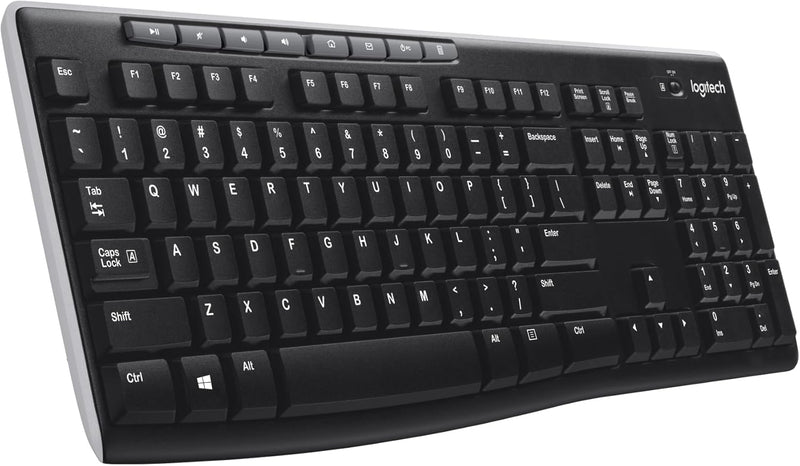
Logitech 920-003051 K270 Wireless Keyboard Long Battery Life

4.5 (107246 reviews)

A full-size wireless keyboard with a two-year battery life, spill-proof build, and plug-and-play USB setup.

$24.95*
In Stock on Amazon.com
View on Amazon

*Price sourced from Amazon.com. Last updated:Jul 14, 2026.Price and availability are subject to change.

Affiliate Disclosure: Studio Supplies may earn a commission from qualifying purchases made through links on this page, at no additional cost to you. This helps support our editorial team.

Notice a mistake? Let Us Know

Overview

The Logitech K270 (920-003051) is a full-size wireless keyboard built for everyday computing at home or in the office. It connects via a 2.4 GHz Logitech Unifying USB receiver with a range of up to 33 feet, providing a stable, lag-free wireless connection without Bluetooth pairing hassles. The full-size layout includes a dedicated number pad, all standard F-keys, arrow keys, and eight multimedia hotkeys for quick access to email, internet, volume controls, and media playback. Setup is entirely plug-and-play — insert the receiver into a USB port and start typing.

Durability is a key focus of the K270's design. Its spill-proof construction helps protect against liquid damage from everyday accidents, and the key legends are printed to resist fading over time. Logitech rates the battery life at up to 24 months on standard AA batteries, which is among the longest in its class and means you can go two years before needing a battery change. The keyboard uses 38% certified post-consumer recycled plastic in its construction. The Unifying receiver is also a practical advantage — a single receiver supports up to six compatible Logitech peripherals, freeing up USB ports on your computer. At 104 keys with a familiar layout, the K270 is designed to be a dependable, low-maintenance keyboard for users who prioritize function and reliability over premium features.

Key Features

All-day Comfort: This USB keyboard creates a comfortable and familiar typing experience thanks to the deep-profile keys and standard full-size layout with all F-keys, number pad and arrow keys

Built to Last: The spill-proof (2) design and durable print characters keep you on track for years to come despite any on-the-job mishaps; it’s a reliable partner for your desk at home, or at work

Long-lasting Battery Life: A 24-month battery life (4) means you can go for 2 years without the hassle of changing batteries of your wireless full-size keyboard

Easy to Set-up and Use: Simply plug the USB receiver into a USB port on your desktop, laptop or netbook computer and start using the keyboard right away without any software installation

Simply Wireless: Forget about drop-outs and delays thanks to a strong, reliable wireless connection with up to 33 ft range (5); K270 is compatible with Windows 7, 8, 10 or later

Multimedia Keys: The things you do most are right at your fingertips with 8 keyboard hotkeys for instant access to the Internet, E-mail, play/pause, volume and more

Favorite Wireless Keyboard: K270 brings together familiar typing, wireless freedom, and long battery life; no wonder this is the world's top-selling keyboard (1)

Plastic parts in K270 include 38% certified post-consumer recycled plastic

In case of wireless keyboard or combo (keyboard and mouse), the USB receiver is usually provided either inside the mouse (under the battery cover) or attached within the product packaging

Logitech Unifying receiver: Plug-and-play setup with one tiny receiver that stays in your computer and lets you add compatible devices

Reliable 2.4 GHz wireless: Robust connection with up to 10-meter (33 feet) range* (* Wireless range may vary due to environmental and computing conditions.)

Eight hot keys: For instant access to the Internet, e-mail, music volume and more

Long-lasting battery life: Go 24 months without changing the batteries** (** Keyboard battery life calculation based on an estimated two million keystrokes/year in an office environment. User experience ;may vary.) ;

Works with Windows-based computers: Compact design with familiar full-size layout, including number pad

Specifications

Brand
Logitech
Model
920-003051
Layout
Full-size (104 keys)
Wireless Technology
2.4 GHz (Logitech Unifying receiver)
Wireless Range
Up to 33 feet (10 meters)
Battery Life
Up to 24 months
Multimedia Keys
8 hotkeys
Spill Proof
Yes
Compatibility
Windows 7, 8, 10 or later
Color
Black
Recycled Content
38% post-consumer recycled plastic
Special Features
Spill-proof design, Unifying receiver (supports up to 6 devices)

Logitech MK270 Wireless Keyboard + Mouse Combo — Editorial Review & Use Cases

The Logitech MK270 family (920-008813 Black, 920-013270 Rose, 920-013290 / 920-013289 colored variants, plus the standalone K270 keyboard 920-003051) is Logitech's mainstream-popular budget wireless keyboard + mouse combo — a single USB nano receiver pairs both devices, full-size 6-row keyboard with number pad, ambidextrous 3-button + scroll-wheel mouse. Per Logitech's official MK270 product page, the combo runs on AA batteries (~36 months keyboard, ~12 months mouse per Logitech's published claims), 2.4GHz wireless via Logitech's USB nano receiver, and supports 128-bit AES encryption between keyboard and receiver.

What the MK270 Specifically Wins

  • Sub-$30 wireless combo — vs branded ergonomic / mechanical wireless setups ($150+), the MK270 is the entry-tier value pick
  • Logitech Unifying Receiver compatibility — single USB nano receiver pairs MK270 keyboard + mouse + up to 4 additional Logitech Unifying-compatible devices
  • Full-size 104-key layout with number pad — accounting / spreadsheet / data-entry workflows benefit from the number pad
  • 36-month keyboard battery + 12-month mouse battery — substantially longer than rechargeable wireless keyboards. Replace AAs annually for normal use
  • Ambidextrous 3-button mouse — works for left or right hand operators
  • 128-bit AES wireless encryption — keyboard-to-receiver encryption prevents simple sniffing attacks
  • Universal plug-and-play — Windows / macOS / Linux / Chrome OS all auto-detect via standard USB HID protocol
  • Available in multiple colors — Black, White, Rose, plus regional variants
  • Long Logitech reliability track record — MK270 has been in production for 6+ years; warranty claims rate is low per consumer reports
  • Suitable for shared / multi-user office desks — quick disconnect by unplugging USB receiver

Where the MK270 Specifically Fits

  • Budget office desk setup — basic productivity workstation needs
  • Home office / work-from-home with multiple workstations
  • School / classroom computer labs — bulk purchasing for student computers
  • Reception / point-of-sale workstations
  • Spare / backup keyboard + mouse for IT departments
  • Conference room / meeting room setups
  • Senior / elderly home computer setup — large keys + scroll wheel mouse easier than chiclet laptop keys
  • Recovery / temporary workstation after main keyboard fails
  • Multi-PC ergonomic switching — single keyboard for desk + laptop docking station
  • Children / family computer — budget-friendly + replaceable
  • Travel / portable presentation setup — USB-receiver pairing eliminates Bluetooth complexity
  • Gaming alternative for non-competitive use — Logitech Mid-tier MK270 is fine for casual gaming + browsing

Honest Limits Buyers Should Know

  • 2.4GHz wireless only — no Bluetooth. Requires USB-A receiver port. Modern USB-C-only laptops need a USB-A-to-USB-C adapter or hub. Bluetooth-only laptops (some MacBook Pro M-series) won't work with MK270 receiver
  • Membrane keyboard — no mechanical key switches. Tactile feedback is mushy compared to mechanical / scissor-switch laptop keyboards. Heavy typists may find this fatiguing. For mechanical wireless, look at Logitech G915 / Keychron K2 / Glorious GMMK Pro
  • No backlight on keyboard. Dim-environment typing is harder without backlight. For backlit wireless, look at Logitech MK850 Performance, Apple Magic Keyboard, Keychron K2 (backlit)
  • Mouse is ambidextrous but not ergonomic. Symmetric design suits left/right hand use but doesn't match the contoured fit of ergonomic mice (Logitech MX Master 3, Apple Magic Mouse). Long hours can cause wrist strain
  • No DPI adjustment on mouse. Fixed 1000 DPI; competitive gaming or precision design work benefits from adjustable DPI mice (Logitech G502, Razer DeathAdder)
  • USB-A receiver protrudes from laptop port. Snags on desk edge / case during transport. Logitech sells small unifying receivers but MK270 ships with full-size USB-A
  • Battery replacement vs rechargeable. AA batteries are cheap but environmental impact + replacement intervals matter. Rechargeable alternatives (Logitech MX Keys Mini / Apple Magic Keyboard) charge via USB-C
  • Membrane keys can stick or fail over years. Heavy / continuous-use environments see key failures after 3-5 years. Mechanical keyboards last 10+ years
  • Multi-device pairing limited to Unifying ecosystem. The MK270 doesn't roam across multiple computers like Bluetooth keyboards. Move receiver between PCs (slower than Bluetooth re-pairing)
  • Not for competitive esports gaming. 2.4GHz wireless has ~2-3ms latency suitable for typing but not competitive FPS. For esports gaming, use mechanical wired keyboards (Razer Huntsman, Logitech G-series)

Where Buyers Should Look Elsewhere

  • Mechanical wireless keyboard → Logitech G915 / G915 TKL, Keychron K2 (wireless mechanical), Razer BlackWidow V3 Pro
  • Backlit / ergonomic for power users → Logitech MX Keys Mini + MX Master 3, Apple Magic Keyboard + Magic Trackpad
  • Cross-platform Bluetooth (laptop + iPad + iPhone) → Logitech K380, Apple Magic Keyboard standalone
  • Gaming-specific → Razer DeathStalker V3 Pro, Logitech G915, Keychron Q1
  • Rechargeable mouse + keyboard combo → Logitech MX Keys + MX Master 3 (USB-C rechargeable)
  • Budget wired (no battery concerns) → Logitech K120 / K200 wired combo
  • Mac-optimized → Apple Magic Keyboard + Magic Mouse 3
  • Premium ergonomic split keyboard → Logitech ERGO K860, Microsoft Natural Ergonomic 4000

Sources & Citations

  1. Logitech, "MK270 Wireless Combo product page," logitech.com (accessed 2026-05-18)
  2. RTINGS.com, "Logitech MK270 keyboard + mouse review," rtings.com (accessed 2026-05-18)
  3. Tom's Hardware, "Best wireless keyboard buying guide," tomshardware.com (accessed 2026-05-18)
  4. The Wirecutter (NYT), "Best wireless keyboard and mouse combo," nytimes.com/wirecutter (accessed 2026-05-18)

Last verified: 2026-05-18

Now that you've seen the details — ready to take a closer look?

View on Amazon

Pros & Cons

👍 Pros

  • Two-year battery life means minimal maintenance and no frequent battery swaps
  • Spill-proof design adds durability for everyday desk use
  • Logitech Unifying receiver supports up to six compatible devices on one USB port
  • Full-size layout with dedicated number pad, F-keys, and eight multimedia hotkeys
  • Reliable 2.4 GHz wireless connection with up to 33-foot range

👎 Cons

  • No backlighting, which limits usability in low-light environments
  • Windows-only optimization — Mac and Linux compatibility is limited
  • Plastic build feels lightweight and less premium than higher-end keyboards
  • Keys use a membrane mechanism with no mechanical switch options

Frequently Asked Questions

No. Simply plug the included USB receiver into your computer and the keyboard is ready to use immediately — no software or driver installation required.
Logitech rates the K270 for up to 24 months of battery life based on typical office usage, using the included AA batteries.
The K270 is designed for Windows (7, 8, 10, or later). It may function for basic typing on a Mac, but the multimedia hotkeys and some key mappings may not work correctly.
The Unifying receiver is a small USB dongle that stays plugged into your computer. It supports the K270 and also lets you connect up to six compatible Logitech devices through a single receiver.
No, the K270 does not have backlighting.