



Logitech
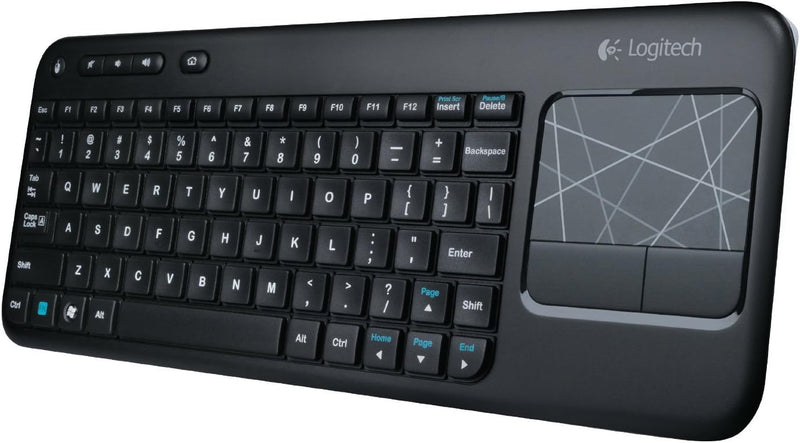
Logitech 920-003070 Wireless Touch Keyboard K400 with Touchpad
Eliminate the mouse from your couch-to-TV setup with a 10-meter wireless keyboard and integrated multi-touch trackpad.
$104.99*
View on Amazon
✓ In Stock on Amazon.com
*Price sourced from Amazon.com. Last updated:Oct 18, 2026.Price and availability are subject to change — details.
Affiliate Disclosure: As an Amazon Associate, Studio Supplies earns from qualifying purchases made through links on this page, at no additional cost to you. This helps support our editorial team.
Notice a mistake? Let Us Know
Overview
Key Features
Long-range wireless: Control your TV-connected laptop from the couch with 33 feet/10 meter wireless range (Wireless range may vary due to environmental and computing conditions.)
Built-in multi-touch touchpad: Large (3.5-inch) touchpad with multi-touch navigation for easier web browsing
Plug-and-play setup: Plug the tiny Logitech Unifying wireless receiver into your laptop and start surfing the web
Sleek, low-profile keys: Easy and comfortable typing on quiet keys with bold, easy-to-read characters
For Windows-based laptops: Works with Windows 7, Windows Vista and Windows XP
Specifications
Wireless Technology
2.4 GHz (Logitech Unifying Receiver)
Wireless Range
Up to 10 meters (33 feet)
Touchpad
3.5-inch Integrated Multi-Touch
Battery
2x AA (Included), Up to 12 Months
Dimensions
13.9 x 5.35 x 0.94 inches
Weight
12.7 ounces
Key Type
Low-Profile Membrane, Quiet Keys
Hot Keys
Media Controls (Volume, Playback)
Compatibility
Windows XP, Vista, 7, 8 / Windows 8 RT
Connection
USB-A (Plug-and-Play)
Color
Black
Frequently Asked Questions
What wireless technology does the K400 use, and does it require Bluetooth?
It uses Logitech's proprietary 2.4 GHz Unifying receiver — not Bluetooth. The tiny USB receiver plugs into a standard USB-A port, and the keyboard is recognized immediately with no driver installation or pairing process required. One Unifying receiver can also connect up to six compatible Logitech devices.
Will this keyboard work with a smart TV, media player, or Raspberry Pi?
It works with any device that accepts a USB HID keyboard — so yes, Android TV boxes, Raspberry Pi, Intel NUCs, and most smart TV platforms with a USB port will recognize it. Official compatibility is listed for Windows XP through Windows 8, but the standard HID protocol provides broad functionality on Linux and other platforms as well.
How large is the built-in touchpad, and does it support gestures?
The touchpad measures 3.5 inches diagonally and supports basic multi-touch gestures, primarily two-finger scrolling for easier web navigation. It is not a precision touchpad with full Windows gesture support — it is designed for couch-distance cursor control rather than replacing a desktop trackpad.
What is the realistic battery life, and what batteries does it use?
Logitech rates the K400 at up to 12 months on two AA batteries, which are included. Real-world longevity depends on usage patterns, but the keyboard's low-power 2.4 GHz radio and automatic sleep mode keep consumption minimal during idle periods.
Is the keyboard backlit, and how usable is it in a dark living room?
The K400 is not backlit. The keys do feature bold, high-contrast characters that are easier to read in low ambient light than typical keyboards, but in a fully dark room you will be typing by feel. This is a common trade-off in long-battery-life wireless designs.
Related Products


