

Logitech
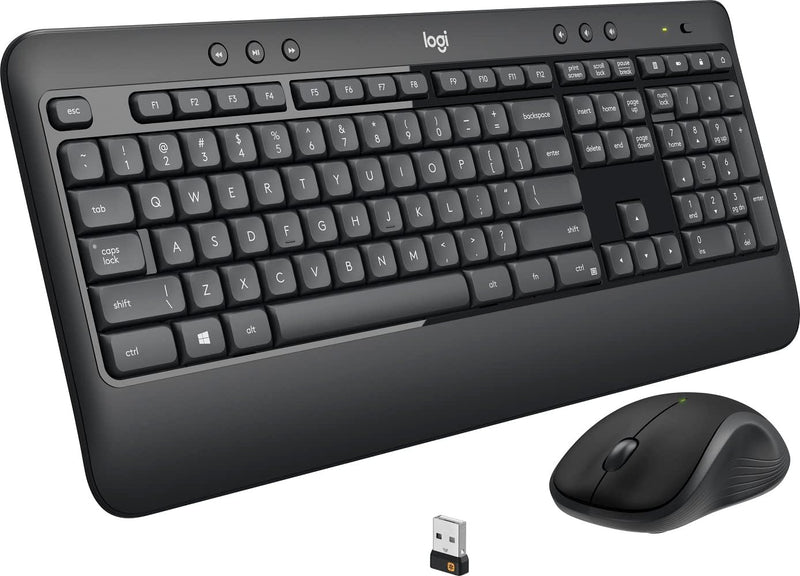
Logitech MK540 Wireless Keyboard and Mouse Combo (Renewed)
Logitech's MK540 delivers 36-month keyboard battery life and lag-free 2.4GHz wireless in a full-size renewed combo that won't ask you to stop working.
$39.99*$44.90Save 10%
View on Amazon
✓ In Stock on Amazon.com
*Price sourced from Amazon.com. Last updated:Oct 18, 2026.Price and availability are subject to change — details.
Affiliate Disclosure: As an Amazon Associate, Studio Supplies earns from qualifying purchases made through links on this page, at no additional cost to you. This helps support our editorial team.
Notice a mistake? Let Us Know
Overview
Key Features
Advanced Wireless Connectivity: Full-size wireless keyboard and mouse combo featuring secure 2.4GHz wireless technology for reliable, lag-free performance up to 33 feet away from your computer
Ergonomic Design: Experience ultimate comfort while working or gaming with the Logitech MK540 ergonomic keyboard and mouse set. The keyboard features a sleek, full-size design with a comfortable palm rest and adjustable tilt legs, while the contoured mouse is designed for right-handed users, ensuring a comfortable grip for long hours of use
High Performance Gaming: Elevate your gaming experience with the Logitech MK540 gaming keyboard and mouse combo, featuring responsive keys and a high-precision optical sensor for accurate tracking. The keyboard offers customizable function keys for quick access to your favorite commands, while the mouse is designed for smooth and precise control
Enhanced Productivity: The Logitech MK540 wireless keyboard and mouse combo offers a range of features designed to boost your productivity, including one-touch media controls, customizable hotkeys, and a built-in numeric keypad. The wireless design allows for a clutter-free workspace and easy portability for both home and office use
Silent and Durable: Work or play in peace with the Logitech MK540 silent keyboard and mouse wireless combo. The keyboard features whisper-quiet keys for minimal noise, while the durable construction ensures long-lasting performance. The mouse is also designed for silent operation for shared workspaces or late-night gaming sessions
Plug-and-Play Setup: Easy installation with included USB receiver that connects both keyboard and mouse simultaneously, requiring no software or complicated setup process to get started
Specifications
Model
MK540 Advanced (Renewed)
Wireless Technology
Advanced 2.4GHz wireless
Wireless Range
10 meters
Keyboard Battery Life
36 Months
Mouse Battery Life
24 Months
Keyboard Tilt Positions
Natural, 4°, and 8°
Keyboard Indicators
Caps lock indicator light, Battery indicator light
Mouse Features
Soft rubber grips, Ambidextrous design, Precision laser grade tracking
Receiver Type
Logitech Unifying receiver
Frequently Asked Questions
What does "Renewed" mean for this combo, and does it affect reliability?
Renewed means the unit has been inspected, tested, and restored to working condition by a certified refurbisher. Functionally, the MK540 should perform identically to a new unit — the trade-off is cosmetic: you may see minor scuffs on the chassis, but the electronics and wireless link are verified operational.
Does the MK540 use a separate USB receiver for the keyboard and mouse, or one shared receiver?
One Logitech Unifying receiver handles both devices. It occupies a single USB-A port and supports the full 10-meter wireless range for both the keyboard and the M310 mouse simultaneously — no pairing steps beyond initial plug-in.
Can I add other Logitech Unifying devices to this receiver?
Yes. The Unifying receiver supports up to six compatible Logitech devices. Using the Logitech Unifying software, you can pair additional keyboards, mice, or number pads to the same dongle — useful if you want to consolidate all your peripherals to one USB port.
What keyboard adjustments are available for ergonomics?
The keyboard offers three tilt positions: flat (natural), 4°, and 8°. The integrated palm rest is fixed. There is no negative tilt option, so users who prefer a downward-sloping keyboard angle won't find it here.
Are the hotkeys and Fn keys programmable?
The dedicated media, calculator, and battery-check hotkeys work out of the box with no software. The Fn keys can be remapped using Logitech Options software (Windows/macOS), which allows you to assign custom shortcuts or application-specific functions.
Related Products


