
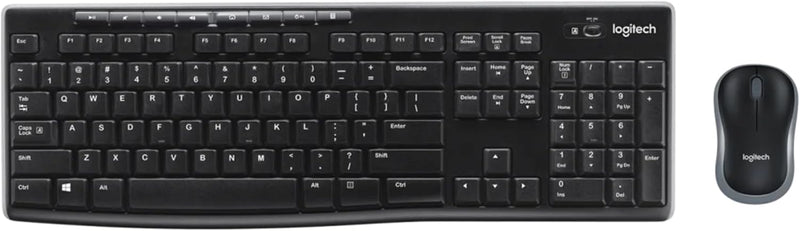


Logitech MK270 Wireless Keyboard + Mouse Combo — Editorial Review & Use Cases
The Logitech MK270 family (920-008813 Black, 920-013270 Rose, 920-013290 / 920-013289 colored variants, plus the standalone K270 keyboard 920-003051) is Logitech's mainstream-popular budget wireless keyboard + mouse combo — a single USB nano receiver pairs both devices, full-size 6-row keyboard with number pad, ambidextrous 3-button + scroll-wheel mouse. Per Logitech's official MK270 product page, the combo runs on AA batteries (~36 months keyboard, ~12 months mouse per Logitech's published claims), 2.4GHz wireless via Logitech's USB nano receiver, and supports 128-bit AES encryption between keyboard and receiver.
What the MK270 Specifically Wins
- Sub-$30 wireless combo — vs branded ergonomic / mechanical wireless setups ($150+), the MK270 is the entry-tier value pick
- Logitech Unifying Receiver compatibility — single USB nano receiver pairs MK270 keyboard + mouse + up to 4 additional Logitech Unifying-compatible devices
- Full-size 104-key layout with number pad — accounting / spreadsheet / data-entry workflows benefit from the number pad
- 36-month keyboard battery + 12-month mouse battery — substantially longer than rechargeable wireless keyboards. Replace AAs annually for normal use
- Ambidextrous 3-button mouse — works for left or right hand operators
- 128-bit AES wireless encryption — keyboard-to-receiver encryption prevents simple sniffing attacks
- Universal plug-and-play — Windows / macOS / Linux / Chrome OS all auto-detect via standard USB HID protocol
- Available in multiple colors — Black, White, Rose, plus regional variants
- Long Logitech reliability track record — MK270 has been in production for 6+ years; warranty claims rate is low per consumer reports
- Suitable for shared / multi-user office desks — quick disconnect by unplugging USB receiver
Where the MK270 Specifically Fits
- Budget office desk setup — basic productivity workstation needs
- Home office / work-from-home with multiple workstations
- School / classroom computer labs — bulk purchasing for student computers
- Reception / point-of-sale workstations
- Spare / backup keyboard + mouse for IT departments
- Conference room / meeting room setups
- Senior / elderly home computer setup — large keys + scroll wheel mouse easier than chiclet laptop keys
- Recovery / temporary workstation after main keyboard fails
- Multi-PC ergonomic switching — single keyboard for desk + laptop docking station
- Children / family computer — budget-friendly + replaceable
- Travel / portable presentation setup — USB-receiver pairing eliminates Bluetooth complexity
- Gaming alternative for non-competitive use — Logitech Mid-tier MK270 is fine for casual gaming + browsing
Honest Limits Buyers Should Know
- 2.4GHz wireless only — no Bluetooth. Requires USB-A receiver port. Modern USB-C-only laptops need a USB-A-to-USB-C adapter or hub. Bluetooth-only laptops (some MacBook Pro M-series) won't work with MK270 receiver
- Membrane keyboard — no mechanical key switches. Tactile feedback is mushy compared to mechanical / scissor-switch laptop keyboards. Heavy typists may find this fatiguing. For mechanical wireless, look at Logitech G915 / Keychron K2 / Glorious GMMK Pro
- No backlight on keyboard. Dim-environment typing is harder without backlight. For backlit wireless, look at Logitech MK850 Performance, Apple Magic Keyboard, Keychron K2 (backlit)
- Mouse is ambidextrous but not ergonomic. Symmetric design suits left/right hand use but doesn't match the contoured fit of ergonomic mice (Logitech MX Master 3, Apple Magic Mouse). Long hours can cause wrist strain
- No DPI adjustment on mouse. Fixed 1000 DPI; competitive gaming or precision design work benefits from adjustable DPI mice (Logitech G502, Razer DeathAdder)
- USB-A receiver protrudes from laptop port. Snags on desk edge / case during transport. Logitech sells small unifying receivers but MK270 ships with full-size USB-A
- Battery replacement vs rechargeable. AA batteries are cheap but environmental impact + replacement intervals matter. Rechargeable alternatives (Logitech MX Keys Mini / Apple Magic Keyboard) charge via USB-C
- Membrane keys can stick or fail over years. Heavy / continuous-use environments see key failures after 3-5 years. Mechanical keyboards last 10+ years
- Multi-device pairing limited to Unifying ecosystem. The MK270 doesn't roam across multiple computers like Bluetooth keyboards. Move receiver between PCs (slower than Bluetooth re-pairing)
- Not for competitive esports gaming. 2.4GHz wireless has ~2-3ms latency suitable for typing but not competitive FPS. For esports gaming, use mechanical wired keyboards (Razer Huntsman, Logitech G-series)
Where Buyers Should Look Elsewhere
- Mechanical wireless keyboard → Logitech G915 / G915 TKL, Keychron K2 (wireless mechanical), Razer BlackWidow V3 Pro
- Backlit / ergonomic for power users → Logitech MX Keys Mini + MX Master 3, Apple Magic Keyboard + Magic Trackpad
- Cross-platform Bluetooth (laptop + iPad + iPhone) → Logitech K380, Apple Magic Keyboard standalone
- Gaming-specific → Razer DeathStalker V3 Pro, Logitech G915, Keychron Q1
- Rechargeable mouse + keyboard combo → Logitech MX Keys + MX Master 3 (USB-C rechargeable)
- Budget wired (no battery concerns) → Logitech K120 / K200 wired combo
- Mac-optimized → Apple Magic Keyboard + Magic Mouse 3
- Premium ergonomic split keyboard → Logitech ERGO K860, Microsoft Natural Ergonomic 4000
Sources & Citations
- Logitech, "MK270 Wireless Combo product page," logitech.com (accessed 2026-05-18)
- RTINGS.com, "Logitech MK270 keyboard + mouse review," rtings.com (accessed 2026-05-18)
- Tom's Hardware, "Best wireless keyboard buying guide," tomshardware.com (accessed 2026-05-18)
- The Wirecutter (NYT), "Best wireless keyboard and mouse combo," nytimes.com/wirecutter (accessed 2026-05-18)
Last verified: 2026-05-18


