



Logitech
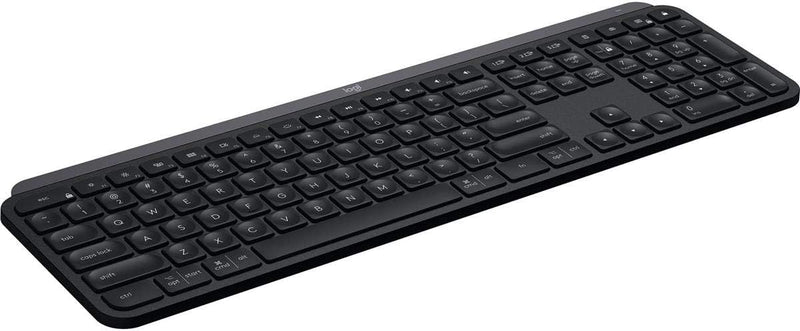
Logitech 920-009295 MX Keys Wireless Illuminated Keyboard
Experience Comfortable and Precise TypingThe Logitech MX Keys is an advanced wireless illuminated keyboard designed for efficiency, stability, and precision. Featuring Perfect Stroke keys, smart illumination, and multi-device connectivity, this keyboard enhances your productivity. Keys: Perfect S...
$116.99*$125.60Save 6%
View on Amazon
✓ In Stock on Amazon.com
*Price sourced from Amazon.com. Last updated:Aug 30, 2026.Price and availability are subject to change — details.
Affiliate Disclosure: As an Amazon Associate, Studio Supplies earns from qualifying purchases made through links on this page, at no additional cost to you. This helps support our editorial team.
Notice a mistake? Let Us Know
Overview
Experience Comfortable and Precise Typing
The Logitech MX Keys is an advanced wireless illuminated keyboard designed for efficiency, stability, and precision. Featuring Perfect Stroke keys, smart illumination, and multi-device connectivity, this keyboard enhances your productivity.
- Keys: Perfect Stroke keys
- Illumination: Smart illumination with hand proximity detection
- Connectivity: Bluetooth, USB-C
- Compatibility: Windows, macOS, Linux, iOS, Android
- Multi-Device: Pair with up to three devices
- Battery: USB-C Rechargeable (up to 10 days with backlighting on, up to 5 months with backlighting off)
Key Features
PERFECT STROKE KEYS: Perfect Stroke keys are shaped for your fingertips and increased key stability reduces noise while optimizing responsiveness
COMFORTABLE DESIGN: Tactile reference for hand positioning makes it easy to stay oriented and in your flow
BACKLIT KEYS: The backlit keys light up the moment your hands approach, and automatically adjust to suit changing lighting conditions
FLOW CROSS-COMPUTER TYPING: Supports flow cross-computer typing across multiple screens. Pair up to 3 devices via Bluetooth Low Energy or Unifying USB receiver
Specifications
Brand
Logitech
Model Name
MX Keys
Connectivity Technology
Wireless (Bluetooth Low Energy or Unifying USB receiver)
Key Design
Perfect Stroke Keys
Key Stability
Increased
Noise Reduction
Optimized
Backlighting
Adaptive Illuminated Keys
Multi-Device Support
Pair up to 3 devices
Cross-Computer Functionality
Flow Cross-Computer Typing
Frequently Asked Questions
What makes the "Perfect Stroke Keys" special on the Logitech MX Keys keyboard?
Perfect Stroke keys are specifically shaped for your fingertips, and they feature increased key stability which reduces noise while optimizing responsiveness for a more fluid typing experience.
How does the backlighting work on this keyboard?
The backlit keys on the Logitech MX Keys illuminate the moment your hands approach the keyboard and automatically adjust their brightness to suit changing lighting conditions.
Can this keyboard be used with multiple computers simultaneously?
Yes, the Logitech MX Keys supports Flow cross-computer typing across multiple screens and can be paired with up to three devices via Bluetooth Low Energy or a Unifying USB receiver.
What connectivity options are available for the MX Keys keyboard?
You can connect the Logitech MX Keys wirelessly either through Bluetooth Low Energy or by using the included Unifying USB receiver.
Is the design comfortable for long typing sessions?
The keyboard features a comfortable design with tactile references for hand positioning, aiming to make it easy to stay oriented and in your typing flow.
Related Products


