



Logitech
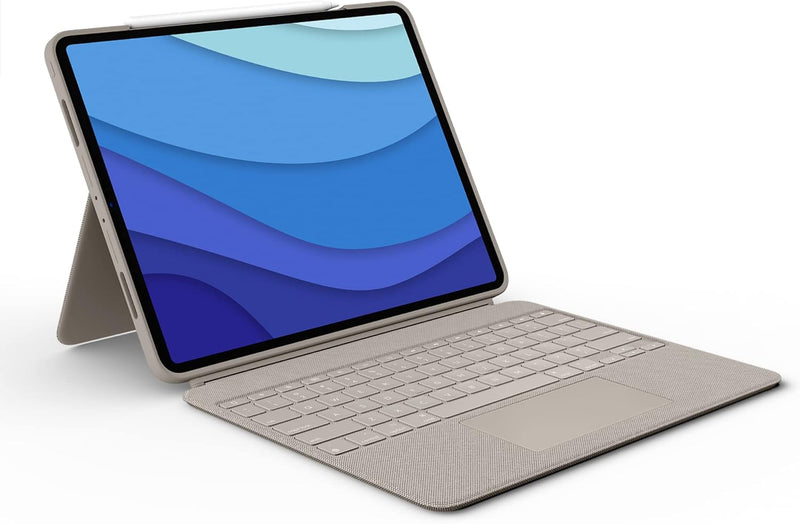
Logitech 920-010119 Combo Touch iPad Pro Keyboard Case Sand
Transform your iPad Pro 12.9 into a four-mode productivity workstation with a backlit keyboard, trackpad, and zero charging overhead via Smart Connector.
$218.90*$229.99Save 4%
Check availability
*Price sourced from Amazon.com. Last updated:Aug 28, 2026.Price and availability are subject to change — details.
Affiliate Disclosure: As an Amazon Associate, Studio Supplies earns from qualifying purchases made through links on this page, at no additional cost to you. This helps support our editorial team.
Notice a mistake? Let Us Know
Overview
Key Features
Compatibility: For iPad Pro 12.9-inch (5th, 6th gen - 2021, 2022) - A2378, A2461, A2379, A2462
Do it all with Combo Touch: Four versatile use modes allow you to type, sketch, view and read without ever having to remove your iPad Pro from the keyboard case
Detachable keyboard and adjustable kickstand: Remove the keyboard when you're done typing for more flexibility and enjoy 50 degrees of adjustable viewing angles
Large, click-anywhere trackpad: This iPad keyboard case features a responsive and reliable trackpad that allows you to use the entire surface to work and perform Multi-Touch trackpad gestures
Backlit, laptop-like keyboard: Backlit keys auto-adjust to your environment with 16 levels of brightness and a full row of iPadOS shortcut keys provide one-tap access to volume controls and more
Front, back and corner protection: A durable form-fit cover protects the front, back, and corners of your iPad Pro, securely holding it in place no matter what youre doing
SMART CONNECTOR technology: Enjoy instant power and pairing with Combo Touch keyboard case and never worry about charging as power is sourced directly from your iPad Pro
Home for Apple Pencil: Easily charge your Apple Pencil while keeping the case on thanks to a convenient opening in the side of the iPad Pro case
Specifications
Compatibility
iPad Pro 12.9-inch 5th gen (2021), 6th gen (2022) — A2378, A2461, A2379, A2462
Keyboard
Detachable, backlit (16 brightness levels), USA layout
Trackpad
Click-anywhere, Multi-Touch gesture support
Connectivity
Smart Connector (no Bluetooth, no charging required)
Use Modes
Type, View, Sketch, Read
Viewing Angles
10–60 degrees
Dimensions
11.24 x 8.89 x 0.69 in
Weight
27.51 oz
Apple Pencil Charging
Side opening included
Color
Sand
Frequently Asked Questions
Which iPad Pro models are compatible with the Combo Touch 920-010119?
Compatibility is limited to iPad Pro 12.9-inch 5th generation (2021) and 6th generation (2022) — specifically models A2378, A2461, A2379, and A2462. Earlier or smaller iPad Pro variants require a different Combo Touch SKU.
Does the keyboard need to be charged separately, and how does it receive power?
No separate charging is required. The Combo Touch draws power directly from the iPad Pro via the Smart Connector — the three-pin magnetic interface on the side of the iPad. There are no batteries to manage and no Bluetooth pairing to maintain.
Can you remove the keyboard and still use the iPad Pro in the case?
Yes. The keyboard is fully detachable, and the iPad Pro remains in the protective case with kickstand functionality intact. The case protects the front, back, and corners whether or not the keyboard is attached, supporting sketch, view, and read modes without it.
What is the adjustable viewing angle range on the Combo Touch kickstand?
The kickstand supports 10 to 60 degrees of viewing angle adjustment — useful for desk work, media consumption, and drawing with Apple Pencil, though the range stops short of a fully flat position.
Can you charge an Apple Pencil while using the Combo Touch case?
Yes. The case includes a dedicated side opening that exposes the iPad Pro's magnetic Apple Pencil charging area, so you can charge your Apple Pencil without removing the iPad from the case.
Related Products

