



Logitech
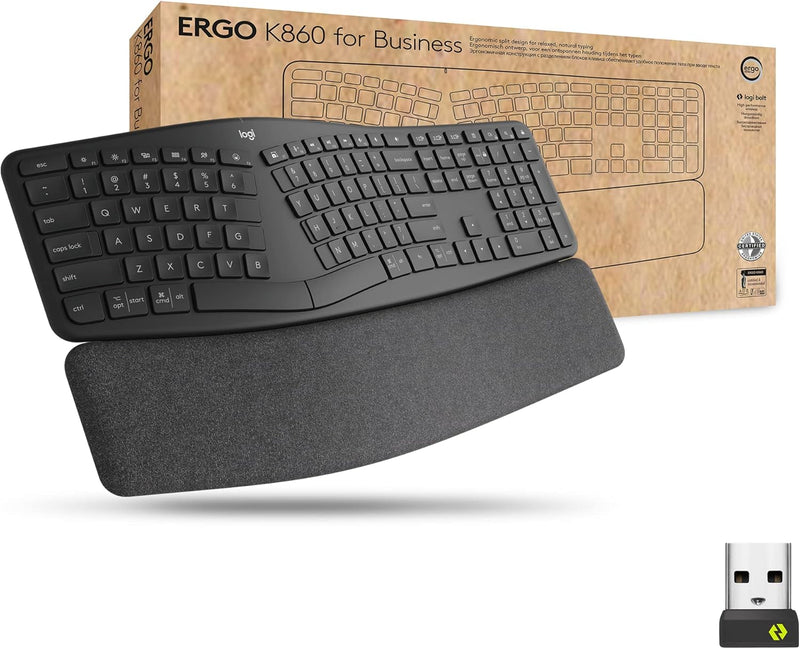
Logitech 920-010175 Ergo K860 Wireless Ergonomic Keyboard
Split-frame ergonomic keyboard engineered to reduce wrist strain across full workdays without sacrificing typing speed or enterprise security.
$159.99*
View on Amazon
✓ In Stock on Amazon.com
*Price sourced from Amazon.com. Last updated:Aug 29, 2026.Price and availability are subject to change — details.
Affiliate Disclosure: As an Amazon Associate, Studio Supplies earns from qualifying purchases made through links on this page, at no additional cost to you. This helps support our editorial team.
Notice a mistake? Let Us Know
Overview
Key Features
Ideal for IT departments that need high-performance, secure wireless connections and ease of deployment and for people who want an ergonomic keyboard for day-long comfort and productivity
Enterprise Secure: Logi Bolt wireless technology exceeds security needs with fully encrypted, Secure Connections Only mode
Built for Scale: Certified in over 100 countries, support for IT pros and business users, remote mass deploy and manage DFUs and Logitech Options app
User Tested, Ergonomist Approved: ERGO K860 has been designed, developed and tested with criteria set out by leading ergonomists to improve posture and lower muscle strain
Uncompromised Performance: A full-size Numpad, connect to up to three devices and two-year battery life to ensure you donâ??t compromise performance for ergonomics
Split, Curved Design: Type more naturally with an ergonomic keyframe that improves typing posture. The sloping keyboard reduces muscle strain on your wrists and forearms
Adjustable Palm Lift: Seated or standing, keep wrists in a natural posture with 3 tilt leg positions, and pillowed wrist rest for more wrist support and less wrist bending
In case of wireless keyboard or combo (keyboard and mouse), the USB receiver is usually provided either inside the mouse (under the battery cover) or attached within the product packaging
Specifications
Brand
Logitech
Model
920-010175 (Ergo K860)
Layout
Full-size with dedicated numpad
Key Switch Type
Membrane
Connectivity
Logi Bolt 2.4GHz / Bluetooth
Encryption
AES 128-bit (Logi Bolt)
Multi-Device Support
Up to 3 devices
Battery
AAA (up to 2-year life)
Wrist Rest
Integrated pillowed rest
Tilt Positions
3 adjustable angles
Compatibility
Windows, macOS, Chrome OS, Linux
Color
Graphite
Frequently Asked Questions
Does the Ergo K860 work with both Windows and macOS without remapping keys?
Yes. The keyboard is compatible with Windows, macOS, Chrome OS, and Linux. Key legends are printed for both Windows and Mac modifier functions, and the Logitech Options software allows per-OS profile customization. You can switch between up to three paired devices using dedicated channel keys.
How does the Logi Bolt receiver compare to standard Bluetooth for connection reliability?
Logi Bolt operates on a dedicated 2.4GHz wireless protocol with AES 128-bit encryption and a proprietary frequency-hopping scheme. It delivers lower latency and more stable connections than Bluetooth in RF-congested office environments, and its Secure Connections Only mode meets enterprise security requirements that standard Bluetooth cannot.
What is the adjustment range on the palm lift, and does it work at a standing desk?
The keyboard offers three tilt positions via adjustable rear legs. The default angle suits standard seated desk height, while the two elevated positions increase the negative tilt for standing desk use. The integrated pillowed wrist rest provides support across all three positions without requiring a separate accessory.
How long does the two-year battery life actually last under heavy daily use?
Logitech rates the battery at up to two years based on typical office usage patterns. Heavy all-day typists may see closer to 12–18 months depending on backlighting use and connection method. The keyboard uses standard AAA batteries, which are replaceable without tools.
Is there a noticeable adjustment period switching from a standard flat keyboard?
Yes. The split curved layout changes hand positioning significantly — most users report a 1–2 week adaptation period before reaching their previous typing speed. The learning curve is steeper if you have cross-hand typing habits, as the physical split enforces proper finger-to-key assignments.
Related Products


