

Logitech
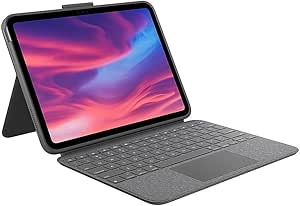
Logitech 920-011293 Combo Touch iPad 10th Gen Keyboard Case
Transform Your iPad with Logitech Combo TouchUnlock new possibilities with the Logitech Combo Touch Keyboard Case for iPad (10th gen). This detachable keyboard case features a large precision trackpad, full-size backlit keyboard, and Smart Connector technology, providing unparalleled versatility ...
Check availability
Affiliate Disclosure: As an Amazon Associate, Studio Supplies earns from qualifying purchases made through links on this page, at no additional cost to you. This helps support our editorial team.
Notice a mistake? Let Us Know
Overview
Transform Your iPad with Logitech Combo Touch
Unlock new possibilities with the Logitech Combo Touch Keyboard Case for iPad (10th gen). This detachable keyboard case features a large precision trackpad, full-size backlit keyboard, and Smart Connector technology, providing unparalleled versatility and productivity.
Specifications:
- Compatibility: iPad (10th generation)
- Keyboard: Detachable, Full-size, Backlit
- Trackpad: Large, Precision Multi-Touch
- Connectivity: Smart Connector
- Use Modes: Type, Read, Sketch, View
- Kickstand: Flexible, 40° tilt
- Protection: Drop protection up to 4 feet
- Additional Features: iPadOS shortcut keys, Apple Pencil/Logitech Crayon storage
Key Features
Edit documents, navigate apps, and build presentations with unparalleled precision using a familiar multi-gesture trackpad.
Type comfortably and accurately anywhere. A well-spaced backlit keyboard with a full row of iPadOS shortcut keys including new screenshot and dictation keys helps you optimize productivity, day or night.
Batteries aren’t included, because you’ll never need them—your keyboard instantly pairs and powers on using the Smart Connector. Power is sourced directly from iPad so you never have to charge.
Get more done no matter where you are, with four distinct use modes including Type, Read, Sketch, and View Modes.
Flexible kickstand offers 40° of tilt so you can always have the right angle for the task at hand. When typing isn’t needed, detach the keyboard and enjoy your iPad screen with nothing in the way.
Specifications
Compatibility
iPad 10th Gen
Keyboard Feature
Backlit
Connectivity
Smart Connector
Trackpad Functionality
Multi-gesture
Use Modes
Type, Read, Sketch, View
Kickstand Tilt Angle
40°
Special Keys
iPadOS shortcut keys, screenshot, dictation
Frequently Asked Questions
How does the Logitech Combo Touch keyboard case connect to the iPad 10th Gen?
The Logitech Combo Touch connects instantly and powers on using the Smart Connector, drawing power directly from the iPad so you never have to charge the keyboard.
Can I use the iPad in different orientations with this keyboard case?
Yes, this case offers four distinct use modes: Type, Read, Sketch, and View, providing versatility for various tasks and orientations.
Does the keyboard have backlighting for low-light conditions?
Yes, the Logitech Combo Touch features a well-spaced backlit keyboard, allowing for comfortable and accurate typing day or night.
What kind of trackpad is included with this keyboard case?
The case features a familiar multi-gesture trackpad, designed for unparalleled precision when editing documents, navigating apps, and building presentations.
Is the keyboard detachable from the case?
Yes, when typing is not needed, you can detach the keyboard and enjoy your iPad screen with nothing in the way, making it flexible for different uses.
Related Products


