



Logitech
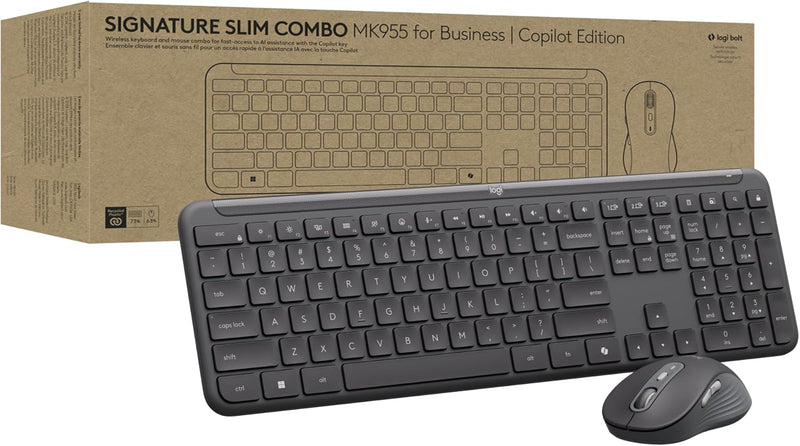
Logitech 920-013271 Signature Slim Wireless Keyboard Mouse Combo
Enterprise-grade wireless security and a dedicated Copilot key make the MK955 the productivity combo built for the modern Windows workplace.
$109.99*$119.99Save 8%
View on Amazon
✓ In Stock on Amazon.com
*Price sourced from Amazon.com. Last updated:Aug 28, 2026.Price and availability are subject to change — details.
Affiliate Disclosure: As an Amazon Associate, Studio Supplies earns from qualifying purchases made through links on this page, at no additional cost to you. This helps support our editorial team.
Notice a mistake? Let Us Know
Overview
Key Features
Unlock Microsoft Copilot in Windows (1) with a dedicated Copilot key: Seamlessly add the everyday AI companion to employee workflows for elevated productivity with a single keystroke
Laptop-Style Typing, Designed for Windows: The slim keyboard comes in a Windows layout and delivers a familiar, laptop-style typing experience that employees desire
Enterprise Secure: Logi Bolt wireless technology addresses security concerns with Bluetooth Low Energy; equipped with Secure Connections Only Mode - Logi Bolt receiver included
SmartWheel Technology: Designed for different work tasks, the mouse provides precise, line-by-line scrolling or super fast scrolling with a flick of its SmartWheel
Switch Between Devices: Connect via Logi Bolt or Bluetooth and seamlessly switch between 3 of your devices with the Easy-Switch buttons for easy multitasking
Time-saving shortcuts: Preset shortcut keys and buttons are available for better efficiency
Quiet Typing and Clicking: Quiet typing and clicking promote focus in a more productive environment. Silent Touch technology produces 90% less mouse click noise(2)
Designed with Sustainability in Mind: The plastic parts of Signature Slim Combo MK955 for Business Copilot Edition are made with a minimum of 63% post-consumer recycled plastic (3)
In case of wireless keyboard or combo (keyboard and mouse), the USB receiver is usually provided either inside the mouse (under the battery cover) or attached within the product packaging
Specifications
Model
920-013271 (MK955 Copilot Edition)
Connectivity
Logi Bolt (USB receiver), Bluetooth Low Energy
Wireless Security
Secure Connections Only Mode (Logi Bolt)
Device Pairing
Up to 3 devices (Easy-Switch)
Keyboard Layout
Windows Full-Size, Low-Profile
Special Keys
Dedicated Copilot Key, Preset Shortcut Keys
Mouse Scroll
SmartWheel (Auto-Switching Precision / Free-Spin)
Mouse Click Noise
90% Reduced (Silent Touch Technology)
OS Compatibility
Windows 10, Windows 11
Power Source
Battery Powered
Color
Graphite
Sustainability
Min. 63% Post-Consumer Recycled Plastic
Frequently Asked Questions
What makes Logi Bolt more secure than standard Bluetooth for enterprise use?
Logi Bolt uses Bluetooth Low Energy with Secure Connections Only Mode enforced at the hardware level, preventing downgrade attacks that affect standard BT pairings. It also operates on a dedicated 2.4 GHz channel via the USB receiver, reducing exposure to shared Bluetooth frequency congestion in dense office environments.
How does device-switching work, and is there a latency penalty when switching between paired devices?
The keyboard and mouse each support up to 3 paired devices switched via Easy-Switch buttons. Switching is near-instantaneous for Logi Bolt connections and typically 1–2 seconds for Bluetooth re-pairing. Both the keyboard and mouse maintain independent device memory, so they don't need to be switched in tandem if your workflow uses different device configurations.
What is the battery life, and what type of batteries does it use?
Battery type and rated life are not specified in available product data. Logitech's Signature Slim line typically uses standard AA or AAA alkaline batteries; verify current battery specifications in the product documentation before planning enterprise deployments at scale.
Does the dedicated Copilot key work in all Windows versions, or is it limited to specific builds?
The Copilot key requires Windows 10 or Windows 11 with the Copilot feature enabled. On Windows 11 builds that include Copilot integration, the key launches the AI companion directly. On systems where Copilot has been disabled by IT policy or is unavailable, the key will either do nothing or can be remapped via Logitech Options+ software.
Is the mouse's SmartWheel scrolling speed configurable?
SmartWheel automatically switches between line-by-line precise scrolling and fast free-spin scrolling based on how quickly you flick the wheel — no configuration required for basic use. Threshold sensitivity and per-application behavior can be tuned in Logitech Options+ software for users who want more control over the transition point.
Related Products


