

Logitech
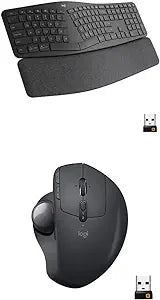
Logitech Ergo K860 & MX Ergo Wireless Ergonomic Combo
Ergonomic Comfort and Precision for All-Day ProductivityThe Logitech Ergo K860 Wireless Ergonomic Keyboard and MX Ergo Wireless Trackball Mouse combo offers superior comfort and precision for extended use. Designed to reduce strain and promote a natural posture, this set is ideal for professional...
$207.85*
Check availability
*Price sourced from Amazon.com. Last updated:Aug 30, 2026.Price and availability are subject to change — details.
Affiliate Disclosure: As an Amazon Associate, Studio Supplies earns from qualifying purchases made through links on this page, at no additional cost to you. This helps support our editorial team.
Notice a mistake? Let Us Know
Overview
Ergonomic Comfort and Precision for All-Day Productivity
The Logitech Ergo K860 Wireless Ergonomic Keyboard and MX Ergo Wireless Trackball Mouse combo offers superior comfort and precision for extended use. Designed to reduce strain and promote a natural posture, this set is ideal for professionals seeking to enhance their workspace ergonomics.
Keyboard Features:
- Split keyframe and curved profile
- Integrated palm rest
- Adjustable tilt legs (0°, -4°, -7°)
- Wireless connectivity via Bluetooth or USB receiver
Mouse Features:
- Adjustable tilt for personalized comfort
- Precision tracking with customizable speed and accuracy
- Wireless connectivity via Bluetooth or USB receiver
Key Features
Improved typing posture: Type more naturally with a curved, split KeyFrame. The sloping keyboard reduces strain on your wrists and forearms.
Pillowed wrist rest: the curved wrist rest offers 54% more wrist support and reduces wrist bending by 25% compared to a standard keyboard without Palm rest.
Perfect stroke keys: scooped keys match the shape of your fingertips. Type with confidence on a wireless keyboard crafted for comfort, Precision, and fluidity.
Ergonomic sculpted design - unique adjustable hinge allows you to customize the trackball angle from 0 to 20 degrees for a more natural, comfortable hand position, and reduced muscle strain
Cross-computer control- game-changing capacity to navigate seamlessly on 2 computers, and copy-paste text, images, and files from one to the other using Logitech flow
Dual connectivity- use with up to 3 Windows or Mac computers via included Unifying receiver or Bluetooth smart wireless technology
Specifications
Brand
Logitech
Keyboard Type
Ergonomic, Wireless
Mouse Type
Ergonomic Trackball, Wireless
Connectivity
Logitech Unifying receiver, Bluetooth Smart
Compatibility
Windows, Mac
Wrist Rest
Pillowed
Keyboard Feature
Curved, Split KeyFrame, Perfect Stroke keys
Mouse Feature
Adjustable Hinge (0 to 20 degrees)
Special Feature
Logitech Flow (Cross-computer control)
Frequently Asked Questions
How does the curved, split KeyFrame of the Ergo K860 keyboard benefit typing?
The curved, split KeyFrame is designed to improve typing posture and reduce strain on your wrists and forearms, promoting a more natural hand position.
What is the benefit of the pillowed wrist rest included with the keyboard?
The pillowed wrist rest provides 54% more wrist support and reduces wrist bending by 25% compared to a standard keyboard without a palm rest, enhancing comfort during extended use.
Can the MX Ergo trackball mouse be adjusted for different hand positions?
Yes, the MX Ergo mouse features a unique adjustable hinge that allows you to customize the trackball angle from 0 to 20 degrees for a more natural and comfortable hand position.
What is Logitech Flow and how does it function with this combo?
Logitech Flow enables cross-computer control, allowing you to seamlessly navigate and copy-paste text, images, and files between two different computers using the MX Ergo mouse.
What connectivity options are available for the Logitech Ergo K860 and MX Ergo combo?
This combo offers dual connectivity, allowing connection to up to three Windows or Mac computers via the included Unifying receiver or Bluetooth Smart wireless technology.
Are the keyboard and mouse compatible with both Windows and Mac operating systems?
Yes, both the Logitech Ergo K860 keyboard and MX Ergo mouse are compatible with up to three Windows or Mac computers.
Related Products


