


Logitech
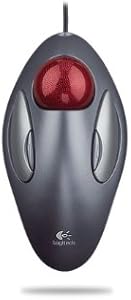
Logitech FBA_910-000806 Trackman Marble USB Wired Trackball Mouse
Ambidextrous marble-optical trackball that eliminates wrist travel entirely — four programmable buttons in a stationary form factor built for precision work.
$189.99*
View on Amazon
✓ In Stock on Amazon.com
*Price sourced from Amazon.com. Last updated:Aug 28, 2026.Price and availability are subject to change — details.
Affiliate Disclosure: As an Amazon Associate, Studio Supplies earns from qualifying purchases made through links on this page, at no additional cost to you. This helps support our editorial team.
Notice a mistake? Let Us Know
Overview
Key Features
Sold as 1 EA
Manufacturer: Logitech, Inc
Total percentage of recycled content: 0
Post Consumer Waste: 0
Country of origin: CN
Specifications
Tracking Technology
Marble Optical
Connectivity
Wired USB
Number of Buttons
4 (Programmable)
Ergonomics
Ambidextrous
Scroll Wheel
None
Driver Software
Logitech SetPoint (optional)
Country of Origin
China
Frequently Asked Questions
Does the Trackman Marble have a scroll wheel, and if not, how do you scroll?
The Trackman Marble has no scroll wheel. Scrolling requires either using software configuration to assign a scroll function to one of the four buttons (hold a button while rolling the ball), or using Logitech's SetPoint/Options software to map middle-click + ball movement to scroll. This is the most significant workflow adjustment for users coming from a conventional mouse.
Is the Trackman Marble truly ambidextrous, or is it shaped for right-hand use?
The design is symmetrical and genuinely ambidextrous — left-handed users can use it without any ergonomic compromise. The four buttons are positioned identically on both sides, and the 1.5-inch marble sits centered in the body.
What is the DPI specification of the marble optical tracking sensor?
Logitech does not publish a DPI specification for the Trackman Marble's optical sensor. The trackball uses a fixed, non-adjustable tracking resolution — there are no DPI settings or on-the-fly sensitivity buttons. Pointer speed is adjusted through OS-level settings.
Does this trackball require any special drivers, or does it work plug-and-play?
It is plug-and-play on Windows and macOS — the basic four-button functions work immediately via USB HID without any driver installation. Logitech's SetPoint software is optional and required only if you want to reprogram button functions or configure the scroll workaround.
Will the Trackman Marble reduce wrist and repetitive strain injury (RSI) symptoms compared to a conventional mouse?
The Trackman Marble keeps the entire hand and wrist stationary — only the thumb and index finger move the ball. For users whose RSI is caused by lateral wrist movement and forearm rotation during mousing, this design can significantly reduce aggravating motion. Results vary by individual and the specific RSI condition involved.
Related Products
