



Logitech
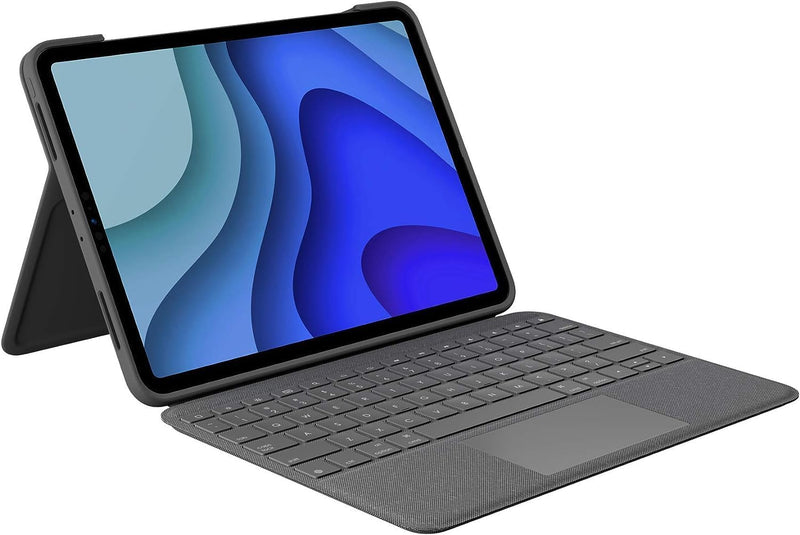
Logitech Folio Touch iPad Pro Keyboard Case Trackpad Renewed
Transform your iPad Pro into a full workstation with Logitech's Folio Touch keyboard case, trackpad, and adjustable kickstand.
$98.96*
View on Amazon
✓ In Stock on Amazon.com
*Price sourced from Amazon.com. Last updated:Aug 29, 2026.Price and availability are subject to change — details.
Affiliate Disclosure: As an Amazon Associate, Studio Supplies earns from qualifying purchases made through links on this page, at no additional cost to you. This helps support our editorial team.
Notice a mistake? Let Us Know
Overview
Key Features
High-Precision Trackpad: Use all the multi-touch gesture controls you already love like swipe, pinch, and scroll to navigate iPad Pro even faster
Backlit Keys: Backlit keys automatically adjust to your environment's lighting. If you need more or less light, the brightness levels are adjustable
Laptop-Like Typing: Large, well-spaced keyboard containing a full row of iPadOS shortcut keys lets you type comfortably with speed and accuracy
Four Use Modes: Type, sketch, view and read—if you need to get something done on your iPad Pro, choose from four versatile use modes to get it done.
Adjustable Kickstand: Kickstand with 40° range of angles combines with a foldable keyboard for a true view and sketch mode with nothing in the way
Power and Pair in One Click: Folio Touch instantly pairs via the Smart Connector. Power sources directly from iPad Pro so you never have to charge
Military-Grade Drop Protection: A sturdy case that meets MIL STD 810G keeps iPad Pro protected from bumps and scratches. A secure magnetic latch keeps it shut on the go
Home for Digital Pencil: Folio Touch has space for you to store your Logitech Crayon or charge your Apple Pencil (2nd gen) with the case on
Specifications
Brand
Logitech
Model
Folio Touch
Compatibility
iPad Pro 11-inch (1st, 2nd, 3rd Generation)
Connectivity
Smart Connector
Keyboard
Backlit with full row of iPadOS shortcut keys
Trackpad
High-precision multi-touch
Kickstand Range
40 degrees
Use Modes
Type, View, Sketch, Read
Material
Acrylonitrile Butadiene Styrene (ABS)
Color
Grey
Condition
Renewed
Frequently Asked Questions
Which iPad Pro models is the Folio Touch compatible with?
The Folio Touch is compatible with the iPad Pro 11-inch 1st, 2nd, and 3rd generation models. It connects via the Smart Connector, so no Bluetooth pairing or charging is needed.
Does the Folio Touch require separate charging or battery replacement?
No. The Folio Touch draws power directly from your iPad Pro through the Smart Connector, so there are no batteries to charge or replace.
What are the four use modes?
The four modes are Type (laptop-style with keyboard and trackpad), View (propped up for watching content), Sketch (flat angled for drawing with Apple Pencil), and Read (tablet folded back for handheld use).
Can I adjust the keyboard backlight brightness?
Yes. The backlit keys automatically adapt to ambient lighting, but you can also manually adjust the brightness to your preference.
Does this renewed unit include the same functionality as a new Folio Touch?
Yes. This renewed unit has been inspected and tested to function like new, though it may show minor cosmetic signs of previous use.
Related Products

