Logitech

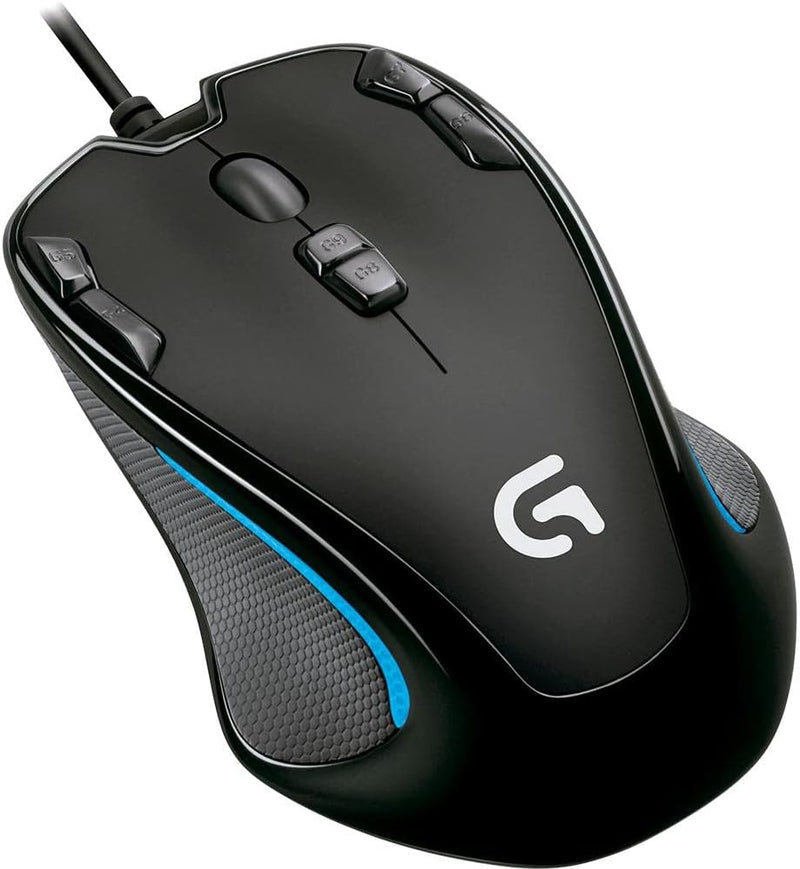
Logitech G300 Programmable Gaming Mouse

4.0 (291 reviews)

Compact, ambidextrous gaming mouse with nine programmable controls and onboard memory for instant profile switching.

Check availability
Affiliate Disclosure: Studio Supplies may earn a commission from qualifying purchases made through links on this page, at no additional cost to you. This helps support our editorial team.

Notice a mistake? Let Us Know

Overview

The Logitech G300 Programmable Gaming Mouse packs a surprising amount of functionality into a compact, symmetrical frame. With nine programmable controls, gamers and power users can relocate frequently used keyboard shortcuts directly onto the mouse, cutting down on hand movement and speeding up in-game actions or productivity workflows. The drag-and-drop configuration software keeps setup simple — just assign commands to the buttons you want and save them to one of three onboard memory profiles. Because those profiles are stored on the mouse itself, you can plug the G300 into a different computer and have your preferred layout ready without reinstalling software.

Under the hood, a gaming-grade optical sensor provides consistent tracking across a variety of surfaces, and its sensitivity is tunable so you can dial in the exact responsiveness your play style demands. The symmetrical shape is genuinely comfortable for both right- and left-handed users, and its smaller footprint appeals to anyone who finds full-size gaming mice cumbersome. Connected via USB, the G300 offers a reliable wired connection with no latency concerns, making it a dependable choice for competitive play on a budget.

Key Features

Nine programmable controls: Move keyboard commands to mouse buttons that are in easy reach

Three onboard memory profiles: Save profiles to the mouse once for gameplay on different computers (Some profile settings require Logitech Gaming Software to be enabled and are not supported on Linux and earlier Windows-based systems.)

Easy configuration software: Simply drag and drop commands to the buttons to setup the mouse exactly the way you want

Symmetrical compact shape: Feels comfortable in either hand and perfect for people who don't want a large mouse

Gaming-grade optical sensor: Tracks great on a wide variety of surfaces and is tunable to achieve the responsiveness you need.

Specifications

Programmable Controls
9
Onboard Memory Profiles
3
Sensor Type
Gaming-grade optical
Design
Symmetrical compact shape
Connectivity
USB (wired)
Compatibility
Windows, Mac (some profile features not supported on Linux)

Pros & Cons

👍 Pros

  • Nine programmable buttons let you move frequently used keyboard commands to the mouse for faster access
  • Three onboard memory profiles save settings directly to the mouse for easy use across multiple computers
  • Symmetrical compact shape is comfortable for both left-handed and right-handed users
  • Tunable optical sensor allows you to adjust tracking responsiveness to your preference
  • Simple drag-and-drop software makes button remapping straightforward

👎 Cons

  • USB 2.0 wired connection only with no wireless option
  • Compact size may feel too small for users with larger hands
  • Some profile settings require Logitech Gaming Software and are not supported on Linux
  • No adjustable weight system for tuning the feel of the mouse

Frequently Asked Questions

The G300 has nine programmable controls that you can customize using Logitech's drag-and-drop configuration software.
Yes, it supports three onboard memory profiles, so your settings travel with the mouse to different computers without reinstalling software.
Yes, the G300 features a symmetrical compact shape designed to be comfortable in either hand.
It uses a gaming-grade optical sensor that is tunable for responsiveness and tracks reliably on a wide variety of surfaces.
It works as plug-and-play over USB, but Logitech Gaming Software is needed to configure advanced profile settings. Note that some profile features are not supported on Linux or earlier Windows systems.