Logitech

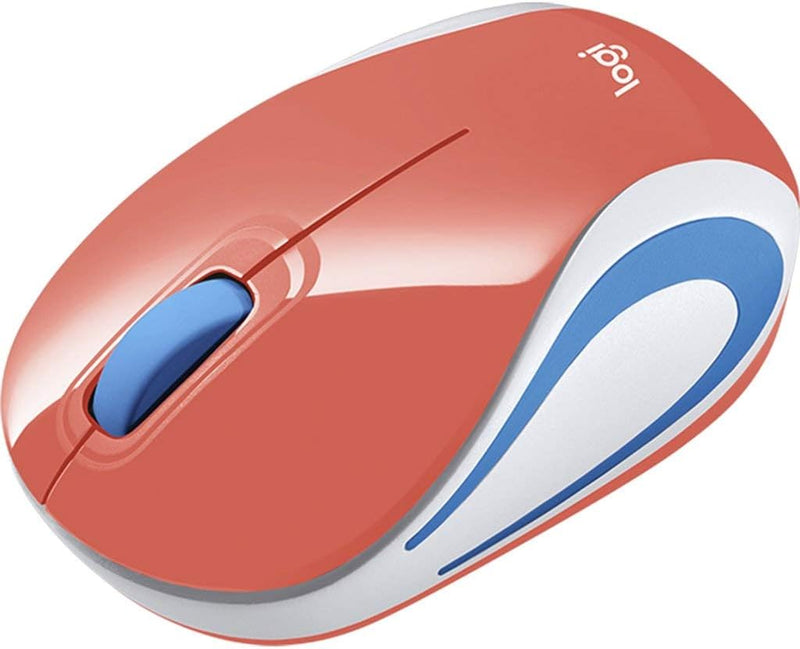
Logitech M187 Wireless Mini Mouse - Coral Portable

4.7 (230 reviews)

The Logitech M187 delivers dependable 2.4GHz wireless pointing in a compact form factor designed to disappear into a laptop bag and work anywhere without setup friction.

View price on Amazon
Affiliate Disclosure: Studio Supplies may earn a commission from qualifying purchases made through links on this page, at no additional cost to you. This helps support our editorial team.

Notice a mistake? Let Us Know

Overview

The Logitech M187 is a compact ambidextrous wireless mouse operating on 2.4GHz RF via a dedicated nano USB receiver. The defining specification is its form factor: small enough to be genuinely portable without the mouse becoming an afterthought in a laptop bag, and light enough that its presence in a setup is never an ergonomic burden. The 2.4GHz connection provides the low-latency, stable wireless performance that characterizes Logitech's RF mice across their lineup — the M187 does not differentiate itself through sensor precision or feature density, but through delivering the baseline wireless pointing experience in the smallest practical package.

Three buttons (left, right, and scroll wheel click) and a scroll wheel cover the standard pointing device requirements without the additional complexity of programmable side buttons. This simplicity serves the portable use case well — less to configure, less to break, immediate compatibility with any OS. The coral color option provides a visual differentiator in multi-device environments. Operating system support covers Windows 7 through current and macOS 10.10 and later, and the plug-and-play HID operation requires no software for full basic function. For users building a minimal, portable productivity kit around a laptop, the M187 offers exactly the trade-off profile that category demands: small, reliable, and frictionless to deploy anywhere.

Key Features

Mouse offers maximum efficiency and usability

3 total buttons for better reliability and ensure maximum productivity

Radio frequency wireless technology enables signals to travel efficiently and reliably with maximum dependability

USB mouse host interface allows quick transmission of data at a higher rate for your convenience

Scroll Wheel scroller type for convenient, easy scrolling with maximum usability

Enjoy the freedom of Radio Frequency wireless connectivity found in most Notebooks

Features optical resolution for silky smooth movement

Notebook device support for convenient and quick access to the information to ensure maximum productivity

Comes in coral product color for a chic look with maximum usability

Specifications

Wireless Technology
2.4GHz Radio Frequency
Receiver
Dedicated Nano USB (non-Unifying)
Buttons
3 (left, right, scroll wheel click)
Scroll
Scroll Wheel
Tracking
Optical
Power
1× AA battery
Color
Coral
OS Compatibility
Windows 7/8/10+, macOS X 10.10+
Connection Interface
USB

Pros & Cons

👍 Pros

  • The compact form factor and dedicated nano receiver make the M187 genuinely pocket-portable — the mouse and receiver pack flat in a laptop bag without adding the bulk of a full-size mouse.
  • 2.4GHz radio frequency wireless provides a more stable and lower-latency connection than Bluetooth for a basic pointing device, with reliable performance in typical office and travel environments.
  • Plug-and-play operation without mandatory software installation means the M187 is usable immediately on any Windows or macOS machine, including locked-down IT-managed laptops where software installation is restricted.
  • The ambidextrous symmetrical design accommodates left-handed users without the compromise of an asymmetric mouse that forces a single hand orientation.
  • The coral colorway is a practical differentiator in shared-desk or multi-device environments where identifying your own peripheral among similar-looking devices saves time.

👎 Cons

  • Logitech does not publish a specific DPI specification for the M187, which means buyers cannot verify whether the sensor resolution meets their precision requirements before purchase — a meaningful data gap for users who care about pointer accuracy.
  • The three-button layout (left, right, scroll wheel click) lacks the side buttons present on nearly all productivity-oriented mice at this price tier, limiting shortcut customization for power users.
  • The M187 uses its own dedicated receiver rather than Logitech's Unifying receiver, occupying a full USB port permanently without the ability to share that port assignment with other Logitech devices.
  • The compact size requires a fingertip or claw grip — users accustomed to a full palm grip on a standard-size mouse will experience fatigue during extended continuous use sessions.
  • No on/off power switch is visible in the specifications, which means the mouse draws battery power continuously whenever the receiver is plugged in — a minor but persistent battery drain in non-use periods.

Frequently Asked Questions

The M187 ships with its own dedicated nano USB receiver. It is not compatible with Logitech's Unifying receiver — meaning you cannot consolidate it onto a single receiver alongside other Logitech Unifying-compatible devices. Each M187 requires its own receiver dongle to be plugged in.
Logitech does not publish a specific DPI spec for the M187. The optical sensor tracks reliably on standard desk surfaces, notebooks, and mousepads. It will struggle on highly reflective surfaces like glass or mirror-finish desks, where the optical sensor loses the texture reference it needs for accurate tracking — a limitation common to all optical mice without dedicated glass-surface sensors.
The M187 runs on a single AA battery. Logitech does not publish a specific battery life figure for this model, but compact 2.4GHz optical mice in this class typically achieve 6-12 months of moderate daily use on a single AA. The mouse lacks a power indicator LED, so battery depletion arrives without warning — keeping a spare AA on hand avoids unexpected downtime.
The M187 is plug-and-play — insert the receiver, and the mouse functions immediately as a standard HID pointing device on Windows 7/8/10 or later and macOS X 10.10 or later without installing any software. Logitech Options software can optionally be installed for button remapping, but it is not required for basic operation.
The M187 has a symmetrical, ambidextrous shape — it can be used comfortably with either hand. The compact size, however, is optimized for fingertip grip rather than palm grip. Users who prefer a full palm grip with wrist resting on the desk will find the small form factor requires an adaptation in grip style.