



Logitech
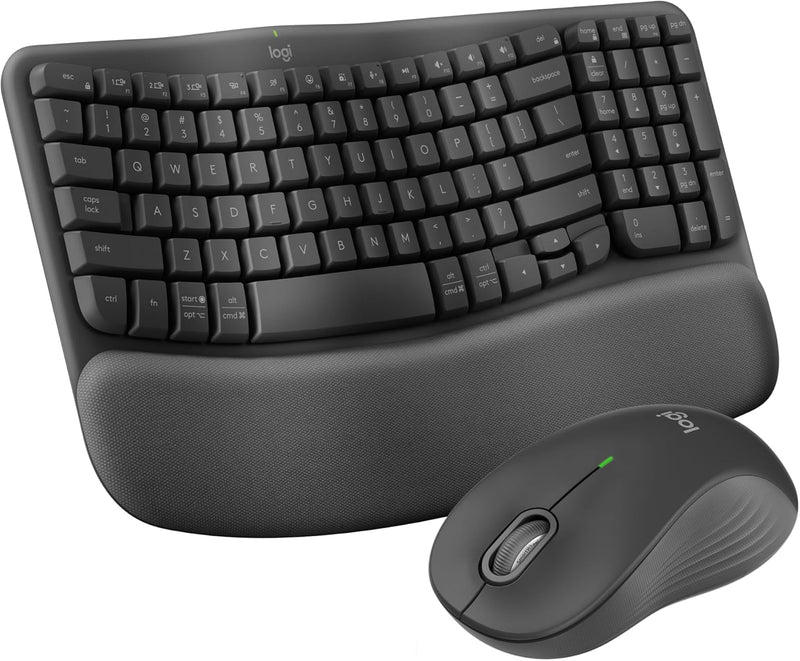
Logitech MK670 Wave Keys Ergonomic Keyboard Mouse Combo Graphite
Type and click in all-day comfort with this ergonomic wave keyboard and quiet wireless mouse combo.
$76.49*$89.99Save 15%
View on Amazon
✓ In Stock on Amazon.com
*Price sourced from Amazon.com. Last updated:Aug 29, 2026.Price and availability are subject to change — details.
Affiliate Disclosure: As an Amazon Associate, Studio Supplies earns from qualifying purchases made through links on this page, at no additional cost to you. This helps support our editorial team.
Notice a mistake? Let Us Know
Overview
Key Features
Meet the comfort combo: Get comfier with the Wave Keys Ergonomic Wireless Keyboard paired with the Signature M550 L Wireless Mouse - a great fit for medium- to large-sized hands
Compact keys: Wave Keys’ compact size allows you to bring your mouse closer to your body, resulting in a more natural shoulder position compared to a full size keyboard
Type in comfort all day long: The wavy design of this compact keyboard places your hands, wrists and forearms in a natural typing position for all-day comfort
More palm support, less pressure: A cushioned palm rest with memory foam gives you more wrist support throughout the day (1)
Less noise, more focus: On top of its sculpted design and rubber grip, this quiet mouse uses SilentTouch technology to make workdays more peaceful with 90% less click noise (7)
Scroll smarter: Scroll through documents line by line, or fly effortlessly through long web pages with SmartWheel
Smoother days, your Way: Personalize your Wave Keys experience using the Logi Options+ App, where you can choose shortcuts that save time and keep your work flowing (2)
Connect the keyboard via Bluetooth or Logi Bolt and use Easy-Switch* to toggle between PC, tablet, and phone (Windows/macOS/iPadOS/ChromeOS); *not-applicable for Signature M550 L mouse
Plastic parts in Wave Keys and Signature M550 L include certified post-consumer recycled plastic (Keyboard: 61%(5), Mouse: 65%(6))
In case of wireless keyboard or combo (keyboard and mouse), the USB receiver is usually provided either inside the mouse (under the battery cover) or attached within the product packaging
Specifications
Brand
Logitech
Model
MK670
Keyboard Design
Ergonomic Wave Layout with Cushioned Memory Foam Palm Rest
Mouse
Signature M550 L Wireless Mouse
Connectivity
Bluetooth, Logi Bolt USB Receiver
Multi-Device
Easy-Switch (keyboard only, up to 3 devices)
Compatibility
Windows, macOS, iPadOS, ChromeOS
Mouse Features
SilentTouch Technology (90% less click noise), SmartWheel Scrolling
Customization
Logi Options+ App
Recycled Material
Keyboard: 61% post-consumer recycled plastic; Mouse: 65%
Color
Graphite
Frequently Asked Questions
What devices and operating systems are compatible with this combo?
The keyboard works with Windows, macOS, iPadOS, and ChromeOS via Bluetooth or the included Logi Bolt USB receiver. The Signature M550 L mouse connects via Bluetooth or Logi Bolt as well.
Can I switch the keyboard between multiple devices?
Yes, the Wave Keys keyboard supports Easy-Switch, allowing you to pair with and toggle between up to three devices such as a PC, tablet, and phone. Note that Easy-Switch applies to the keyboard only.
How quiet is the Signature M550 L mouse?
Logitech states the mouse uses SilentTouch technology with 90% less click noise compared to standard mice, making it noticeably quieter during use.
What size hands is the mouse designed for?
The Signature M550 L is the large-sized variant, designed to fit medium- to large-sized hands comfortably.
Where is the USB receiver located in the packaging?
The Logi Bolt USB receiver is typically found inside the mouse under the battery cover or attached within the product packaging.
Related Products


