Logitech

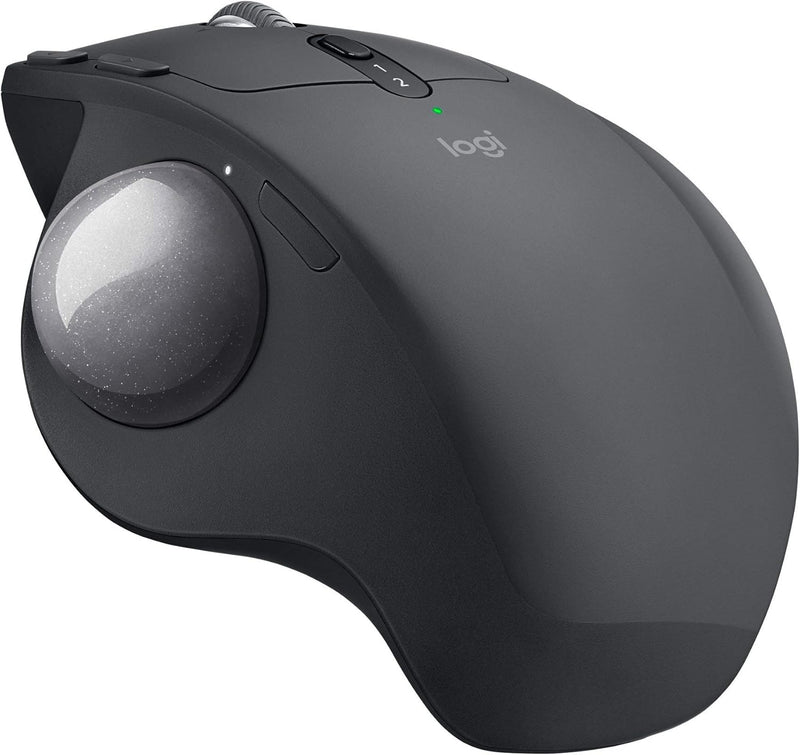
Logitech MX Ergo Plus Wireless Trackball with Adjustable Hinge

4.5 (673 reviews)

Ergonomic wireless trackball with adjustable 0°–30° hinge and multi-computer FLOW control for all-day comfort.

$99.99*
In Stock on Amazon.com
View on Amazon

*Price sourced from Amazon.com. Last updated:Jul 14, 2026.Price and availability are subject to change.

Affiliate Disclosure: Studio Supplies may earn a commission from qualifying purchases made through links on this page, at no additional cost to you. This helps support our editorial team.

Notice a mistake? Let Us Know

Overview

The Logitech MX Ergo Plus is a wireless trackball engineered around ergonomic comfort and multi-device productivity. Its defining feature is the adjustable metal hinge at the base, which — combined with the included extra 10° wedge — allows you to tilt the device to 0°, 20°, or 30°. This adjustable angle positions your hand and forearm in a more natural posture, and Logitech claims it reduces muscular strain by 20% compared to a standard mouse. The trackball itself is thumb-operated, meaning your hand stays stationary while you navigate, eliminating the repetitive wrist movements associated with traditional mice.

Beyond ergonomics, the MX Ergo Plus is built for efficient workflows. The precision mode button on top lets you toggle instantly between fast cursor speed and fine-grained tracking — useful when switching between general browsing and detail-oriented tasks like design or data work. Easy-Switch technology paired with Logitech FLOW allows you to connect up to two computers simultaneously and move your cursor between screens as if they were one system, with cross-computer copy and paste for text, images, and files. Connectivity options include both Bluetooth and the Logitech Unifying USB receiver. The built-in rechargeable battery holds a charge for up to four months, and the quick-charge feature delivers a full day of use from just 60 seconds of charging, ensuring the trackball is rarely out of commission.

Key Features

Smart adjustable hinge plus extra 10? wedge for customized hand position and greater comfort.

Choose the best angle for you 0?, 20? or 30?.

Advanced tracking. Precision mode button lets you instantly switch between speed and high precision tracking.

Precision scroll-wheel with tilt and middle click allows for precise scrolling and convenient controls.

Easy-Switch? and FLOW-enabled for effortless multi-computer workflow. Pair up to 2 computers and easily switch between them, copy and paste text, images and files.

Fast rechargeable battery. Holds power for up to 4 months on a full charge. Quick charge: 1 minute of charge gives up to a day of use.

Specifications

Brand
Logitech
Series
MX ERGO Wireless Trackball
Model
MX Ergo Plus
Movement Detection
Trackball
Connectivity
Bluetooth, USB Unifying Receiver, Radio Frequency
Adjustable Angles
0°, 20°, 30°
Battery Life
Up to 4 months
Quick Charge
1 minute = 1 day of use
Multi-Device Support
Up to 2 computers (Easy-Switch + FLOW)
Special Feature
Precision mode button, wireless
Weight
1.1 pounds
Dimensions (L x W x H)
6.5 x 4.7 x 3.6 inches
Color
Graphite
Compatible Platforms
PC (Windows 7, Windows 8)

Pros & Cons

👍 Pros

  • Adjustable hinge with three angle settings (0°, 20°, 30°) lets you personalize ergonomic positioning.
  • Rechargeable battery lasts up to four months and supports quick-charge for a full day from just one minute.
  • FLOW technology enables seamless cursor movement and file transfer between two paired computers.
  • Precision mode button provides instant switching between speed and accuracy without changing settings.
  • Trackball design eliminates the need for desk space to move a mouse.

👎 Cons

  • Trackball requires a learning curve for users accustomed to traditional mice.
  • At 1.1 pounds, it is heavier than most standard wireless mice, making it less portable.
  • Only pairs with two computers maximum, which may limit users with more complex multi-device setups.
  • The thumb-operated trackball ball can accumulate dust and debris, requiring periodic cleaning for smooth tracking.

Frequently Asked Questions

The adjustable hinge plus the included extra 10° wedge lets you set the trackball at 0°, 20°, or 30° to find the most comfortable hand position for your workflow.
Pressing the precision mode button instantly toggles the trackball between fast cursor speed for general navigation and high-precision tracking for detailed work like photo editing or spreadsheet selection.
Yes. With Easy-Switch and Logitech FLOW technology, you can pair up to two computers and seamlessly switch between them — including copying and pasting text, images, and files across machines.
A full charge lasts up to four months. If the battery runs low, a one-minute quick charge provides enough power for a full day of use.
It supports both Bluetooth and the included Logitech Unifying USB receiver, giving you flexible connectivity options depending on your setup.