

Logitech
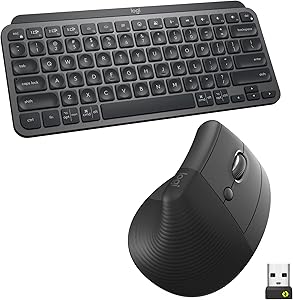
Logitech MX Keys Mini Combo - Ergonomic Wireless Keyboard & Mouse
Logitech MX Keys Mini and Lift Combo: Ergonomic Comfort and Performance The Logitech MX Keys Mini Keyboard and Lift Vertical Ergonomic Mouse Combo is designed for all-day comfort and enhanced productivity. With wireless connectivity, backlit keys, and customizable buttons, this combo is perfect ...
$151.25*$169.98Save 11%
Check availability
*Price sourced from Amazon.com. Last updated:Aug 30, 2026.Price and availability are subject to change — details.
Affiliate Disclosure: As an Amazon Associate, Studio Supplies earns from qualifying purchases made through links on this page, at no additional cost to you. This helps support our editorial team.
Notice a mistake? Let Us Know
Overview
Logitech MX Keys Mini and Lift Combo: Ergonomic Comfort and Performance
The Logitech MX Keys Mini Keyboard and Lift Vertical Ergonomic Mouse Combo is designed for all-day comfort and enhanced productivity. With wireless connectivity, backlit keys, and customizable buttons, this combo is perfect for your home office or workspace.
Key Features:- Ergonomic Design: Lift vertical mouse promotes natural hand posture.
- Compact Keyboard: MX Keys Mini's minimalist size allows for relaxed arm positioning.
- Smart Illumination: Backlit keys on MX Keys Mini light up upon hand approach.
- Wireless Connectivity: Connect via Bluetooth or Logi Bolt USB to up to 3 devices.
- Customizable Buttons: Lift mouse features easy-to-reach customizable buttons.
- Weight: 17.86 oz (506.4 g)
- Dimensions: 0.82 x 11.65 x 5.19 in (20.97 x 295.99 x 131.95 mm)
- Battery Life: Up to 10 days with backlight, up to 5 months without.
- Connectivity: Bluetooth or Logi Bolt USB
- Weight: 4.4 oz (125 g)
- Dimensions: 4.25 x 2.75 x 2.79 in (108 x 70 x 71 mm)
- Tracking: 4000 DPI
- Battery Life: 24 months (1x AA battery)
- Connectivity: Bluetooth or Logi Bolt USB
Key Features
Combined for feel-better working: Improve your upper body posture at the desk with MX Keys Mini keyboard and Lift vertical ergonomic mouse - an intuitive wireless setup
Raise your hand into comfort: Rest on Lift upright mouse throughout the day, with a softly textured grip for level-above cosiness; A great ergonomic fit for small to medium hands
Optimal 57° angle: Lift’s vertical shape takes the pressure off your wrists, and promotes a more natural posture in the forearm for day-long comfort and performance
Relax into focus: Settle into desk work with a wireless computer mouse featuring easy-to-reach customizable buttons, whisper-quiet clicks, and a SmartWheel for smooth, seamless scrolling
Less arm reaching, more relaxation: The minimalist size of wireless MX Keys Mini allows you to place your Lift mouse closer to your keyboard and keep your arm more relaxed
Fluid, intuitive typing with Perfect Stroke Keys: MX Keys Mini’s keys are shaped to fit your fingertips, with one-tap Smart Keys for Mic Mute/Unmute, Emoji and more
All-day focus with smart illumination: MX Keys Mini wireless keyboard features backlit keys that light up the moment your hands approach and auto-adjust to your environment
Connect your way: Connect MX Keys Mini and Lift set via Bluetooth Low Energy or Logi Bolt USB with up to 3 devices (Windows, macOS, iPadOS, Chrome OS, or Linux)
Specifications
Keyboard Model
MX Keys Mini
Mouse Model
Lift Vertical Ergonomic Mouse
Mouse Angle
Optimal 57°
Keyboard Keys
Perfect Stroke Keys, Smart Keys (Mic Mute/Unmute, Emoji)
Keyboard Backlighting
Smart Illumination (auto-adjusts, hands-approach activation)
Connectivity
Bluetooth Low Energy, Logi Bolt USB
Multi-Device Support
Up to 3 devices
Operating System Compatibility
Windows, macOS, iPadOS, Chrome OS, Linux
Frequently Asked Questions
How does this combo improve ergonomics?
The MX Keys Mini and Lift mouse are designed to improve upper body posture; the Lift mouse's 57° angle reduces wrist pressure and promotes a natural forearm posture.
What operating systems are compatible with this keyboard and mouse combo?
This combo is compatible with Windows, macOS, iPadOS, Chrome OS, and Linux, allowing for broad device connectivity.
Does the MX Keys Mini keyboard have backlit keys?
Yes, the MX Keys Mini features smart illumination with backlit keys that light up when your hands approach and auto-adjust to the environment.
How do the keyboard and mouse connect to a computer?
You can connect both devices wirelessly via Bluetooth Low Energy or using the Logi Bolt USB receiver, supporting up to 3 devices.
Is the Lift mouse suitable for all hand sizes?
The Lift mouse is described as a great ergonomic fit for small to medium hands.
Does the keyboard have special function keys?
Yes, the MX Keys Mini includes one-tap Smart Keys for convenient functions like Mic Mute/Unmute and Emoji.
Related Products


