

Logitech
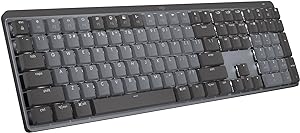
Logitech MX Mechanical Master Wireless Illuminated Keyboard
USB-C
Elevate Your Typing Experience with the Logitech MX Mechanical Keyboard The Logitech MX Mechanical Wireless Illuminated Performance Keyboard is designed for precision, comfort, and productivity. Featuring low-profile mechanical switches, smart illumination, and extensive customization options, th...
View price on Amazon
Affiliate Disclosure: As an Amazon Associate, Studio Supplies earns from qualifying purchases made through links on this page, at no additional cost to you. This helps support our editorial team.
Notice a mistake? Let Us Know
Overview
Elevate Your Typing Experience with the Logitech MX Mechanical Keyboard
The Logitech MX Mechanical Wireless Illuminated Performance Keyboard is designed for precision, comfort, and productivity. Featuring low-profile mechanical switches, smart illumination, and extensive customization options, this keyboard offers a superior typing experience for professionals and enthusiasts alike. Seamlessly switch between multiple devices and operating systems, and enjoy long-lasting battery life with USB-C quick charging.
Key Features:
- Switches: Linear Switches
- Illumination: Backlit Keys
- Connectivity: Bluetooth, USB-C
- Compatibility: macOS, Windows
Key Features
Fluid and quiet mechanical typing: MX Mechanical keyboard features Tactile Quiet switches that deliver next-level feel and flow with less noise - Clicky and Linear switches are also available
Low-profile keys, more comfort: A keyboard layout designed for effortless precision, with a full-size form factor and low-profile mechanical switches for better ergonomics
Smart illumination: Backlit keys light up the moment your hands approach the cordless keyboard and automatically adjust to suit changing lighting conditions
Faster workflow, more customization: Customize Fn keys, assign backlighting effects, enable Flow cross-computer, multi-device control, and more in the improved Logi Options+ (1)
Multi-device, multi-OS: Pair MX Mechanical Bluetooth wireless keyboard with up to 3 devices on nearly any operating system via Bluetooth Low Energy or included Logi Bolt receiver(2)
USB-C quick charging: MX Mechanical keyboard stays powered up to 15 days on a full charge or up to 10 months with the backlighting turned off (3)
Plastic parts in MX Mechanical include certified post consumer recycled plastic (Graphite: 45%(5)). Certified carbon neutral.
Specifications
Switch Type
Tactile Quiet mechanical
Key Profile
Low-profile
Form Factor
Full-size
Backlighting
Smart illumination, automatically adjusting
Customization Software
Logi Options+
Connectivity
Bluetooth Low Energy, Logi Bolt receiver
Multi-Device Pairing
Up to 3 devices
Charging Port
USB-C
Battery Life (backlighting on)
Up to 15 days
Battery Life (backlighting off)
Up to 10 months
Recycled Plastic Content (Graphite)
45% post-consumer
Environmental Certification
Certified carbon neutral
Frequently Asked Questions
What type of mechanical switches does this Logitech MX Mechanical Master keyboard use?
This MX Mechanical keyboard features Tactile Quiet switches, which are engineered to provide a fluid typing experience with reduced noise compared to other mechanical switch types.
How does the smart illumination feature work on the Logitech MX Mechanical Master keyboard?
The backlit keys on this cordless keyboard automatically light up the moment your hands approach and adjust their brightness to suit changing lighting conditions, enhancing visibility and saving power.
Can I connect the MX Mechanical Master keyboard to multiple devices simultaneously?
Yes, the MX Mechanical Bluetooth wireless keyboard can be paired with up to three devices across nearly any operating system using either Bluetooth Low Energy or the included Logi Bolt receiver.
What is the battery life of the MX Mechanical Master keyboard, especially with the backlighting enabled?
The MX Mechanical keyboard offers impressive battery life, lasting up to 15 days on a full charge with the backlighting turned on, and extending to up to 10 months when the backlighting is turned off.
Is the Logitech MX Mechanical Master keyboard designed with sustainability in mind?
Yes, plastic parts in the Graphite version of the MX Mechanical keyboard include 45% certified post-consumer recycled plastic, and the product is also certified carbon neutral.
What options are available for customizing the keyboard's functions and lighting?
The improved Logi Options+ software allows you to customize Fn keys, assign backlighting effects, and enable features like Flow for cross-computer control, providing a personalized user experience.
Does the low-profile design of the keys offer any ergonomic benefits?
The keyboard's layout features low-profile mechanical switches and a full-size form factor, which is designed to provide better ergonomics and more comfortable typing for extended periods.
Related Products


