
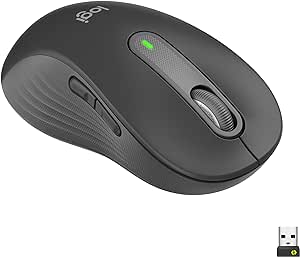
Logitech Signature M650 L Left Wireless Mouse Renewed
Ergonomic Precision for Left-Handed ComfortThe Logitech Signature M650 L Left Wireless Mouse is designed to provide all-day comfort and precise control for left-handed users with larger hands. Enjoy silent clicks, customizable side buttons, and multi-device compatibility. Hand Orientation: ...
*Price sourced from Amazon.com. Last updated:Aug 30, 2026.Price and availability are subject to change — details.
Notice a mistake? Let Us Know
Overview
Ergonomic Precision for Left-Handed Comfort
The Logitech Signature M650 L Left Wireless Mouse is designed to provide all-day comfort and precise control for left-handed users with larger hands. Enjoy silent clicks, customizable side buttons, and multi-device compatibility.
- Hand Orientation: Designed for Large Sized Left Hands
- Connectivity: Bluetooth, Logi Bolt USB Type-A
- Sensor: 2000 DPI Advanced Optical Sensor
- Scrolling: SmartWheel Adaptive Scrolling
- Buttons: Primary and Two Customizable Side Buttons
- Silent Clicks: Logitech SilentTouch Technology
- Battery Life: Up to 2 Years (Varies with Use)
- Compatibility: Windows, macOS, Chrome OS, Linux, Android, iPadOS
Key Features
Scroll smarter: With Logitech Signature M650 Wireless Mouse you get line-by-line precision for documents and super-fast scrolling for long web pages; simply switch modes with a flick of the SmartWheel
The optimal fit for your hand: This comfortable mouse is designed for small-to-medium sized hands, for the optimal fit
Upgrade your comfort: This work mouse provides long hours of comfort thanks to a contoured shape, soft thumb area, and rubber side grips that keep your hand snug and in place
Connect the way you like: Connect this cordless computer mouse in an instant via Bluetooth Low Energy or Logi Bolt USB receiver
Less noise, more focus: Whether working at the office or at home, Logitech Signature M650 is a quiet mouse, allowing you to enjoy 90 percent less click noise with SilentTouch technology*
Customizable side buttons: Customize the side buttons on the computer mouse with Logitech Options+, available on Windows and macOS, to your favorite shortcuts – like back/forward or copy/paste
24 month battery life: Work for up to 2 years on the single AA battery that comes with your multi-device mouse**
Works on multiple platforms: Experience seamless compatibility with Windows, macOS, Linux, Chrome OS, ipadOS, and Android operating systems with Logitech Signature M650 wireless Bluetooth mouse
Specifications
Frequently Asked Questions
Related Products
