

Logitech
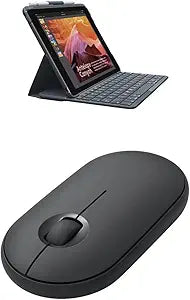
Logitech Slim Folio iPad Keyboard + Pebble i345 Mouse
iPad keyboard folio and wireless mouse bundle that turns your 5th or 6th generation iPad into a portable, laptop-like workstation.
Check availability
Affiliate Disclosure: As an Amazon Associate, Studio Supplies earns from qualifying purchases made through links on this page, at no additional cost to you. This helps support our editorial team.
Notice a mistake? Let Us Know
Overview
Key Features
Compatible Devices iPad, 5th generation (Model A1822, A1823). iPad, 6th generation (Model A1893, A1954)
3 use modes with integrated keyboard: Type, View, Protect. Enjoy the simplicity of this all in one, including front and back protection for your iPad from bumps, scratches and spills
Premium laptop like typing with iOS shortcut keys: Enjoy the familiar, comfortable feeling of well spaced, full sized keys
SLIM. LIGHT. PORTABLE - It’s compact, light, and easy—just like your iPad. Slip Logitech Pebble i345 in your bag or drop it in your pocket. Take it to a poolside lounge, cafe table, or airplane, and say "hello" to your new mobile office.
WORKS ON MULTIPLE SURFACES - Logitech Pebble i345 tracks fast and accurately whether you use it on a table at your favorite coffee shop or directly on your bed covers.
BEAUTIFUL DESIGN - Just like an iPad, Logitech Pebble i345 is sleek and streamlined. With round corners, clean lines, and modern colors, it is the perfect match to iPad and looks great in any setup.
Specifications
Keyboard
Logitech Slim Folio with Integrated Bluetooth Keyboard
Mouse
Logitech Pebble i345 Wireless Bluetooth Mouse — Graphite
iPad Compatibility
iPad 5th gen (A1822, A1823), iPad 6th gen (A1893, A1954)
Keyboard Connectivity
Bluetooth
Mouse Connectivity
Bluetooth
Use Modes
Type, View, Protect
Keyboard Features
Full-sized keys, iOS shortcut keys, front and back iPad protection
Mouse Features
Multi-surface tracking, compact portable design
Frequently Asked Questions
Which iPad models are compatible with the Slim Folio keyboard?
The Slim Folio is compatible with the iPad 5th generation (models A1822, A1823) and iPad 6th generation (models A1893, A1954). It will not fit other iPad sizes or generations.
Which iPad models are compatible with this Slim Folio keyboard?
It is compatible with the iPad 5th generation (models A1822, A1823) and iPad 6th generation (models A1893, A1954) only.
How does the Pebble i345 mouse connect to the iPad?
The Pebble i345 connects via Bluetooth, pairing wirelessly with your iPad without the need for a USB dongle or adapter.
How does the Pebble i345 mouse connect to the iPad?
The Pebble i345 connects via Bluetooth, so no dongle or USB receiver is needed. It pairs directly with compatible iPads running iPadOS 13 or later.
Does the Slim Folio protect both the front and back of the iPad?
Yes, the folio wraps around the iPad to provide front and back coverage against bumps, scratches, and spills.
What are the three use modes of the Slim Folio?
The three modes are Type (keyboard positioned for typing), View (stand angle for watching or reading), and Protect (closed to shield the front and back of the iPad).
Does the Slim Folio include iOS shortcut keys?
Yes, the keyboard includes dedicated iOS shortcut keys, giving you quick access to common iPad functions without touching the screen.
What are the three use modes of the Slim Folio?
The three modes are Type (keyboard angled for typing), View (propped up for watching content), and Protect (closed to safeguard the screen and back).
Does the mouse work on soft or uneven surfaces?
Yes, Logitech designed the Pebble i345 to track accurately on a variety of surfaces including desks, couch cushions, and bed covers.
Can the Pebble i345 mouse be used on soft surfaces?
Yes, Logitech states the Pebble i345 tracks accurately on multiple surfaces, including soft surfaces like bed covers and tablecloths.
Related Products

