

Logitech
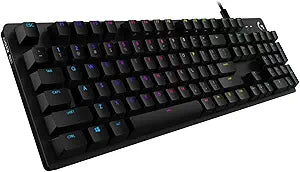
Logitech SYktcjgs G512 Mechanical Gaming Keyboard
Level Up Your Game with Tactile Precision The Logitech G512 Mechanical Gaming Keyboard offers advanced features and a premium design for serious gamers. With customizable RGB lighting, GX Blue clicky key switches, and a durable aluminum case, this keyboard delivers exceptional performance and st...
View price on Amazon
Affiliate Disclosure: As an Amazon Associate, Studio Supplies earns from qualifying purchases made through links on this page, at no additional cost to you. This helps support our editorial team.
Notice a mistake? Let Us Know
Overview
Level Up Your Game with Tactile Precision
The Logitech G512 Mechanical Gaming Keyboard offers advanced features and a premium design for serious gamers. With customizable RGB lighting, GX Blue clicky key switches, and a durable aluminum case, this keyboard delivers exceptional performance and style.
Specifications:
- Brand: Logitech
- Model: G512 Special Edition
- Switch Type: GX Blue Clicky
- Backlighting: RGB LIGHTSYNC (Customizable per-key)
- Case Material: Aircraft-Grade Aluminum Alloy
- USB Passthrough: Yes
- Layout: AZERTY (France)
- Special Features: Customizable F-Keys
Key Features
RGB LIGHTSYNC backlit keys : G512 is full spectrum ~16.8M colours with customisable per key lighting. Create your own RGB animation effects or choose from preset animations. Lighting is driven by games in the new LIGHTSYNC technology to deliver the most immersive RGB experience ever
CHOICE OF MECHANICAL SWITCH : Choose from three distinct mechanical switches: Romer-G Tactile, Romer-G Linear and GX Blue. GX Blue is an iconic design providing both tactile and clicky feedback with snappy actuation you can feel and hear
AIRCRAFT-GRADE ALUMINIUM ALLOY : The brushed aluminium-magnesium alloy top case serves as the Logitech G512 wired gamingkeyboard’s backbone. The result is a minimal design balanced with a full set of features focused on high-end finish and performance
USB PASSTHROUGH : Convenience and speed are directly within reach. The additional, dedicated USB cable connects the USB passthrough port to its own input for 100% power throughput and data speed. Plug in a mouse or other device to charge
FULL FUNCTION KEYS : Media and lighting controls are right at your fingertips. Use the FN key to control volume, play and pause, mute, toggle game mode, change lighting effects, etc. Use Logitech Gaming Software to configure your function keys to perform these alt commands by default
Specifications
Key Backlighting
RGB LIGHTSYNC (approx. 16.8M colors), Per-key customizable
Switch Types
Romer-G Tactile, Romer-G Linear, GX Blue Mechanical
Material
Aircraft-grade Aluminum Alloy (top case)
Connectivity
Wired
Additional Ports
USB Passthrough
Controls
Full Function Keys (media, lighting, game mode)
Frequently Asked Questions
Can I customize the lighting on the Logitech G512 keyboard?
Yes, the G512 features RGB LIGHTSYNC backlit keys with approximately 16.8 million colors, offering customizable per-key lighting and animation effects via software.
What kind of mechanical switches are available for this keyboard?
You can choose from three distinct mechanical switches: Romer-G Tactile, Romer-G Linear, and GX Blue, each offering a different typing and gaming feel.
Is the keyboard built to be durable?
Yes, the Logitech G512 keyboard is constructed with an aircraft-grade aluminum-magnesium alloy top case, which provides a strong and durable backbone.
Does this keyboard have a USB port for connecting other devices?
Yes, it includes a USB passthrough port with a dedicated USB cable, offering full power throughput and data speed for plugging in a mouse or other devices.
How do I control media and lighting on the keyboard?
Media and lighting controls are conveniently accessible through the full function keys, which can be configured using Logitech Gaming Software.
Does the GX Blue switch provide audible feedback?
Yes, the GX Blue switch is described as an iconic design that provides both tactile and clicky feedback, meaning you can both feel and hear the actuation.
Related Products


