
Logitech
Logitech Ultrathin Touch T630 Bluetooth Mouse
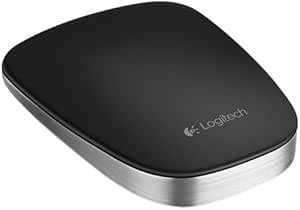
Sleek and Portable Touch Control The Logitech Ultrathin Touch T630 wireless mouse is designed for Ultrabooks, featuring a brushed metallic body and a smooth touch surface. Its ultra-portable design and intuitive touch gestures make it the perfect companion for on-the-go productivity. Specificati...
Check availability
Affiliate Disclosure: As an Amazon Associate, Studio Supplies earns from qualifying purchases made through links on this page, at no additional cost to you. This helps support our editorial team.
Notice a mistake? Let Us Know
Overview
Sleek and Portable Touch Control
The Logitech Ultrathin Touch T630 wireless mouse is designed for Ultrabooks, featuring a brushed metallic body and a smooth touch surface. Its ultra-portable design and intuitive touch gestures make it the perfect companion for on-the-go productivity.
Specifications:
- Brand: Logitech
- Model: Ultrathin Touch T630
- Interface: Bluetooth
- Color: Black, Silver
- Material: Metal
- Dimensions: 5 cm (Width) x 8 cm (Depth)
- Recommended Use: Laptop
- Operating System Support (Mac): Mac OS X 10.6 Snow Leopard, Mac OS X 10.7 Lion, Mac OS X 10.8 Mountain Lion
- Cables Included: USB
Key Features
Ultrathin Touch Mouse T630
Specifications
Brand
Logitech
Model
Ultrathin Touch T630
Connectivity
Bluetooth
Design
Ultrathin Touch Mouse
Frequently Asked Questions
Is the Logitech Ultrathin Touch T630 mouse compatible with both Windows and Mac operating systems?
As a Bluetooth mouse, the Logitech Ultrathin Touch T630 is generally compatible with devices supporting Bluetooth, including Windows and Mac, but specific system requirements are not listed.
How do you charge or power the Logitech T630 mouse?
The product description does not specify the battery type or charging method for the Logitech Ultrathin Touch T630 mouse.
Does the touch surface support multi-finger gestures?
The listing indicates "Touch Mouse," suggesting gesture capabilities, but specific details about multi-finger gestures are not provided.
Is this mouse suitable for left-handed users?
The design is described as "Ultrathin," which often implies an ambidextrous or symmetrical shape, but specific left-handed optimization is not mentioned.
What is the range of the Bluetooth connection for the Logitech T630?
The product description does not specify the effective Bluetooth range for the Logitech Ultrathin Touch T630 mouse.
Related Products
