



Logitech
Logitech USB PC Computer Headset H390 Renewed
Zero-driver USB audio with noise-canceling mic — the H390 delivers reliable PC call quality out of the box without touching a settings menu.
$34.99*
View on Amazon
✓ In Stock on Amazon.com
*Price sourced from Amazon.com. Last updated:Aug 30, 2026.Price and availability are subject to change — details.
Affiliate Disclosure: As an Amazon Associate, Studio Supplies earns from qualifying purchases made through links on this page, at no additional cost to you. This helps support our editorial team.
Notice a mistake? Let Us Know
Overview
Key Features
Laser-tuned drivers provide enhanced digital audio for music, games and calls. This plug-and-play USB headset can be used with any PC or Mac computer without the need to install software.
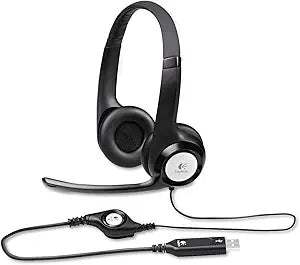
Minimizes unwanted background noise for clear conversations. Rigid, left-sided mic can be positioned for better voice capture. Moveable boom can be tucked out of the way when you’re not using it.
Simple in-line controls on the headset cord let you adjust the volume or mute calls without disruption. Advanced Digital USB Connections: USB Compatible (1.1 and 2.0)
Adjustable headband features swivel-mounted, leatherette ear cushions for hours of comfort. The Logitech H390 is really easy to clean, too.
Compatible with the following: Windows Vista, Windows 7, Windows 8, Windows 10 or later and Mac OS X (10.2.8 or later)
Specifications
Brand
Logitech
Model
H390
Connection
USB 1.1 / 2.0 (plug-and-play)
Microphone
Noise-canceling, adjustable left-side boom
Controls
In-line volume and mute
Headband
Adjustable, padded
Ear Cushions
Leatherette, swivel-mounted
OS Compatibility
Windows Vista/7/8/10+, Mac OS X 10.2.8+
Condition
Renewed
Frequently Asked Questions
Does the Logitech H390 require any software installation to work?
No — it's true plug-and-play via USB. Connect it to any USB-A port on a PC running Windows Vista through Windows 10 or any Mac running OS X 10.2.8 or later, and the OS recognizes it as a standard USB audio device. No driver installation, no setup software required, though Logitech's optional software can provide additional audio customization if desired.
Does the H390 require driver installation or software to function?
No — the H390 uses USB plug-and-play via the standard USB HID audio profile, meaning Windows and macOS recognize it as an audio device immediately upon connection. No Logitech software, driver download, or system restart is required.
What USB version does the H390 support, and will it work in a USB 3.0 port?
The H390 supports USB 1.1 and 2.0. USB 3.0 ports are backward compatible and will power and operate the headset without issue — the audio connection runs over the USB 2.0 protocol regardless of which port generation it's plugged into.
Is the microphone on the H390 noise-canceling, and how well does it filter background sound?
Yes — the boom mic is noise-canceling. It uses a unidirectional pickup pattern to attenuate sound coming from directions other than directly in front of the mic element. For typical office or home environments — keyboard noise, HVAC, moderate ambient conversation — it reduces background pickup meaningfully. It is not immune to loud ambient noise but performs well compared to non-noise-canceling alternatives in its class.
Can the boom microphone be moved out of the way when not in use?
Yes — the rigid left-side boom can be repositioned toward your mouth for calls and recording, then rotated upward and out of the field of view when you're not using the microphone. It is fixed to the left earcup and cannot be removed, but the range of motion provides practical flexibility.
Where are the volume and mute controls located on the H390?
In-line controls for volume adjustment and call muting are built directly into the headset cord, positioned for easy reach without navigating OS audio settings or reaching for the computer. The mic boom can also be folded up to physically move it out of position when not in use.
What is the microphone configuration on the H390?
The H390 uses a rigid, noise-canceling boom microphone fixed on the left side of the headset. The boom arm is adjustable for positioning relative to the mouth, and folds upward to tuck out of the way when the mic is not needed.
Does the H390 work with USB hubs, or does it need to connect directly to a motherboard USB port?
It supports USB 1.1 and 2.0 standards and generally works through powered and unpowered USB hubs. Direct port connection is always more reliable for audio devices in terms of stable power delivery, but the low-power draw of the H390 means hub compatibility is typically not an issue in practice.
Where are the volume and mute controls, and can you use them without taking the headset off?
The in-line controls sit on the headset cord and include a volume wheel and a mute button. They are positioned to be reachable by hand without removing the headset or reaching to your computer — useful during calls when you need to mute quickly or adjust volume without touching your machine.
What operating systems is the H390 compatible with?
The H390 is certified for Windows Vista, 7, 8, and 10 or later, and Mac OS X 10.2.8 or later — a compatibility range that covers virtually every machine still in active daily use.
Related Products


