



Generic
Lysora L7 Wi-Fi 7 BE5040 Dual-Band Ceiling Access Point
Ceiling-mounted Wi-Fi 7 coverage with a 2.5G multi-gig uplink and five spatial streams, all managed from the Lysora Cloud App
$258.00*
View on Amazon
✓ In Stock on Amazon.com
*Price sourced from Amazon.com. Last updated:Oct 23, 2026.Price and availability are subject to change — details.
Affiliate Disclosure: As an Amazon Associate, Studio Supplies earns from qualifying purchases made through links on this page, at no additional cost to you. This helps support our editorial team.
Notice a mistake? Let Us Know
Overview
Key Features
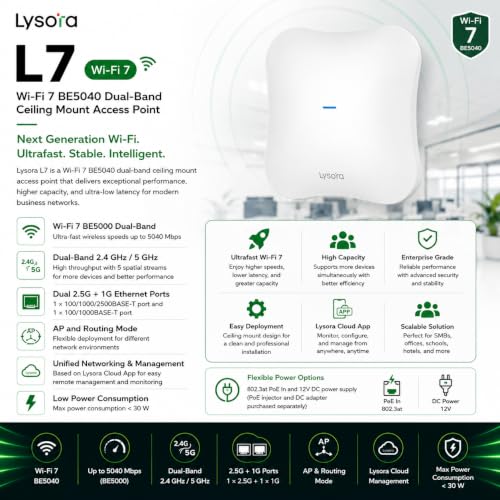
Wi-Fi 7 BE5000 Technology: Dual-band ceiling mount access point with 2.4 GHz and 5 GHz frequencies, delivering high throughput with 5 spatial streams for enhanced wireless performance
Cloud-Based Management: Unified networking and management capabilities based on Lysora Cloud App with maximum power consumption under 30 W for energy-efficient operation
Flexible Power Options: Supports 802.3at PoE In and 12V DC power supply, with PoE injector and DC adapter available for purchase separately
Multi-Gigabit Connectivity: Features 1 x 100/1000/2500BASE-T port and 1 x 100/1000BASE-T port, supporting both AP and routing mode for flexible network deployment
Professional Ceiling Mount Design: Designed for ceiling installation to provide optimal wireless coverage and seamless connectivity throughout your space
Specifications
Model
Lysora L7
Wi-Fi Standard
Wi-Fi 7
Rating
BE5040 (BE5000 class)
Bands
Dual-band 2.4 GHz / 5 GHz
Spatial Streams
5
Primary Port
1 x 100/1000/2500BASE-T (2.5G)
Secondary Port
1 x 100/1000BASE-T
Operating Modes
AP and routing mode
Management
Lysora Cloud App
Power Input
802.3at PoE In / 12V DC
Max Power Consumption
Under 30 W
Mounting
Ceiling mount
Frequently Asked Questions
Does the Lysora L7 support the full 2.5G multi-gig speed on both of its Ethernet ports?
No. Only the primary 100/1000/2500BASE-T port reaches 2.5G. The secondary port tops out at gigabit on 100/1000BASE-T, so plan your multi-gig uplink around the primary port.
Is a power supply included, or do I need to buy the PoE injector or DC adapter separately?
They are sold separately. The L7 accepts 802.3at PoE In or a 12V DC supply, but both the PoE injector and the DC adapter are purchased on their own, so budget accordingly.
Does the Lysora L7 have a 6 GHz band like some other Wi-Fi 7 access points?
No. The L7 is a dual-band BE5040 unit covering 2.4 GHz and 5 GHz only. It carries the Wi-Fi 7 standard but does not include a dedicated 6 GHz radio.
Can the Lysora L7 work as a standalone router, or only as an access point?
Both. It supports AP mode to extend an existing network and routing mode to anchor one, so it can slot in either as an add-on or as the network's core device.
How is the Lysora L7 configured and managed after installation?
Through the Lysora Cloud App, which provides unified networking and management. This brings the L7 into a single dashboard alongside other Lysora hardware for setup and ongoing control.
How much power does the Lysora L7 draw, and will a standard PoE switch run it?
It draws under 30 watts at maximum and accepts 802.3at PoE In, so 802.3at-capable PoE hardware can power the unit over a single Ethernet run.
Related Products


