

Ayylltx
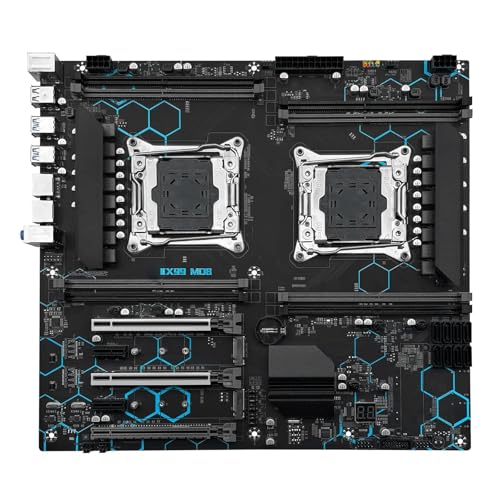
Machinist X99 MD8 Dual Xeon E5 Motherboard Combo Kit
A ready-to-build dual LGA2011-3 kit pairing two Intel Xeon E5 2680 V4 chips and 32GB of DDR4 on a C612 server board
View price on Amazon
Affiliate Disclosure: As an Amazon Associate, Studio Supplies earns from qualifying purchases made through links on this page, at no additional cost to you. This helps support our editorial team.
Notice a mistake? Let Us Know
Overview
Key Features
Enhanced Power Solution:premium chokes and capacitors for steady power delivery
Advanced Thermal Armor: Advanced heatsinks for better heat dissipation
Specifications
Brand
Ayylltx
Model
Machinist X99 MD8
Configuration
Motherboard + CPU + RAM kit
CPU Included
Dual Intel Xeon E5 2680 V4
Socket
LGA2011-3 (dual)
Chipset
Intel C612
Memory Type
DDR4
Memory Included
32GB
Power Design
Premium chokes and capacitors
Cooling
Advanced heatsinks
Intended Use
Server / workstation
Frequently Asked Questions
What exactly comes in the box with this X99 MD8 kit?
It ships as a bundle containing the Machinist X99 MD8 motherboard, two Intel Xeon E5 2680 V4 processors, and 32GB of DDR4 RAM as a matched set.
What kind of workloads is this dual Xeon E5 2680 V4 kit best for?
Its two Xeon processors on the C612 chipset favor heavily multi-threaded tasks like rendering, compiling, and virtualization rather than high-clock, single-thread jobs such as gaming.
Which socket and memory does the board use?
The board uses dual LGA2011-3 sockets built on Intel's C612 server chipset and runs DDR4 memory, with 32GB included in the kit.
How does the board handle power and heat with two CPUs installed?
It uses premium chokes and capacitors for steadier power delivery and advanced heatsinks for improved heat dissipation across the dual-processor layout.
Can I add more RAM beyond the included 32GB?
The kit includes 32GB of DDR4, but the listing does not specify total slot count or maximum capacity, so confirm the board's memory configuration before planning an upgrade.
Related Products

